1. Introduction
This manual provides instructions for the proper installation, operation, maintenance, and troubleshooting of your Technical Precision Replacement Battery for the Scale-TRONIX, INC. Scale 4800. This product is designed to provide reliable power to your compatible scale.
Please read this manual thoroughly before attempting to install or use the battery to ensure safe and efficient operation.
2. Safety Information
Observe the following safety precautions to prevent injury or damage to the battery or scale:
- Do not short-circuit the battery terminals.
- Do not expose the battery to extreme temperatures (hot or cold).
- Do not disassemble, puncture, or modify the battery.
- Keep the battery away from water and moisture.
- Dispose of used batteries according to local regulations.
- Keep out of reach of children.
3. Setup and Installation
This section guides you through the process of replacing the existing battery in your Scale-TRONIX, INC. Scale 4800 with the Technical Precision replacement battery.
- Power Off the Scale: Ensure your Scale-TRONIX, INC. Scale 4800 is completely powered off and disconnected from any external power sources before proceeding.
- Locate Battery Compartment: Identify the battery compartment on your Scale-TRONIX, INC. Scale 4800. This is typically on the underside or rear of the device.
- Open Compartment: Carefully open the battery compartment cover. This may require a screwdriver or simply unlatching a clip.
- Remove Old Battery: Gently remove the old battery from the compartment. Note its orientation for correct installation of the new battery.
- Insert New Battery: Insert the Technical Precision Replacement Battery into the compartment, ensuring the polarity (+ and - terminals) matches the markings inside the compartment.
- Close Compartment: Securely close the battery compartment cover.
- Test Scale: Power on your Scale-TRONIX, INC. Scale 4800 to confirm the new battery is functioning correctly.
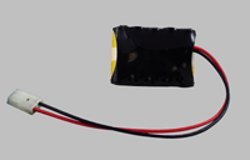
Image 1: Technical Precision Replacement Battery for Scale-TRONIX Scale 4800. This image shows the replacement battery, which is a single unit designed to power the compatible scale.
4. Operating the Battery
Once installed, the Technical Precision Replacement Battery will power your Scale-TRONIX, INC. Scale 4800. The battery operates automatically to provide the necessary power for the scale's functions. There are no specific user operations required for the battery itself beyond proper installation.
Refer to your Scale-TRONIX, INC. Scale 4800 user manual for instructions on operating the scale itself.
5. Maintenance
Proper maintenance can extend the life of your replacement battery:
- Storage: If the scale will not be used for an extended period, it is recommended to remove the battery and store it in a cool, dry place.
- Cleaning: Keep the battery terminals clean and free of corrosion. Use a dry cloth to wipe them if necessary.
- Disposal: When the battery reaches the end of its life, dispose of it responsibly according to local environmental regulations. Do not dispose of batteries in household waste.
6. Troubleshooting
If your Scale-TRONIX, INC. Scale 4800 is not functioning correctly after battery installation, consider the following:
- Scale Not Powering On:
- Ensure the battery is inserted with correct polarity.
- Check that the battery compartment cover is securely closed.
- Verify the battery terminals are clean and making good contact.
- If the battery is new, it should be fully charged. If not, consider replacing it with another new battery to rule out a faulty unit.
- Intermittent Power:
- Check for loose connections within the battery compartment.
- Ensure the battery is seated firmly.
If issues persist, consult the original Scale-TRONIX, INC. Scale 4800 manual or contact Technical Precision customer support.
7. Specifications
| Feature | Detail |
|---|---|
| Brand | Technical Precision |
| Item Model Number | SCALE 4800 BATTERY |
| ASIN | B01MAXVSB8 |
| Battery Cell Composition | Alkaline |
| Unit Count | 1.0 Count |
| Manufacturer | Technical Precision |
| Date First Available | October 17, 2016 |
8. Warranty and Support
For warranty information or technical support regarding your Technical Precision Replacement Battery, please contact the manufacturer directly. Details can typically be found on the product packaging or the Technical Precision official website.
Please have your product model number (SCALE 4800 BATTERY) and ASIN (B01MAXVSB8) available when contacting support.