
Panasonic KX-TGE310SPB
Panasonic KX-TGE310SPB Digital Cordless Phone
User Instruction Manual
Model: KX-TGE310SPB
Introduction
Thank you for purchasing the Panasonic KX-TGE310SPB Digital Cordless Phone. This phone is designed for ease of use, featuring a large, easy-to-read LCD display, big buttons, and essential functions like hands-free speakerphone and nuisance call blocking. This manual provides detailed instructions for setting up, operating, and maintaining your new phone.

Image: The Panasonic KX-TGE310SPB cordless phone, showing the black handset resting on its compact base unit. The handset features a large amber-backlit LCD screen and clearly labeled, large numeric and function buttons.
Safety Information
Please read these safety instructions carefully before using your phone to prevent injury or damage to the product.
- Use only the supplied power adapter and rechargeable batteries.
- Do not expose the phone to rain or moisture.
- Avoid placing the phone near heat sources or direct sunlight.
- Do not disassemble the phone. Refer all servicing to qualified personnel.
- Keep the phone away from medical devices, such as pacemakers, as it may cause interference.
Package Contents
Ensure all items are present in the package:
- 1 x Digital Cordless Phone Handset
- 1 x Base Unit (Charger)
- 1 x AC Power Adapter for Base Unit
- 1 x Telephone Line Cable
- 2 x AAA Rechargeable Batteries
- 1 x Handset Cover
Setup
1. Connecting the Base Unit
- Connect the AC power adapter to the base unit and plug it into a standard electrical outlet.
- Connect the telephone line cable to the base unit and plug the other end into your telephone wall jack.
2. Installing Batteries
- Remove the handset cover.
- Insert the two supplied AAA rechargeable batteries, observing the correct polarity (+/-).
- Replace the handset cover.
3. Charging the Handset
Place the handset on the base unit. The charging indicator on the handset will illuminate. Allow the handset to charge for at least 7 hours before initial use to ensure full battery capacity.
4. Initial Setup (Date, Time, Language)
Follow the on-screen prompts on the handset's LCD display to set the date, time, and preferred language. Refer to the detailed instructions in the full user guide for specific menu navigation.

Image: A diagram highlighting key features of the Panasonic KX-TGE310SPB, including its compact design, long-lasting battery, easy-to-read display, large buttons, and dedicated nuisance call block key.
Operating the Phone
Making Calls
- Dialing Manually: Pick up the handset, dial the number, and press the Call button (green receiver icon).
- From Phonebook: Press the Phonebook button, navigate to the desired contact, and press the Call button.
- One-Touch Dialing: Use the 3 dedicated memory keys for quick access to frequently called numbers. Press and hold one of the pre-programmed keys (e.g., M1, M2, M3) to dial the stored number.
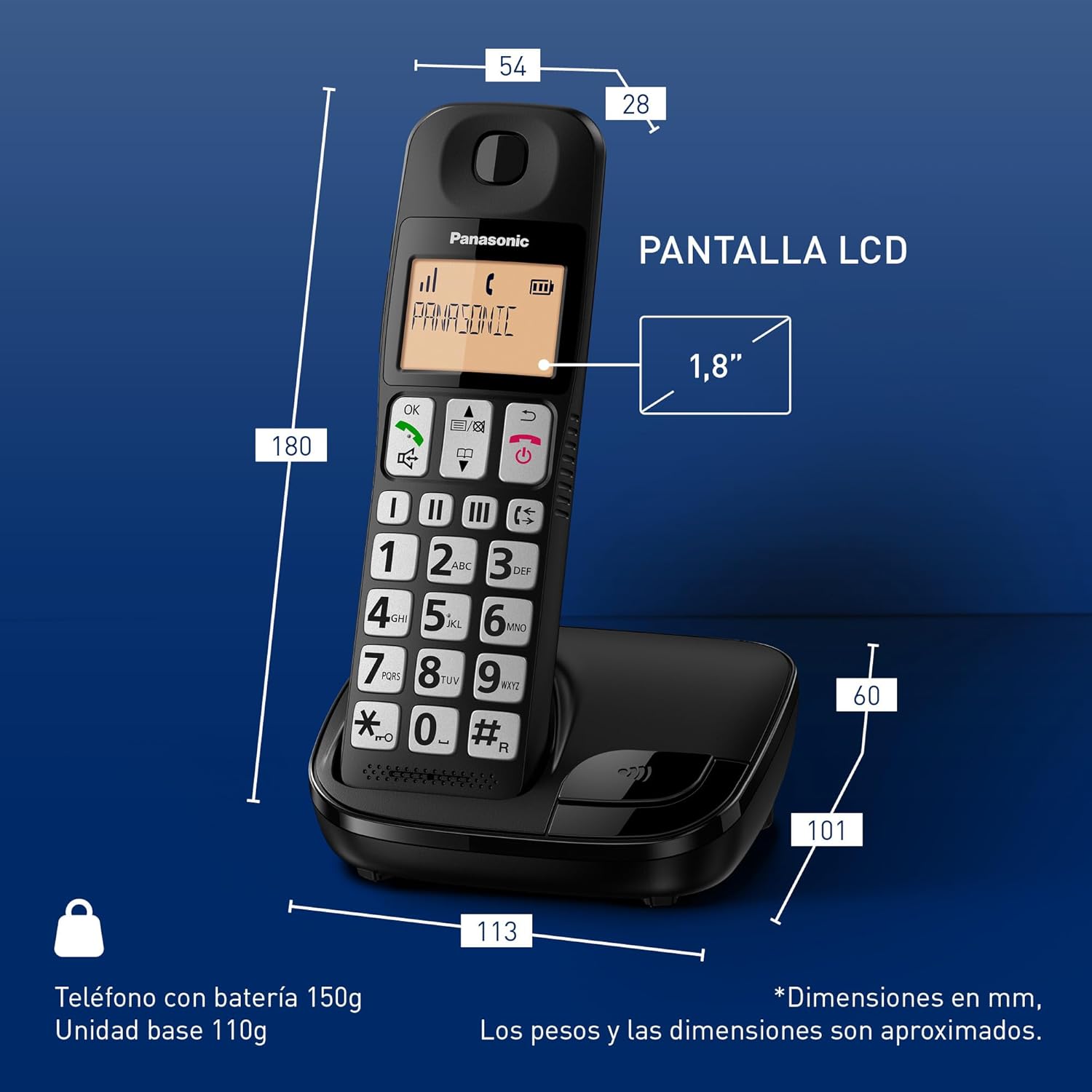
Image: A technical drawing of the Panasonic KX-TGE310SPB handset and base, illustrating its dimensions in millimeters and approximate weights for the handset (150g) and base unit (110g). The LCD screen size is noted as 1.8 inches.
Receiving Calls
When the phone rings, press the Call button or any key (except End Call) to answer. To end a call, press the End Call button (red receiver icon) or place the handset back on the base unit.
Adjusting Volume
During a call, use the volume up/down buttons on the side of the handset to adjust the earpiece volume. The phone also features an amplification key to boost the volume up to twice the normal level for enhanced clarity.
Using Speakerphone
To activate the hands-free speakerphone during a call, press the Speakerphone button. Press it again to switch back to the earpiece.

Image: This image highlights the hands-free speakerphone function and the phone's compatibility with hearing aids (HAC), indicating it meets ETS 300 381 standards for optimal call quality with hearing devices.
Nuisance Call Block
This feature allows you to block unwanted calls from specific numbers or prefixes. This function requires a subscription to a Caller ID service from your telephone provider. Consult your phone's menu for instructions on adding numbers to the block list.

Image: A visual representation of the Nuisance Call Block feature, showing a shield icon with a blocked call symbol, emphasizing its ability to block unwanted calls. A note indicates that a caller ID subscription is required.
Do Not Disturb Mode & Advanced Alarm
The phone includes a 'Do Not Disturb' mode to silence incoming calls during specific times, ensuring uninterrupted personal time. An advanced alarm function is also available for setting reminders or wake-up calls.

Image: This image illustrates two features: 'Do Not Disturb Mode' for quiet periods and 'Advanced Alarm' for setting reminders, depicted with lifestyle imagery.
Maintenance
Cleaning
Wipe the phone and base unit with a soft, damp cloth. Do not use abrasive cleaners or solvents. Ensure the phone is unplugged before cleaning.
Battery Care
To prolong battery life, avoid overcharging by removing the handset from the charger once fully charged if not in use for extended periods. If the phone will not be used for a long time, remove the batteries.
Troubleshooting
| Problem | Solution |
|---|---|
| No dial tone. | Check if the telephone line cable is securely connected to both the base unit and the wall jack. Ensure the power adapter is plugged in. |
| Handset does not charge. | Ensure the handset is correctly seated on the base unit. Check that the power adapter is connected. Verify batteries are inserted correctly. |
| Poor call quality/static. | Move closer to the base unit. Check for interference from other electronic devices. Ensure the telephone line cable is not damaged. |
| Cannot block nuisance calls. | Confirm you have a Caller ID subscription from your telephone service provider. Ensure the numbers are correctly added to the block list in the phone's settings. |
Specifications
| Feature | Detail |
|---|---|
| Model Number | KX-TGE310SPB (5025232853755) |
| Display | 1.8-inch Amber Backlit LCD |
| Battery Type | 2 x AAA Ni-MH Rechargeable Batteries |
| Standby Time | Up to 200 hours |
| Handset Dimensions (H x W x D) | Approx. 180 x 54 x 28 mm |
| Base Unit Dimensions (H x W x D) | Approx. 60 x 113 x 101 mm |
| Handset Weight | Approx. 150 g (with batteries) |
| Base Unit Weight | Approx. 110 g |
| Material | Acrylonitrile Butadiene Styrene (ABS) |
| Hearing Aid Compatibility (HAC) | Yes (ETS 300 381 compliant) |

Image: This image illustrates the "Zero Emissions" feature, indicating total transmission power disconnection in standby mode, promoting a more eco-friendly operation.
Warranty and Support
Panasonic products are designed for reliability and performance. For warranty information, technical support, or service inquiries, please refer to the warranty card included with your product or visit the official Panasonic support website. Keep your purchase receipt as proof of purchase.
For further assistance, you may visit the Panasonic Brand Store on Amazon.
Ask a question about this manual
Ask about setup, troubleshooting, compatibility, parts, safety, or missing instructions. Manuals+ will review the question and use this page’s manual context to help answer it.