
Introduction
This manual provides detailed instructions for the setup, operation, and maintenance of your Sangean BTR-160 Portable Digital Radio. The BTR-160 is a versatile device featuring DAB+ and FM radio reception, Bluetooth connectivity for wireless audio streaming, and a dual alarm function. It is designed for both home use and portability, operating on either AC power or batteries.

Image: The Sangean BTR-160 radio positioned on a wooden surface, illustrating its compact form factor suitable for various environments.
Package Contents
Please check the package for the following items:
- Sangean BTR-160 Portable Digital Radio Unit
- Power Adapter
- User Manual (this document)
Batteries (4x UM-1 type) are not included and must be purchased separately for portable operation.
Product Overview
Familiarize yourself with the controls and display of your Sangean BTR-160 radio.

Image: Detailed front view of the Sangean BTR-160, highlighting its control panel and display for easy navigation.
Controls and Display:
- Power Button: Turns the unit on or off.
- LCD Display: Shows station information, time, menu options, and status.
- Mode Button: Switches between DAB+, FM, and Bluetooth modes.
- Info Button: Displays additional information about the current station or track.
- Menu Button: Accesses system settings and options.
- Back/Forward Buttons: Navigates through stations, tracks, or menu options.
- Volume +/- Buttons: Adjusts the audio output level.
- Mute Button: Temporarily silences the audio.
- Pair Button: Initiates Bluetooth pairing mode.
- Preset Buttons (1-5): Stores and recalls favorite radio stations.
- Tuning Knob (Side): Fine-tunes radio frequencies or navigates menus.
Setup
1. Powering the Unit
The BTR-160 can be powered by the included AC adapter or by batteries.
- AC Power: Connect the supplied power adapter to the DC IN socket on the radio and then plug it into a standard wall outlet.
- Battery Power: Open the battery compartment on the back of the unit. Insert 4 x UM-1 (D size) batteries, ensuring correct polarity. Close the compartment securely. The radio will automatically switch to battery power when the AC adapter is disconnected.
2. Antenna Adjustment
Extend the telescopic antenna fully for optimal DAB+ and FM reception. Adjust its position for the best signal quality.
3. Initial DAB+ Scan
Upon first power-on or after a factory reset, the radio will automatically perform a full scan for available DAB+ stations. This process may take a few minutes. Once complete, the first available station will begin playing.
Operating Instructions
1. DAB+ Radio Mode
- Press the Mode button until "DAB" appears on the display.
- If a scan has not been performed, the radio will initiate one.
- Use the Back and Forward buttons or the tuning knob to navigate through the list of available stations.
- Press the selected station to confirm and begin listening.
- Press the Info button repeatedly to cycle through various information displays, such as program type, ensemble name, frequency, signal strength, and time/date.
2. FM Radio Mode
- Press the Mode button until "FM" appears on the display.
- To manually tune, use the tuning knob.
- To auto-scan for the next available station, press and hold the Forward or Back button.
- The radio supports RDS (Radio Data System), which displays station name and program information when available.
3. Bluetooth Mode
- Press the Mode button until "Bluetooth" appears on the display. The radio will enter pairing mode, indicated by a flashing Bluetooth icon.
- On your Bluetooth-enabled device (smartphone, tablet), enable Bluetooth and search for available devices.
- Select "Sangean BTR-160" from the list. Once connected, the Bluetooth icon on the radio's display will become solid.
- You can now stream audio from your device to the radio. Use the radio's Back and Forward buttons to control track playback, and the Volume +/- buttons to adjust volume.
- To disconnect, either turn off Bluetooth on your device or press and hold the Pair button on the radio.
4. Storing and Recalling Presets
The BTR-160 allows you to store up to 10 favorite stations (5 for DAB+ and 5 for FM).
- To Store: Tune to the desired station. Press and hold one of the Preset buttons (1-5) until the display confirms the station has been saved.
- To Recall: Briefly press the desired Preset button (1-5) to instantly tune to the stored station.
5. Setting the Alarm
The radio features a dual alarm function. Refer to the menu settings for alarm configuration.
- Press the Menu button.
- Navigate to the "Alarm" option using the Back/Forward buttons or tuning knob, then press to select.
- Select "Alarm 1" or "Alarm 2" and configure the alarm time, source (DAB+, FM, or Buzzer), and volume.
- Ensure the alarm is enabled.
Maintenance
- Cleaning: Wipe the radio with a soft, dry cloth. Do not use abrasive cleaners or solvents.
- Battery Care: If the radio will not be used for an extended period, remove the batteries to prevent leakage.
- Water Resistance: The unit is designed with a degree of water resistance. Avoid submerging the radio in water or exposing it to heavy rain. Ensure all port covers are securely closed if present.
Troubleshooting
| Problem | Possible Cause | Solution |
|---|---|---|
| No power | AC adapter not connected; batteries depleted or incorrectly inserted. | Check AC adapter connection; replace or correctly insert batteries. |
| Poor radio reception | Antenna not extended; weak signal area; interference. | Extend and adjust the telescopic antenna; try moving the radio to a different location; perform a full scan for DAB+ stations. |
| Bluetooth device cannot pair | Radio not in pairing mode; device too far; Bluetooth off on device. | Ensure radio is in Bluetooth pairing mode (flashing icon); bring devices closer; enable Bluetooth on your device. |
| No sound | Volume too low; unit muted. | Increase volume; press the Mute button to unmute. |
Specifications
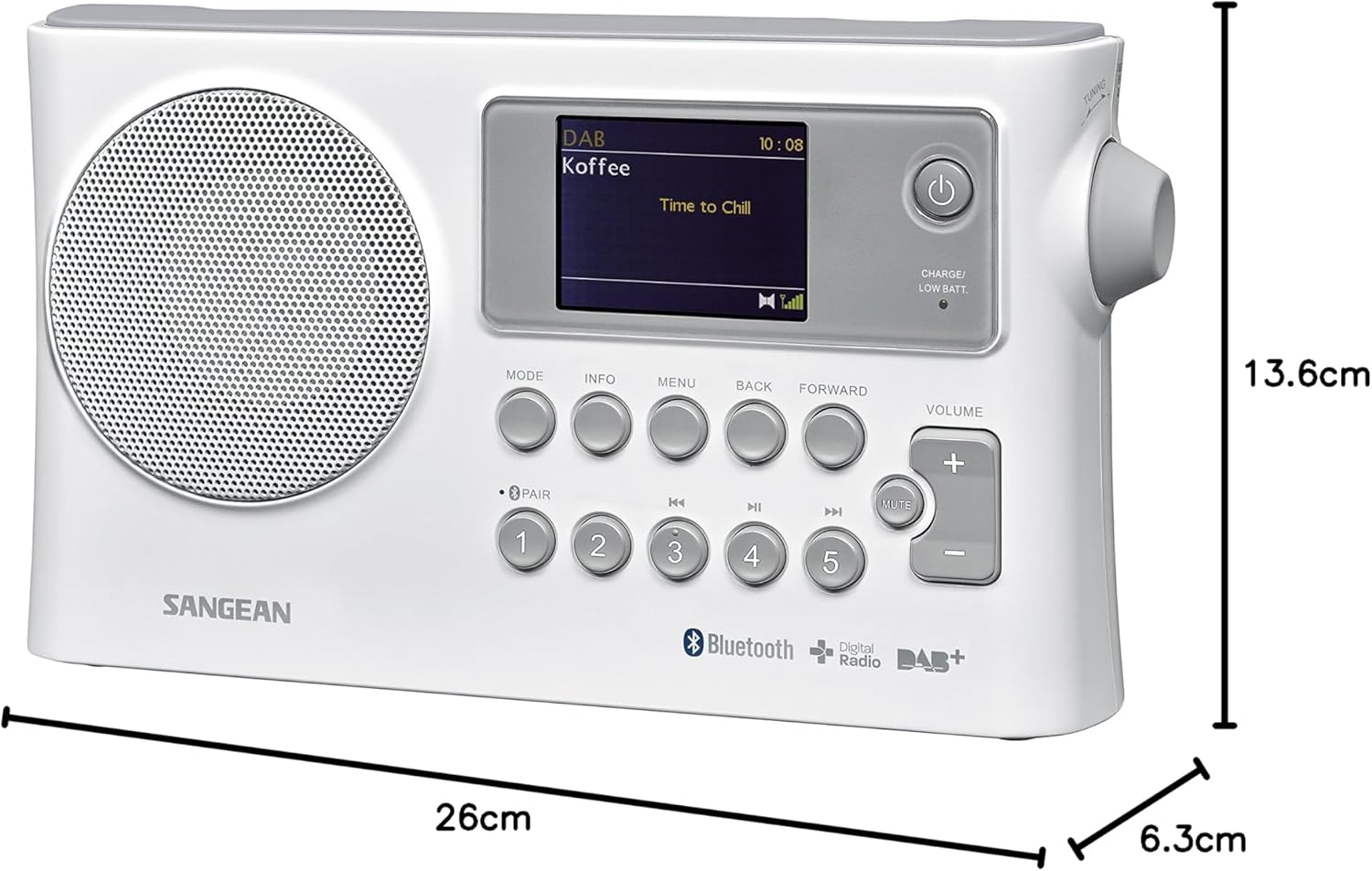
Image: Dimensions of the Sangean BTR-160 radio, showing its length, width, and height.
- Model: BTR-160
- Connectivity Technology: Bluetooth
- Tuner Technology: DAB
- Supported Radio Bands: DAB+, FM
- Power Source: AC Adapter (included), 4 x UM-1 (D size) batteries (not included)
- Output Power: 1.2 Watts
- Display Type: LCD
- Compatible Devices: Smartphone, Tablet
- Product Dimensions (L x W x H): 26 cm x 6.3 cm x 13.6 cm (approximately 10.24 x 2.48 x 5.35 inches)
- Material: Plastic
- Water Resistance Level: Waterproof (Note: Generally implies resistance to splashes and light rain, not submersion.)
- Recommended Uses: Music, Radio, Travel, Outdoor Activities
Warranty and Support
Sangean products are manufactured to high quality standards. For detailed warranty information, please refer to the warranty card included with your product or visit the official Sangean website. For technical support, troubleshooting assistance, or spare parts inquiries, please contact Sangean customer service through their official channels.
You can find more information and support resources on the official Sangean website: www.sangean.eu