
Introduction
This manual provides essential instructions for the safe and efficient operation, maintenance, and care of your BLACK+DECKER CJ650W 32oz Citrus Juicer. Please read all instructions thoroughly before first use and retain this manual for future reference.
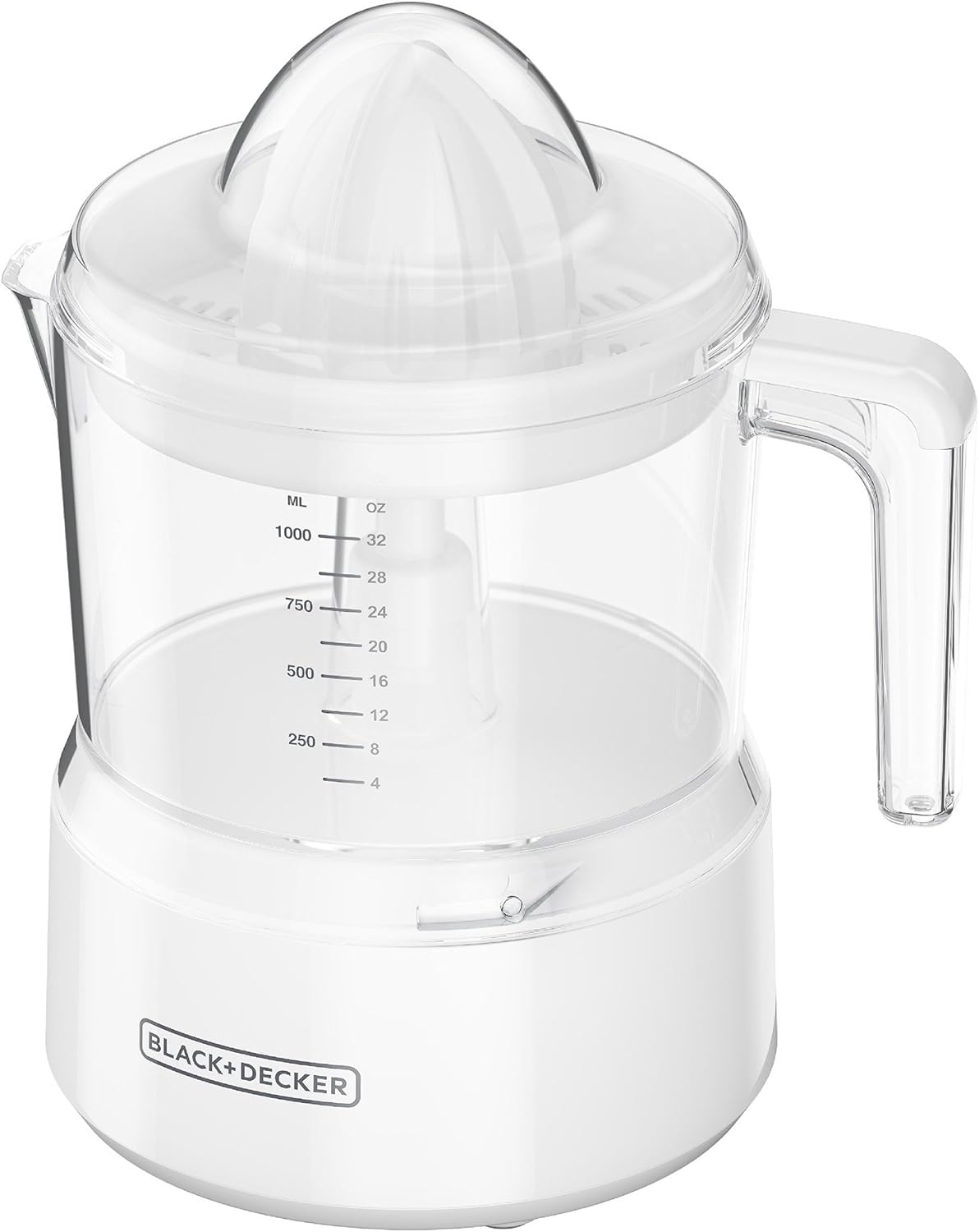
Image: The BLACK+DECKER CJ650W 32oz Citrus Juicer, fully assembled and ready for use. It features a white base, clear juice container with measurement markings, and a clear juicing cone and lid.
Important Safety Instructions
When using electrical appliances, basic safety precautions should always be followed to reduce the risk of fire, electric shock, and/or injury, including the following:
- Read all instructions.
- To protect against risk of electrical shock, do not immerse cord, plugs, or appliance in water or other liquid.
- Close supervision is necessary when any appliance is used by or near children.
- Unplug from outlet when not in use, before putting on or taking off parts, and before cleaning.
- Avoid contact with moving parts.
- Do not operate any appliance with a damaged cord or plug, or after the appliance malfunctions or has been dropped or damaged in any manner. Contact customer service for examination, repair, or electrical or mechanical adjustment.
- The use of attachments not recommended or sold by the appliance manufacturer may cause fire, electric shock, or injury.
- Do not use outdoors.
- Do not let cord hang over edge of table or counter, or touch hot surfaces.
- Do not place on or near a hot gas or electric burner, or in a heated oven.
- Do not use appliance for other than intended use.
- Do not attempt to defeat the interlock mechanism.
- This product is intended for household use only.
Parts Identification
Familiarize yourself with the components of your citrus juicer:

Image: An exploded view showing the individual components of the juicer: the clear dust cover, the juicing cone, the pulp strainer, the juice container with handle and spout, and the motor base.
- Dust Cover: Protects the juicing cone when not in use.
- Juicing Cone: Dual-purpose, self-reversing cone for extracting juice from various citrus sizes.
- Pulp Strainer: Collects pulp and allows for adjustable pulp control.
- Juice Container (32oz/1000ml): Collects extracted juice, features measurement markings and a drip-free pour spout.
- Motor Base: Houses the motor and power cord.

Image: The two self-reversing juicing cones included with the juicer, designed for efficient juice extraction from both small and large citrus fruits.

Image: A close-up of the pulp strainer, highlighting the adjustable pulp control mechanism. Users can slide the lever to select desired pulp levels.

Image: A detailed view of the juice container's measurement markings in both milliliters (ML) and ounces (OZ), up to 1000 ML or 32 OZ.
Setup and Assembly
Follow these steps to assemble your citrus juicer before first use:
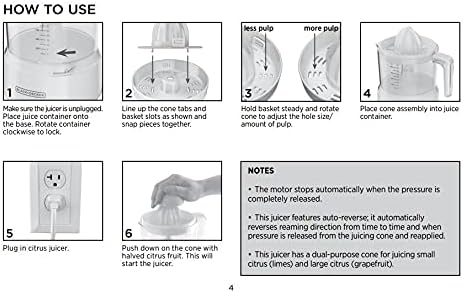
Image: A visual guide detailing the assembly of the juicer components and the initial steps for operation, including placing the juice container, assembling the cone and strainer, and adjusting pulp control.
- Ensure the juicer is unplugged.
- Place the juice container onto the motor base. Rotate the container clockwise to lock it securely.
- Line up the tabs on the juicing cone with the slots on the pulp strainer and snap them together.
- Hold the pulp strainer steady and rotate the juicing cone to adjust the hole size for your desired amount of pulp (less pulp or more pulp).
- Place the assembled cone and strainer into the juice container.
Operating Instructions
Using your BLACK+DECKER CJ650W Citrus Juicer is straightforward:

Image: A hand pressing a halved citrus fruit onto the juicing cone. The text indicates "Pressure Activated: Just press fruit onto the cone to start juicing."
- Ensure the juicer is properly assembled.
- Plug the juicer into a standard 120V AC electrical outlet.
- Cut citrus fruits (oranges, lemons, limes, grapefruits) in half.
- Place one half of the citrus fruit onto the juicing cone.
- Push down firmly on the cone with the halved citrus fruit. The motor will automatically start when pressure is applied.
- The juicing cone features an auto-reverse function, which periodically changes direction to ensure maximum juice extraction.
- Continue pressing until all juice is extracted from the fruit half.
- Release pressure to stop the motor.
- Repeat with remaining fruit halves until the desired amount of juice is collected in the container.
- Once juicing is complete, unplug the appliance.
- Use the drip-free pour spout to dispense the fresh juice.
Important Notes:
- The motor stops automatically when the pressure is completely released.
- The auto-reverse feature automatically changes reaming direction when pressure is released and reapplied.
- This juicer includes a dual-purpose cone suitable for both small citrus (e.g., limes) and large citrus (e.g., grapefruits).
Cleaning and Maintenance
Proper cleaning ensures the longevity and hygiene of your juicer:

Image: The removable parts of the juicer (dust cover, juicing cone, pulp strainer, and juice container) are shown, indicating they are dishwasher safe for easy cleanup.
- Always unplug the juicer before cleaning.
- Disassemble all removable parts: dust cover, juicing cone, pulp strainer, and juice container.
- All removable parts are dishwasher-safe (top rack recommended) or can be hand washed in warm, soapy water. Rinse thoroughly and dry.
- Wipe the motor base with a damp cloth. Do not immerse the motor base in water or any other liquid.
- Ensure all parts are completely dry before reassembling or storing.
- Store the juicer in a clean, dry place.
Troubleshooting
If you encounter issues with your juicer, refer to the following common problems and solutions:
| Problem | Possible Cause | Solution |
|---|---|---|
| Juicer does not turn on. | Not plugged in; no pressure applied; power outage. | Ensure the juicer is securely plugged into a working outlet. Apply firm pressure to the juicing cone with fruit. Check household circuit breaker. |
| Motor stops during juicing. | Pressure released; motor overheating (rare). | Maintain consistent pressure on the fruit. If the motor feels hot, unplug and allow it to cool for 15-20 minutes before resuming. |
| Poor juice extraction. | Insufficient pressure; fruit not properly centered; cone not reversing. | Apply firm, consistent pressure. Ensure fruit half is centered on the cone. The auto-reverse function is automatic; if it seems stuck, lift and reapply pressure. |
| Excessive pulp in juice. | Pulp control setting. | Adjust the pulp control lever on the strainer to the "less pulp" setting. |
Specifications
- Model: CJ650W
- Brand: BLACK+DECKER
- Color: White
- Capacity: 32 oz (1000 ml)
- Power: 30 Watts
- Voltage: 120 Volts
- Product Dimensions: 5"D x 8"W x 9.5"H
- Item Weight: 1.75 pounds
- Blade Material: Stainless Steel (for reamer)
- Power Source: Corded Electric
- Special Features: Auto-reversing juicing cones, adjustable pulp control, drip-free pour spout, measurement markings.

Image: The juicer with its dimensions indicated: approximately 7.7 inches wide and 9.3 inches tall, highlighting its compact and space-saving design.
Warranty and Support
For warranty information, service, or support, please refer to the warranty card included with your product or visit the official BLACK+DECKER website. Keep your purchase receipt as proof of purchase.
Manufacturer: Spectrum Brands


