Introduction
Thank you for choosing the Pioneer TS-695P 6x9 inch 3-Way Car Speakers. This manual provides essential information for the proper installation, operation, and maintenance of your new car audio speakers. Please read this manual thoroughly before installation and keep it for future reference.
Product Overview and Features
The Pioneer TS-695P speakers are designed to deliver high-quality audio performance in your vehicle. Key features include:
- Pioneer TS-695P 6" x 9" 3-way Car Speakers - This package includes 2 sets, totaling 4 individual speakers.
- 230 Watts per pair maximum power output.
- 4 Ohm impedance for compatibility with various car audio systems.
- Carbon Graphite IMPP (Injection Molded Polypropylene) Interlaced Aramid Fiber Cone for robust and clear bass response.
- Lightweight Elastic Polymer Surround for high sensitivity and improved sound reproduction.
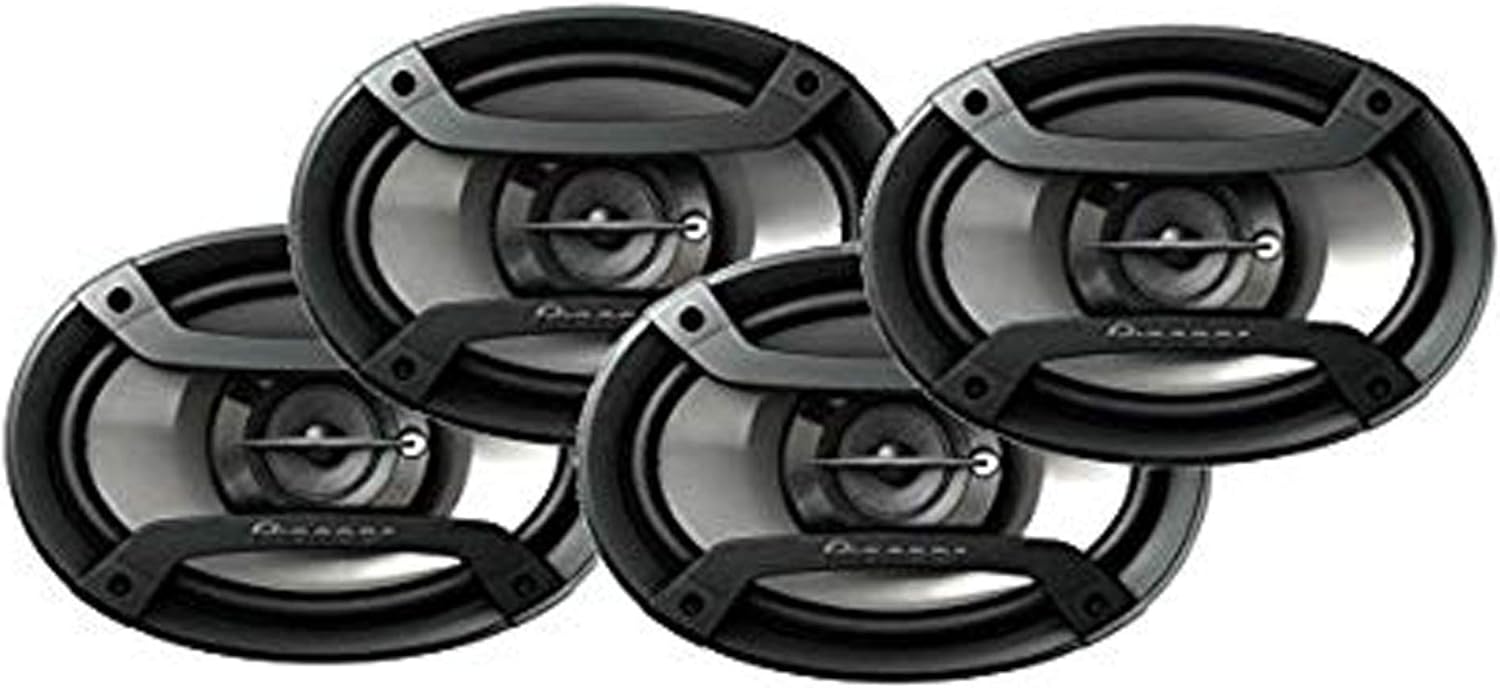
What's in the Box
Your package should contain the following items:
- 4 x Pioneer TS-695P 6x9 inch 3-Way Car Speakers
- Necessary mounting hardware (screws, clips) - (Note: Specific hardware may vary, refer to packaging)
- Speaker wires - (Note: Specific wiring may vary, refer to packaging)
Specifications
| Specification | Value |
|---|---|
| Model Name | ts695p |
| Speaker Type | Car Speakers |
| Recommended Uses For Product | Car Audio |
| Compatible Devices | Car Audio Systems |
| Surround Sound Channel Configuration | 2.0 |
| Included Components | 4 Speakers |
| Impedance | 4 Ohm |
| Is Waterproof | FALSE |
| Control Method | Touch (referring to head unit controls) |
| Speaker Size | 6x9 Inches (Oval) |
| Power Source | Corded Electric (via car's electrical system) |
| Woofer Diameter | 6 Inches (part of 6x9 design) |
| Vehicle Service Type | Car |
| Audio Driver Type | Dynamic Driver |
| Audio Driver Size | 6 Inches (part of 6x9 design) |
| Connectivity Protocol | Coaxial |
| Speaker Maximum Output Power | 230 Watts (per pair) |
| Connectivity Technology | Coaxial |
| Audio Output Mode | Stereo |
| Mounting Type | Car Mount |
Setup and Installation
Installing car speakers can be complex and may require specialized tools and knowledge. It is highly recommended to have these speakers installed by a qualified professional car audio technician.
General Installation Guidelines:
- Safety First: Disconnect the vehicle's battery before beginning any electrical work to prevent short circuits or damage.
- Speaker Location: Identify suitable mounting locations in your vehicle, typically in door panels, rear deck, or kick panels. Ensure the 6x9 inch oval shape fits the existing cutouts or that new cutouts can be safely made.
- Wiring: Connect the speaker wires from your car's audio system (head unit or amplifier) to the corresponding terminals on the TS-695P speakers. Pay close attention to positive (+) and negative (-) polarity to ensure proper sound staging and prevent phase issues.
- Mounting: Securely mount the speakers using the provided screws and mounting hardware. Ensure the speakers are firmly seated to prevent vibrations and rattles.
- Testing: Once installed, reconnect the battery and test the speakers at a low volume. Gradually increase the volume to check for proper operation and sound quality.
Important: Incorrect wiring or installation can damage the speakers, your vehicle's electrical system, or the audio head unit/amplifier. Consult your vehicle's service manual or a professional installer if you are unsure.
Operating Instructions
The Pioneer TS-695P speakers operate as passive components of your car's audio system. Their operation is controlled by your car's head unit (stereo) or external amplifier.
Basic Operation:
- Power On: Turn on your car's ignition and the car audio system.
- Source Selection: Select your desired audio source (radio, CD, USB, Bluetooth, etc.) from your head unit.
- Volume Control: Adjust the volume level using your head unit's volume knob or buttons. Avoid excessively high volumes that cause distortion, as this can damage the speakers.
- Audio Settings: Use your head unit's equalizer, balance, and fader controls to fine-tune the sound to your preference. The 3-way design of these speakers provides a full range of sound, from bass to treble.
For detailed operation of your car's audio system, refer to the user manual provided with your head unit or amplifier.
Maintenance
Proper maintenance will help ensure the longevity and optimal performance of your Pioneer TS-695P speakers.
- Cleaning: Gently wipe the speaker grilles and surrounds with a soft, dry, or slightly damp cloth. Do not use harsh chemicals, solvents, or abrasive cleaners, as these can damage the speaker materials.
- Avoid Moisture: These speakers are not waterproof. Protect them from direct exposure to water or excessive moisture.
- Temperature Extremes: While designed for automotive use, prolonged exposure to extreme temperatures (very hot or very cold) can affect speaker performance and lifespan.
- Physical Damage: Avoid pressing on the speaker cones or tweeters, as this can cause irreparable damage. Ensure no objects obstruct the speaker grilles.
Troubleshooting
If you experience issues with your speakers, refer to the following common troubleshooting steps:
| Problem | Possible Cause | Solution |
|---|---|---|
| No sound from speakers |
|
|
| Distorted or poor sound quality |
|
|
| One speaker not working |
|
|
If these steps do not resolve the issue, contact a qualified car audio technician or the product's customer support.
Warranty and Support
For warranty information and customer support, please refer to the documentation provided with your purchase or contact the seller, Sound of Tri-State, or the manufacturer, Pioneer, directly. Keep your proof of purchase for warranty claims.
Sound of Tri-State Store: Visit Store