
Introduction
The Samsung Gear S3 Frontier is a timeless smartwatch that combines style with the latest innovations in digital technology. It features an always-on 1.3-inch Super AMOLED full-color display. This device is compatible with select Bluetooth-capable smartphones running Android OS 4.4 and later with at least 1.5GB RAM, as well as iPhone 5 and later with iOS 9.0 and above. Please note that not all features may be available with iOS-paired smartphones, and supported smartphones may vary by carrier and device.

Figure 1: Front view of the Samsung Gear S3 Frontier Smartwatch, showcasing its round display and rugged design.
Setup
To begin using your Samsung Gear S3 Frontier, ensure it is adequately charged and paired with a compatible smartphone. The device comes with a wireless charging dock for convenient power replenishment.
Charging the Device
- Connect the wireless charging dock to a power source using the provided charger.
- Place your Gear S3 Frontier onto the charging dock. The watch will align magnetically, and a charging indicator will appear on the screen.
- Allow the watch to charge fully before initial use. A full charge typically provides up to 3 days of typical usage.
Pairing with a Smartphone
- Download the Samsung Gear app from your smartphone's app store (Google Play Store for Android, Apple App Store for iOS).
- Open the Samsung Gear app on your smartphone and follow the on-screen instructions to connect to your Gear S3 Frontier via Bluetooth.
- Confirm the pairing request on both your smartphone and the smartwatch.
Operating the Smartwatch
The Gear S3 Frontier offers intuitive navigation through its distinctive steel bezel, touchscreen, and physical buttons.
Navigation and Interface
- Rotating Bezel: Rotate the steel bezel clockwise or counter-clockwise to navigate through apps, widgets, and notifications. This provides a tactile and efficient way to interact with the watch.
- Touchscreen: Swipe across the 1.3-inch Super AMOLED display to access different screens, tap to select items, and use pinch-to-zoom gestures where applicable.
- Buttons: The watch features two physical buttons on the side. The top button typically acts as a 'Back' key, while the bottom button serves as a 'Home' key, returning you to the watch face or app drawer.
Key Features
- Communication: Text, call, and receive notifications directly from your watch when connected via Bluetooth to your smartphone.
- Samsung Pay: Make payments almost anywhere you can swipe or tap a credit card using Samsung Pay directly from your wrist.
- Fitness Tracking: The Gear S3 Frontier includes a built-in pedometer for step tracking, a heart rate monitor, and GPS for accurate activity tracking. It helps you monitor your daily activity, sleep cycles, and overall fitness.
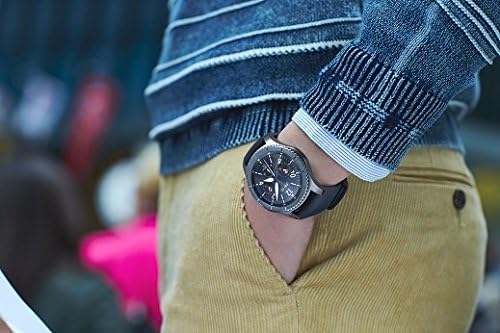
Figure 2: The Samsung Gear S3 Frontier Smartwatch being worn on a wrist, demonstrating its practical use.
Maintenance
Proper care ensures the longevity and optimal performance of your Gear S3 Frontier.
Cleaning and Durability
- Cleaning: Wipe the watch and strap regularly with a soft, dry cloth. For stubborn dirt, a slightly damp cloth can be used, followed by immediate drying. Avoid harsh chemicals or abrasive materials.
- Water and Dust Resistance: With military-grade performance, the Gear S3 resists water, dust, extreme temperatures, and occasional drops. While it is water-resistant, it is not waterproof. Avoid prolonged submersion or high-pressure water exposure.
- Battery Care: To maximize battery life, avoid exposing the watch to extreme temperatures. Charge the device using only the provided wireless charging dock and charger.
Troubleshooting
If you encounter issues with your Gear S3 Frontier, try the following common troubleshooting steps:
- Connectivity Issues:
- Ensure Bluetooth is enabled on both your watch and smartphone.
- Restart both devices and attempt to re-pair them.
- Check if the Samsung Gear app on your smartphone is up to date.
- Battery Draining Quickly:
- Reduce screen brightness.
- Disable unnecessary features like Wi-Fi or GPS when not in use.
- Limit background app refresh.
- Watch Not Responding:
- Perform a soft reset by holding down the Home button until the watch restarts.
- If the issue persists, consider a factory reset (note: this will erase all data on the watch).
Specifications
| Feature | Detail |
|---|---|
| Product Dimensions | 2 x 3 x 1 inches |
| Item Weight | 2.24 ounces |
| Model Number | SM-R760NDAAXAR |
| OS | Android Smartphones (Compatible with Android 4.4 and up, 1.5GB RAM and higher) |
| Wireless Communication | Bluetooth |
| GPS | Built-in GPS |
| Special Features | Activity Tracker, Heart Rate Monitor, Sleep Monitor, Touchscreen, Alarm Clock, Pedometer |
| Display Technology | AMOLED |
| Color | Dark Grey |
| Battery Capacity | 380 Milliamp Hours |
| What's in the Box | Charger, Watch |
| Memory Storage Capacity | 4 GB |
| RAM Memory Installed Size | 1.5 GB |
Warranty and Support
For detailed warranty information and technical support, please refer to the official Samsung website or contact Samsung customer service. You can also find the comprehensive User Manual in PDF format for further reference.
User Manual (PDF): Download Here