
Westone WSTW80
Westone Audio W80 Eight-Driver System User Manual
Model: WSTW80
Brand: Westone
Introduction
The Westone W80 is an award-winning in-ear monitor designed for reference-level audio reproduction. It features an eight-driver balanced-armature system with a three-way crossover, delivering an immersive soundstage with exceptional detail and clarity. Its ergonomic design ensures comfort for extended listening sessions, and it comes with a variety of accessories for a personalized fit and enhanced performance.

Image: Westone W80 earphones featuring their eight-driver system and a high-quality braided cable, showcasing the ergonomic design.
Package Contents
Your Westone W80 package includes the following items:
- 1 pair Westone W80 earphones
- ALO audio Reference 8 Westone Edition Cable
- 3-button MFi Cable with microphone (for Apple & Android devices)
- 5 pairs patented Star silicone ear tips (various sizes)
- 5 pairs True-Fit comfort-foam ear tips (various sizes)
- Premium Westone small carrying case
- Premium Westone large carrying case
- 4 decorative faceplates (Gold, Silver, Metallic Red, Metallic Blue)
- Faceplate removal/replacement tool
- Cleaning tool

Image: The Westone W80 carrying case, opened to reveal the earphones, various ear tips, cables, and the user manual, demonstrating the comprehensive accessory kit.
Setup
1. Choosing Ear Tips
Selecting the correct ear tip size is crucial for optimal sound quality and noise isolation. Experiment with both the Star silicone and True-Fit comfort-foam ear tips provided. A proper seal will enhance bass response and overall audio clarity, while also reducing external noise by an average of 25 dB.
- Gently attach the desired ear tip to the nozzle of the earphone.
- Insert the earphone into your ear canal.
- Adjust until a comfortable and secure seal is achieved. If the sound is thin or lacks bass, try a larger tip. If it feels uncomfortable or causes pressure, try a smaller tip.
2. Connecting Cables
The W80 earphones feature MMCX audio connectors for interchangeable cables. Two cables are included: the ALO audio Reference 8 cable for audiophile-grade listening and the 3-button MFi cable with microphone for device control.
- Identify the left (L) and right (R) earphones and cable connectors.
- Align the MMCX connector on the cable with the receptacle on the earphone.
- Push firmly until you hear a click, indicating a secure connection.
- To disconnect, grasp the cable connector firmly and pull straight away from the earphone. Avoid pulling on the cable itself.
3. Changing Faceplates
Customize the appearance of your W80 earphones with the included decorative faceplates.
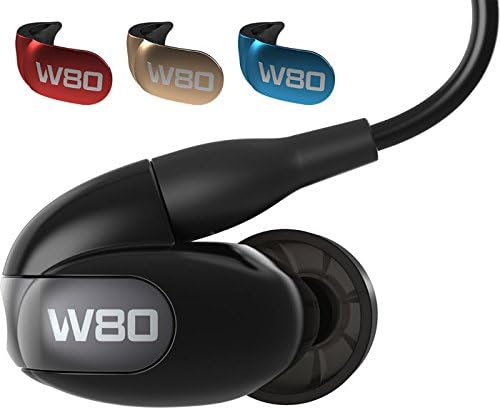
Image: A single Westone W80 earphone shown alongside its four interchangeable faceplates in gold, silver, metallic red, and metallic blue, illustrating customization options.
- Use the provided faceplate removal/replacement tool.
- Gently pry off the existing faceplate.
- Align the new faceplate with the earphone and press firmly until it snaps into place.

Image: A display of several Westone W80 earphones, each fitted with a different colored faceplate (blue, silver, red, gold), highlighting the variety of aesthetic choices available.
Operating Instructions
Wearing the Earphones
The W80 earphones are designed for an over-ear fit, which provides secure placement and reduces microphonics (cable noise).
- Insert the ear tips into your ear canals.
- Loop the cable over and behind your ears. The memory wire section of the cable can be gently molded to fit the contour of your ear for added security.
- Adjust the cable cinch (if present on your chosen cable) to secure the cable behind your head or under your chin.
Using the MFi 3-Button Cable
The MFi cable provides convenient control for compatible Apple and Android devices.
- Center Button:
- Press once to Play/Pause music or Answer/End calls.
- Press twice to Skip to the next track.
- Press three times to Skip to the previous track.
- Volume Buttons (+/-): Press to adjust volume up or down.
- Microphone: Integrated for hands-free calls.
Maintenance
Proper care will extend the life and maintain the performance of your Westone W80 earphones.
- Cleaning Ear Tips: Regularly remove ear tips and clean them with a damp cloth. For foam tips, replace them periodically as they can degrade over time.
- Cleaning Earphones: Use the provided cleaning tool to gently remove any earwax or debris from the earphone nozzles. Wipe the earphone bodies with a soft, dry cloth.
- Cable Care: Store cables neatly to prevent tangling and kinking. Avoid sharp bends or excessive pulling on the connectors.
- Storage: When not in use, store your earphones and accessories in one of the provided premium Westone carrying cases to protect them from dust, moisture, and physical damage.
Troubleshooting
| Problem | Possible Cause | Solution |
|---|---|---|
| No sound or intermittent sound from one or both earphones. | Loose cable connection, dirty earphone nozzle, damaged cable. | Ensure MMCX connectors are fully seated. Clean earphone nozzles. Try a different cable if available. |
| Poor sound quality (e.g., lack of bass, tinny sound). | Improper ear tip seal, earwax buildup in nozzle. | Experiment with different ear tip sizes to achieve a proper seal. Clean earphone nozzles thoroughly. |
| Earphones are uncomfortable or fall out easily. | Incorrect ear tip size or improper wearing technique. | Try different ear tip sizes (silicone or foam). Ensure the cable is looped over the ear correctly and molded for a secure fit. |
| Cable tangles easily or feels stiff. | Natural characteristic of some audiophile cables, improper storage. | Store the cable neatly in the provided case. Some high-purity cables may have a different feel than standard cables. |
Specifications
| Feature | Detail |
|---|---|
| Driver Type | Eight Balanced-Armature Drivers per ear (2 low, 2 mid, 4 high) |
| Frequency Response | 5Hz - 22kHz |
| Sensitivity | 111 dB @ 1mW |
| Impedance | 25 ohms @ 1kHz |
| Noise Control | Sound Isolation (average 25 dB reduction) |
| Connectivity | Wired (3.5mm Jack, MMCX connectors) |
| Item Weight | 7.2 ounces |
| Product Dimensions | 7.25 x 2.25 x 4.25 inches |
| Material | Plastic |
| Model Number | WSTW80 |
| UPC | 602353785087 |
Warranty and Support
The Westone W80 earphones come with a 2-year warranty from the date of purchase. This warranty covers manufacturing defects under normal use.
For warranty claims, technical support, or any inquiries regarding your product, please contact Westone customer service through their official website or the retailer from whom you purchased the product. Please retain your proof of purchase for warranty validation.
For more information, visit the Westone Store.
Ask a question about this manual
Ask about setup, troubleshooting, compatibility, parts, safety, or missing instructions. Manuals+ will review the question and use this page’s manual context to help answer it.