
1. Introduction
This manual provides essential information for the safe and effective operation, setup, maintenance, and troubleshooting of your Telwin Linear 340-819020 MMA DC Welding Machine. Please read this manual thoroughly before using the machine to ensure proper handling and to prevent injury or damage.
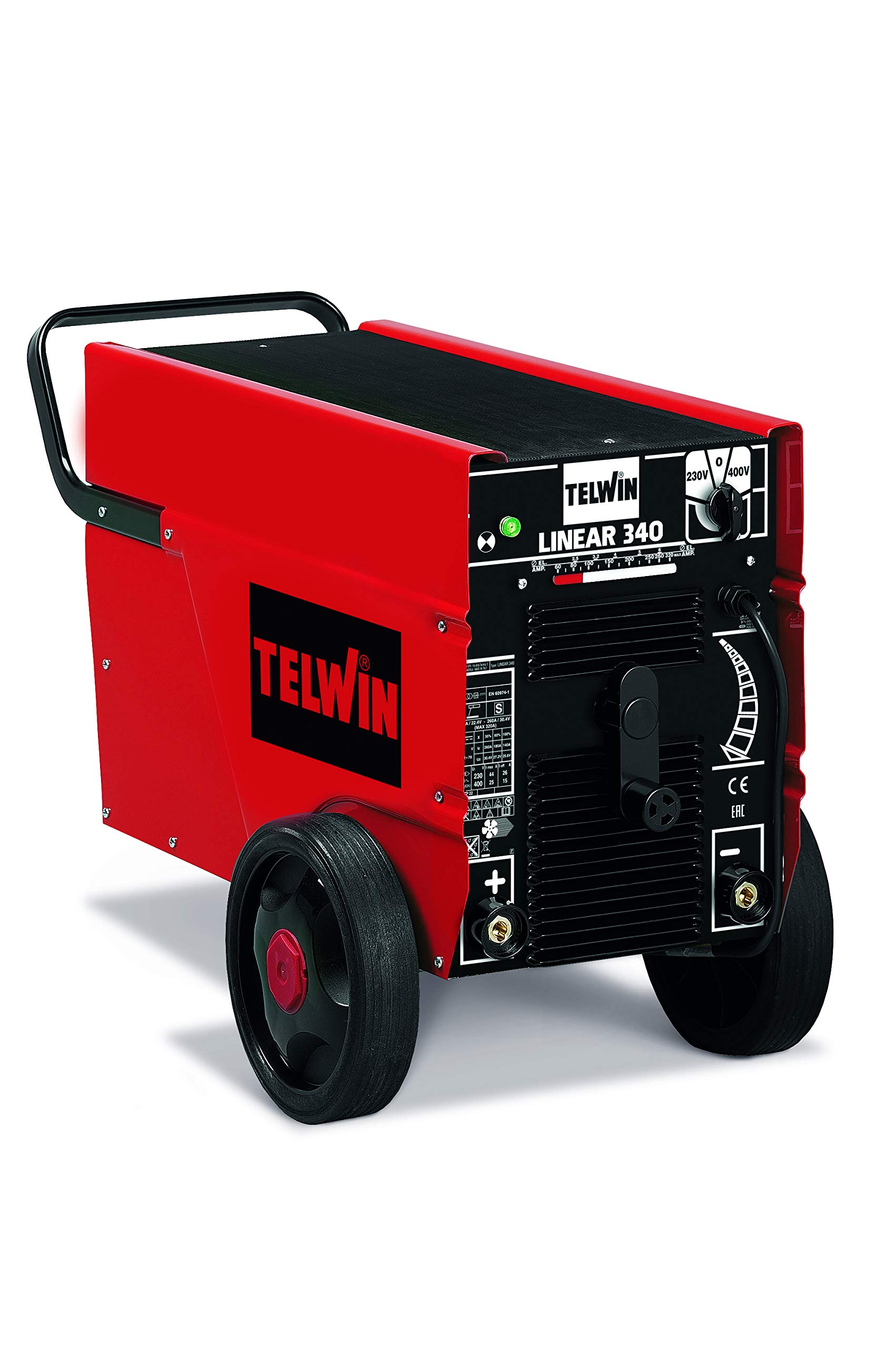
Figure 1: Telwin Linear 340-819020 Welding Machine. This image shows the overall view of the red and black welding machine with its control panel and wheels.
2. Safety Information
Welding operations involve significant risks. Always adhere to safety precautions to prevent electric shock, burns, fire, and exposure to fumes. This machine is designed for Manual Metal Arc (MMA) welding.
- Electric Shock: Ensure the machine is properly grounded. Do not touch live electrical parts. Wear dry welding gloves.
- Fumes and Gases: Work in a well-ventilated area. Use fume extraction if necessary.
- Arc Rays: Protect your eyes and skin from arc rays. Use a welding helmet with appropriate shade and protective clothing.
- Fire and Explosions: Keep flammable materials away from the welding area. Have a fire extinguisher readily available.
- Burns: Hot metal and equipment can cause severe burns. Wear protective clothing, gloves, and footwear.
3. Setup
3.1 Unpacking and Inspection
Carefully remove the welding machine from its packaging. Inspect the machine for any signs of damage that may have occurred during transit. Ensure all components listed in the packing list are present. If any damage or missing parts are found, contact your supplier immediately.
3.2 Power Connection
The Telwin Linear 340-819020 operates on a 230-400V power supply. Ensure your power source matches these requirements. Connect the machine to a suitable power outlet using the provided cord. Verify that the power circuit is adequately protected by a fuse or circuit breaker.
3.3 Electrode Holder Connection
Connect the electrode holder cable to the appropriate terminal on the welding machine. For DC welding, the polarity depends on the electrode type and welding application. Consult your electrode manufacturer's recommendations for correct polarity.
3.4 Ground Clamp Connection
Attach the ground clamp cable to the workpiece. Ensure a clean, solid electrical connection to the base metal to facilitate a stable arc. A poor ground connection can lead to an unstable arc and poor weld quality.

Figure 2: Close-up of the Telwin Linear 340-819020 control panel. This image highlights the current adjustment knob and connection points.
4. Operating Instructions
4.1 Powering On/Off
To power on the machine, switch the main power switch to the 'ON' position. The indicator light will illuminate. To power off, switch the main power switch to the 'OFF' position.
4.2 Current Adjustment
The Telwin Linear 340-819020 features stepless regulation of the welding current. Use the adjustment knob on the front panel to set the desired welding current. Refer to the electrode manufacturer's recommendations for appropriate current settings based on electrode diameter and material thickness.
4.3 Electrode Selection
This machine is compatible with a wide range of electrodes, including rutile, basic, stainless steel, cast iron, and aluminum electrodes. Select the appropriate electrode type and diameter for your specific welding application and material.
4.4 Welding Process
- Ensure all safety gear is worn.
- Insert the chosen electrode into the electrode holder.
- Strike an arc by lightly touching the electrode to the workpiece and quickly lifting it slightly to establish the arc.
- Maintain a consistent arc length and travel speed for optimal weld quality.
- After welding, allow the workpiece to cool before handling.
5. Maintenance
Regular maintenance ensures the longevity and safe operation of your welding machine.
- Cleaning: Periodically clean the machine's exterior with a dry cloth. Ensure ventilation openings are free from dust and debris. Use compressed air to clean internal components if necessary, ensuring the machine is unplugged.
- Cable Inspection: Regularly inspect all welding cables, electrode holder, and ground clamp for damage, cuts, or loose connections. Replace damaged cables immediately.
- Storage: Store the welding machine in a dry, clean environment, away from direct sunlight and extreme temperatures.
6. Troubleshooting
| Problem | Possible Cause | Solution |
|---|---|---|
| No arc or weak arc | Poor ground connection, incorrect current setting, damp electrode, power supply issue. | Check ground clamp connection, adjust current, dry electrodes, verify power supply. |
| Machine overheats | Exceeding duty cycle, blocked ventilation. | Allow machine to cool, clear ventilation openings, reduce welding time. |
| Poor weld quality | Incorrect current, wrong electrode, improper technique, dirty workpiece. | Adjust current, select correct electrode, refine welding technique, clean workpiece. |
7. Specifications
| Feature | Detail |
|---|---|
| Manufacturer | Telwin |
| Model Number | 819020 |
| Item Weight | 80 Kilograms |
| Product Dimensions | 46 x 89 x 59 cm |
| Color | Red/Black |
| Power Source Type | Corded Electric |
| Voltage | 240 Volts (Input 230-400V) |
| Wattage | 11.5 Kilowatts (Max Power 7 kW) |
| Included Components | Device only |
| Batteries Included | No |
| Batteries Required | No |
8. Warranty and Support
For warranty information and technical support, please refer to the documentation provided with your purchase or contact Telwin customer service directly. Keep your proof of purchase for warranty claims.

Figure 3: Telwin brand logo. This image displays the official logo of the manufacturer, Telwin.


