
APC PR#-SRT3000XLT
APC Smart-UPS SRT 3000VA 208V User Manual
Model: PR#-SRT3000XLT
Introduction
This manual provides essential information for the safe and efficient operation of your APC Smart-UPS SRT 3000VA 208V. It covers installation, operation, maintenance, and troubleshooting. Please read this manual thoroughly before installing or operating the UPS.
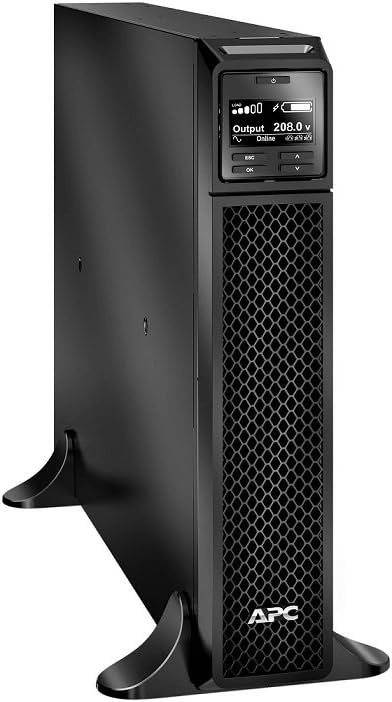
Figure 1: The APC Smart-UPS SRT 3000VA 208V unit, shown in a vertical tower configuration. The front panel features a display screen and control buttons, with a prominent APC logo at the bottom. The unit is black with a honeycomb-patterned ventilation grille on the front.
Safety Information
Always adhere to the following safety guidelines to prevent injury or damage to the equipment:
- Do not open the UPS enclosure. There are no user-serviceable parts inside.
- Connect the UPS to a grounded outlet only.
- Ensure proper ventilation around the UPS. Do not block ventilation openings.
- Do not operate the UPS in environments with excessive dust, humidity, or extreme temperatures.
- Disconnect the UPS from the power source before performing any maintenance or moving the unit.
Setup
Unpacking and Inspection
Carefully unpack the UPS and inspect it for any shipping damage. Retain the packaging for future use. The package should contain the UPS unit, documentation, and any included accessories.
Placement
Place the UPS in a clean, dry area, away from heat sources and direct sunlight. Ensure adequate clearance around the unit for proper airflow. The unit can be placed in a tower configuration or mounted in a rack.
Connecting to Power
- Connect the UPS power cord to a grounded 208V AC outlet.
- Allow the UPS batteries to charge for at least 24 hours before connecting equipment to ensure full runtime capacity.
Connecting Equipment
Connect your critical equipment (servers, networking devices, etc.) to the output receptacles on the rear of the UPS. Do not connect surge suppressors or power strips to the UPS output.
Operating the UPS
Turning On the UPS
Press and hold the power button on the front panel until the display illuminates. The UPS will perform a self-test and then enter online mode, providing conditioned power to connected equipment.
Front Panel Display and Controls
The front panel LCD provides real-time status information, including input/output voltage, load level, battery charge, and operational mode. Use the navigation buttons (ESC, OK, Up, Down) to navigate through menus and adjust settings.
Figure 2: A detailed view of the APC Smart-UPS SRT 3000VA 208V's front display panel. The screen shows "Output 208.0 V" and "Online" status, along with battery and load indicators. Below the screen are control buttons labeled "ESC", "OK", and arrow keys for navigation.
Turning Off the UPS
To turn off the UPS, press and hold the power button until the display indicates "Shutting Down". The UPS will then power down and cease providing output power.
Battery Operation
In the event of a power outage, the UPS will automatically switch to battery power. The duration of battery operation depends on the connected load. The UPS will emit an audible alarm during battery operation.
Maintenance
Battery Replacement
The batteries in the Smart-UPS SRT 3000VA 208V are user-replaceable. Refer to the battery replacement kit instructions for detailed steps. Always use genuine APC replacement battery cartridges (RBCs) to ensure optimal performance and safety. Battery life is typically 3-5 years, depending on environmental conditions and usage.
Cleaning
Keep the UPS clean and free of dust. Use a dry cloth to wipe down the exterior. Do not use liquid cleaners or solvents.
Firmware Updates
Periodically check the APC website for available firmware updates for your UPS model. Firmware updates can improve performance, add features, and address potential issues.
Troubleshooting
This section provides solutions to common issues. For more complex problems, contact APC technical support.
| Problem | Possible Cause | Solution |
|---|---|---|
| UPS does not turn on. | Not connected to AC power; discharged battery. | Ensure power cord is securely connected. Allow batteries to charge for 24 hours. |
| UPS beeps continuously. | Overload condition; on battery power. | Reduce connected load. Check AC input power. |
| Short battery runtime. | Batteries not fully charged; old batteries. | Allow batteries to charge for 24 hours. Consider replacing batteries if they are old. |
Specifications
Key technical specifications for the APC Smart-UPS SRT 3000VA 208V:
- Model: PR#-SRT3000XLT
- Capacity: 3000VA / 2700W
- Input Voltage: 208V
- Output Voltage: 208V
- Form Factor: Rack/Tower Convertible
- Dimensions (H x W x D): 1 x 1 x 1 inches
- Weight: 2 pounds
- Color: Black
- Date First Available: October 31, 2016
Note: Product dimensions and weight provided are from the source data and may represent shipping package dimensions/weight rather than the unit itself.
Warranty and Support
Warranty Information
APC products typically come with a standard manufacturer's warranty. Please refer to the warranty card included with your product or visit the official APC website for detailed warranty terms and conditions specific to the Smart-UPS SRT 3000VA 208V.
Technical Support
For technical assistance, product inquiries, or service requests, please contact APC customer support. Support contact information can usually be found on the APC website or in the documentation provided with your UPS.
You can also visit the APC Store on Amazon for more product information and resources.
Related documentsPR#-SRT3000XLT


Ask a question about this manual
Ask about setup, troubleshooting, compatibility, parts, safety, or missing instructions. Manuals+ will review the question and use this page’s manual context to help answer it.