
Moen WS84913BRB
Moen WS84913BRB Two-Handle High Arc Bathroom Faucet User Manual
Model: WS84913BRB
1. Introduction
Thank you for choosing the Moen WS84913BRB Two-Handle High Arc Bathroom Faucet. This manual provides detailed instructions for the proper installation, operation, maintenance, and troubleshooting of your new faucet. Designed with a timeless aesthetic and finished in Mediterranean Bronze, this faucet combines functionality with elegant design to enhance your bathroom space.

Image 1: Moen WS84913BRB Two-Handle High Arc Bathroom Faucet, Mediterranean Bronze.
The Banbury collection highlights a timeless nostalgia for traditional versatility and sets a tone that is both classical and sensible. This subtle design is elegant and, with its round bell accents, reflects the sophisticated values of traditional homeowners.
2. Setup and Installation
Before beginning installation, ensure you have all necessary tools and components. This faucet is designed for a 3-hole centerset installation. Refer to the included diagram for proper hole spacing and dimensions.
2.1 Pre-Installation Checklist
- Verify sink compatibility (3-hole configuration).
- Ensure adequate space for faucet and handle operation.
- Gather necessary tools: adjustable wrench, plumber's putty or silicone sealant, screwdriver, safety glasses.
2.2 Installation Steps
- Prepare the Sink: Clean the faucet mounting area on the sink.
- Install the Faucet Body: Place the gasket on the underside of the faucet base. Insert the faucet body through the center hole of the sink.
- Secure the Faucet: From underneath the sink, thread the mounting nuts onto the faucet shanks and tighten them securely.
- Connect Water Supply Lines: Attach the hot and cold water supply lines to the corresponding faucet inlets. Ensure connections are tight to prevent leaks.
- Install Drain Assembly: Follow the separate instructions for installing the pop-up drain assembly.
- Test for Leaks: Turn on the water supply and check all connections for leaks.
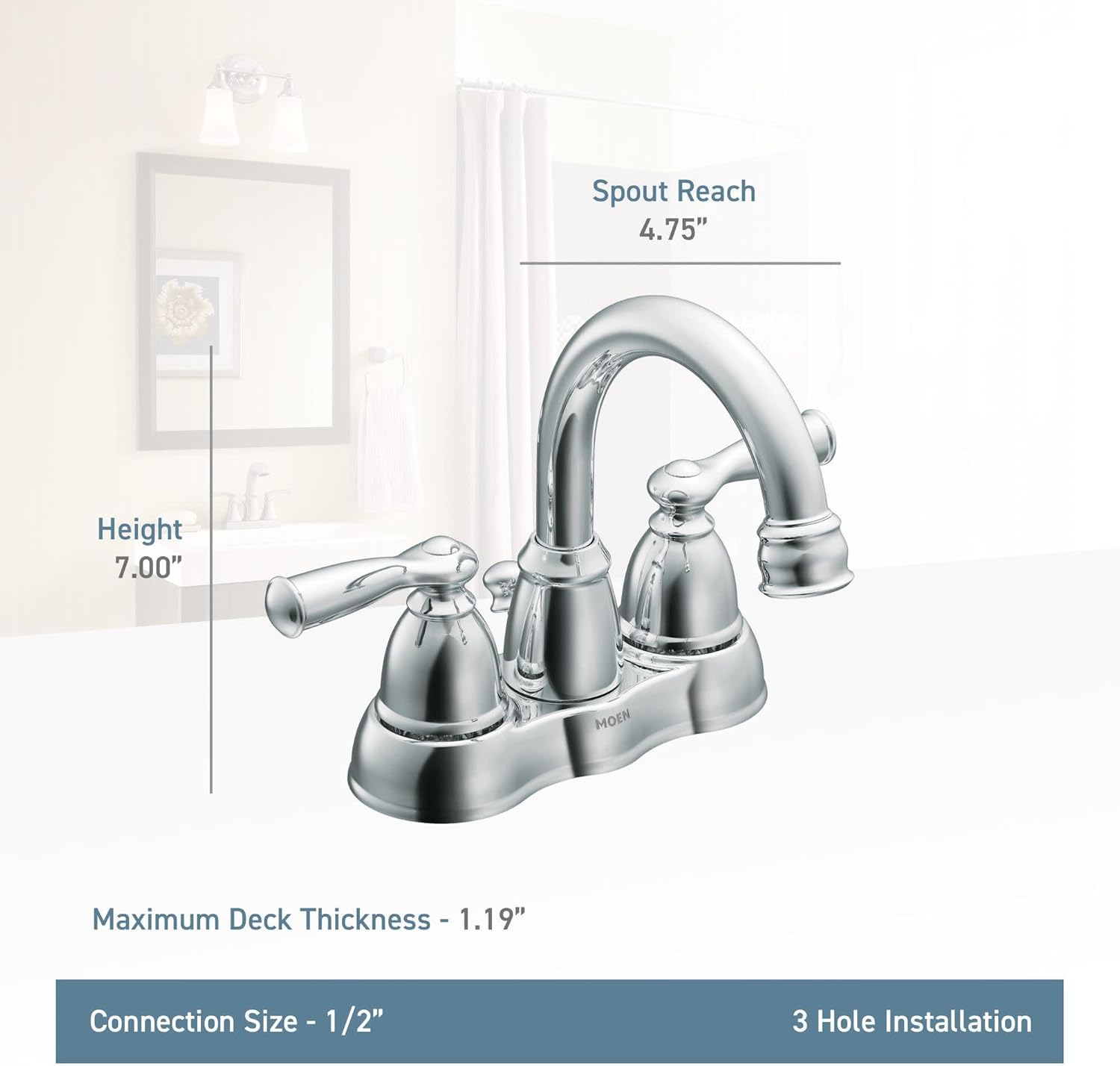
Image 2: Faucet dimensions for installation planning. Height: 7.00", Spout Reach: 4.75", Maximum Deck Thickness: 1.19", Connection Size: 1/2".

Image 3: This faucet is designed to fit a three-hole sink configuration.
3. Operation
Your Moen WS84913BRB faucet features two lever handles for precise control over water temperature and flow.
3.1 Water Flow and Temperature Control
- Cold Water: Turn the right lever handle counter-clockwise to activate cold water flow.
- Hot Water: Turn the left lever handle counter-clockwise to activate hot water flow.
- Mixed Water: Adjust both handles to achieve your desired water temperature and flow rate.
- Shut Off: Turn both handles clockwise until the water flow stops completely.
3.2 Pop-Up Drain Operation
The faucet includes a pop-up drain stopper. To close the drain and fill the sink, simply push down on the stopper. To open the drain and allow water to flow out, push down on the stopper again.

Image 4: The Moen faucet in a bathroom setting, showcasing its design and finish.
4. Maintenance and Care
Proper care will help maintain the beauty and functionality of your Moen faucet for years to come.
4.1 Cleaning Instructions
- Use a soft, damp cloth and mild soap to clean the faucet surface.
- Avoid abrasive cleaners, harsh chemicals, or scouring pads, as these can damage the finish.
- Rinse thoroughly with clean water and dry with a soft cloth to prevent water spots.
4.2 Aerator Maintenance
If water flow becomes restricted, the aerator may need cleaning. Unscrew the aerator from the end of the spout, rinse out any debris, and reattach it securely.
5. Troubleshooting
If you encounter issues with your faucet, refer to the common problems and solutions below. For more complex issues, contact Moen customer support.
| Problem | Possible Cause | Solution |
|---|---|---|
| Low Water Flow | Clogged aerator; partially closed shut-off valves. | Clean aerator; fully open shut-off valves. |
| Leaking from Spout | Worn out cartridge; loose connections. | Replace cartridge; tighten connections. |
| Handles are Stiff | Mineral buildup; worn out cartridge. | Clean around handles; replace cartridge. |
6. Specifications
| Feature | Detail |
|---|---|
| Brand | Moen |
| Model Name | Banbury |
| Model Number | WS84913BRB |
| Finish Type | Bronze (Mediterranean Bronze) |
| Material | Metal |
| Number of Handles | 2 |
| Hole Count | 3 |
| Installation Type | Centerset |
| Maximum Flow Rate | 1.5 Gallons Per Minute |
| Item Weight | 3.19 Pounds |
| Product Dimensions | 1"D x 1"W x 1"H |
| Special Feature | Water Saving |
| UPC | 026508262399 |
7. Warranty Information
This Moen faucet is backed by a Limited Lifetime Warranty. This warranty covers defects in material and manufacturing workmanship for the original consumer purchaser. For full details regarding warranty coverage and claims, please refer to the official Moen warranty documentation or visit the Moen website.
8. Customer Support
For further assistance, technical support, or to order replacement parts, please contact Moen customer service. You can also find additional resources, including a PDF version of the user manual, on the official Moen website.
- Online Resources: Visit the Moen Store on Amazon or the official Moen website.
- User Manual (PDF): A downloadable PDF version of this manual is available at Moen User Manual PDF.
Related documentsWS84913BRB


Ask a question about this manual
Ask about setup, troubleshooting, compatibility, parts, safety, or missing instructions. Manuals+ will review the question and use this page’s manual context to help answer it.