
1. Product Overview
The Vanguard Alta Rise 48 is a versatile camera backpack designed for photographers requiring flexible storage and quick access to their gear. It features an innovative +6 expansion system, allowing the backpack's capacity to be adjusted to accommodate additional equipment or personal items. This backpack is suitable for carrying DSLR or mirrorless cameras, multiple lenses, a flash, accessories, and a laptop or tablet.

Figure 1: Front view of the Vanguard Alta Rise 48 Backpack, showcasing its sleek design and front pocket.
2. Key Features
- +6 Expansion System: Allows for instant expansion or reduction of storage capacity by 6cm with a single zipper motion.
- Quick-Action Side Access: Enables rapid retrieval of camera gear without removing the backpack.
- Optimal Balance Tripod Carrying System: Securely attaches a tripod to the backpack for stable transport.
- Dedicated Compartments: Includes padded sections for 1-2 Pro DSLRs, 3-5 lenses (up to 24-70mm f/2.8), a flash, accessories, and a 15-inch laptop or tablet.
- Concealed Rear Pocket: Provides secure storage for valuables like wallets and travel documents.
- Ergonomic Air System: Features a breathable back panel and harness for comfortable carrying.
- Total Coverage Rain Cover: Integrated rain cover protects gear from adverse weather conditions.
- Bright Interior: Yellow interior lining enhances visibility, making it easier to locate items.
3. Setup and Configuration
3.1 Adjusting Shoulder Straps and Harness
The Alta Rise 48 backpack is equipped with an ergonomic air system back and harness for comfortable wear. Adjust the shoulder straps, sternum strap, and waist belt to ensure a snug and balanced fit. The padded straps and back panel are designed to distribute weight evenly and provide ventilation.

Figure 2: Rear view of the backpack, highlighting the ergonomic air system and adjustable straps.
3.2 Internal Dividers and Organization
The main camera compartment features well-padded, removable, and configurable inserts. These dividers allow you to customize the interior layout to securely fit your specific camera body, lenses, and other accessories. Ensure all gear is snugly fitted to prevent movement during transport.

Figure 3: Interior view of the main compartment, showing customizable padded dividers for camera equipment.
3.3 Utilizing the +6 Expansion System
The +6 expansion system allows you to increase the backpack's depth by 6cm. Locate the expansion zipper along the side of the main compartment. Unzip this section to expand the bag, providing additional space for larger lenses, personal items, or a laptop/tablet in the dedicated compartment. Zip it back up to return to the compact size.

Figure 4: Close-up of the +6 expansion zipper, demonstrating how to adjust the backpack's capacity.
Video 1: Demonstration of the Alta Rise series features, including the +6 expansion system and internal organization.
4. Operation
4.1 Quick Access to Gear
The Alta Rise 48 backpack offers quick side access to your camera. By swinging the backpack around to your front while keeping one shoulder strap on, you can open the side flap to retrieve your camera and lens rapidly. This feature allows for grab-and-shoot moments without setting the bag down.

Figure 5: Illustrates quick side access to the camera compartment, allowing for rapid retrieval of equipment.
4.2 Storing Laptop and Tablet
A dedicated, padded compartment is available for storing a 15-inch laptop or tablet. This compartment is accessible from the side or top, providing secure and protected storage for your electronic devices.
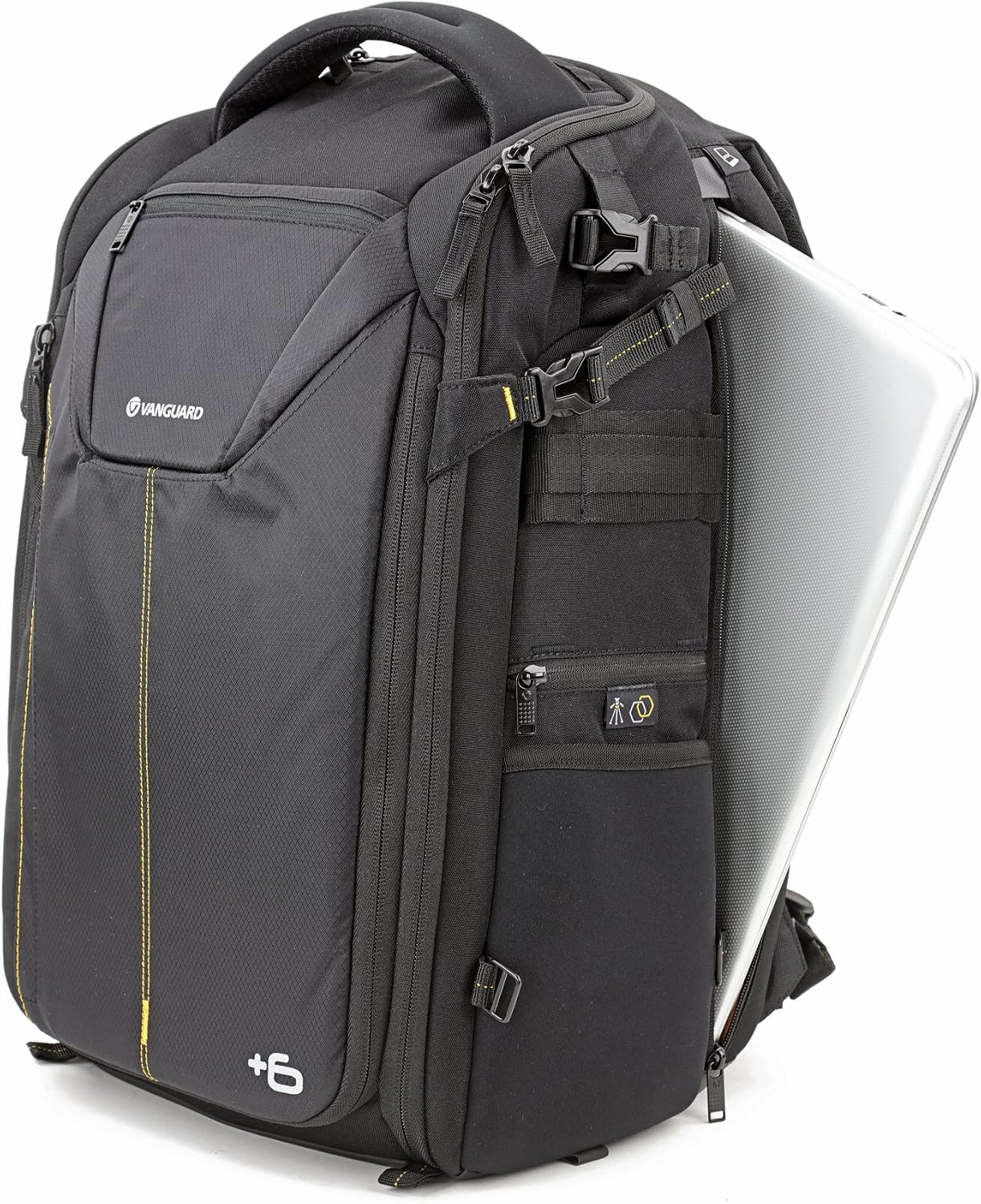
Figure 6: Shows a laptop being inserted into its dedicated padded compartment.

Figure 7: Illustrates the tablet pocket on the side of the backpack.
4.3 Tripod Carrying System
The backpack features an optimal balance tripod carrying system. Utilize the adjustable straps and bottom pocket to securely attach a tripod to the side or front of the backpack, ensuring stability during transport.

Figure 8: A tripod securely attached to the side of the Alta Rise 48 Backpack.
For an enhanced carrying experience, the Alta Rise 48 is compatible with the Alta Link system. This allows you to connect an Alta Action Tripod Bag (sold separately) to the backpack, providing a cohesive carrying solution for your tripod and camera gear.
4.4 Concealed Pockets
A concealed pocket is located on the back panel, close to your body. This pocket is ideal for securing valuables such as a wallet, passport, or travel documents, offering increased security against theft.

Figure 9: A wallet being placed into the concealed rear pocket for secure storage.
5. Maintenance
5.1 Cleaning Instructions
To clean the exterior of the backpack, use a soft, damp cloth with mild soap. Avoid harsh chemicals or abrasive cleaners. For the interior, remove all gear and use a soft brush or vacuum cleaner to remove dust and debris. Allow the backpack to air dry completely before storing or reusing.
5.2 Rain Cover Deployment
The Alta Rise 48 includes a total coverage rain cover. This cover is typically stored in a dedicated pocket, often located at the bottom or side of the backpack. In rainy conditions, pull out the rain cover and stretch it over the entire backpack, ensuring all openings are covered to protect your gear from moisture.
6. Specifications
| Feature | Detail |
|---|---|
| Model Number | ALTA RISE 48 |
| Closure Type | Zipper |
| Capacity | 27 liters |
| Strap Type | Shoulder Strap |
| Pocket Description | Utility Pocket |
| Handle Type | Top Handle |
| Number of Compartments | 7 |
| Color | Black |
| Item Dimensions (L x W x H) | 18.9"L x 9.9"W x 20.9"H |
| Item Weight | 4.2 lbs |
| Material Type | Cloth |
| Shell Type | Soft |
| Included Components | Backpack, rain cover |

Figure 10: Diagram illustrating the key dimensions of the Alta Rise 48 Backpack.
7. Warranty and Support
The Alta Rise bags are covered by a Lifetime Warranty when registered online. For more details or to register your product, please visit the official Vanguard website: vanguardworld.us and search for warranty information.
For further assistance, technical support, or inquiries, please refer to the support section on the Vanguard website.


