
JBL JBLE55BTBLK
JBL E55BT Over-Ear Wireless Headphones User Manual
Model: JBLE55BTBLK
Introduction
This manual provides essential information for the safe and effective use of your JBL E55BT Over-Ear Wireless Headphones. Please read this manual thoroughly before using the product to ensure optimal performance and longevity.
The JBL E55BT headphones offer up to 20 hours of battery life for extended listening, a two-hour recharge time, an ergonomic and form-fitting ear cushion design for comfort, and a one-button universal remote with an integrated microphone for easy control and hands-free calls.
Package Contents
Ensure all items are present in the package:
- JBL E55BT Over-Ear Wireless Headphones
- Detachable Audio Cable (3.5 mm Jack)
- USB Charging Cable
- User Manual
- Ear Cushions (pre-installed)

Image: Overview of JBL E55BT headphones highlighting key features such as battery life, sound controls, and connectivity options.
Setup
Charging the Headphones
Before first use, fully charge the headphones. A full charge takes approximately 2 hours.
- Connect the small end of the USB charging cable to the charging port on the headphone's ear cup.
- Connect the larger end of the USB cable to a USB power adapter (not included) or a computer's USB port.
- The LED indicator on the headphone will show charging status. It typically turns off or changes color when fully charged.
Pairing via Bluetooth
The JBL E55BT headphones can be paired with up to two devices simultaneously.
- Ensure the headphones are charged and powered off.
- Press and hold the Power button on the headphone until the LED indicator flashes blue, indicating pairing mode.
- On your device (smartphone, laptop, tablet), enable Bluetooth and search for available devices.
- Select "JBL E55BT" from the list of found devices.
- Once connected, the LED indicator will turn solid blue.
- To pair a second device, repeat steps 2-4. The headphones will automatically switch between the two connected devices.
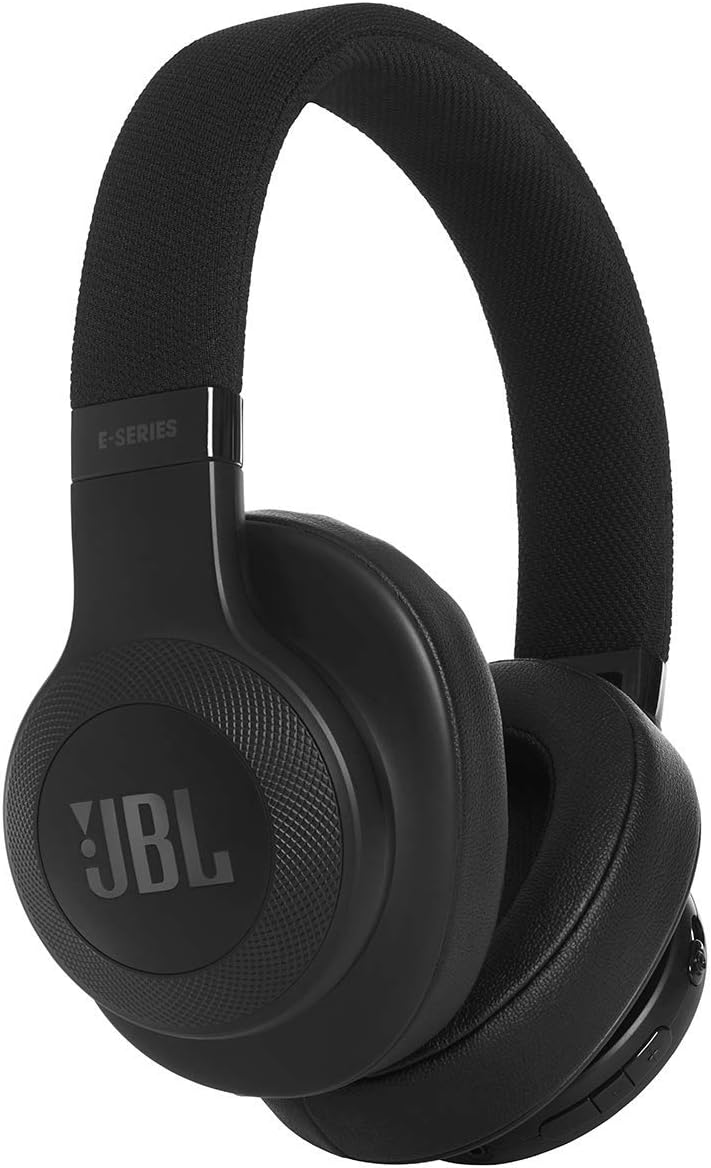
Image: Front view of the JBL E55BT headphones, showcasing their design and ear cup details.
Operating Instructions
Power On/Off
- Power On: Press and hold the Power button for 2 seconds. The LED will light up.
- Power Off: Press and hold the Power button for 3 seconds. The LED will turn off.
Music Playback
- Play/Pause: Press the multi-function button (usually the center button on the ear cup).
- Next Track: Double-press the multi-function button.
- Previous Track: Triple-press the multi-function button.
- Volume Up: Press the '+' button.
- Volume Down: Press the '-' button.
Call Management
- Answer/End Call: Press the multi-function button.
- Reject Call: Press and hold the multi-function button for 2 seconds.
- Activate Voice Assistant: Press and hold the multi-function button for 3 seconds (when not on a call).
Wired Connection
The headphones can be used with the included 3.5mm audio cable when the battery is depleted or for a wired connection.
- Plug one end of the audio cable into the headphone's audio jack.
- Plug the other end into your audio source's 3.5mm jack.
- Note: Bluetooth functions and the built-in microphone may be disabled when using the wired connection.

Image: Angled view of the JBL E55BT headphones, highlighting the control buttons located on the right ear cup.
Maintenance
- Cleaning: Use a soft, dry cloth to clean the ear cups and headband. Do not use liquid cleaners or aerosols.
- Storage: Store the headphones in a cool, dry place away from direct sunlight and extreme temperatures.
- Battery Care: To preserve battery life, fully charge the headphones at least once every three months if not used regularly. Avoid completely draining the battery frequently.
- Handling: Avoid dropping the headphones or exposing them to excessive force, which can damage internal components.
Troubleshooting
| Problem | Possible Cause | Solution |
|---|---|---|
| Headphones do not power on. | Battery is depleted. | Charge the headphones fully. |
| Cannot pair via Bluetooth. | Headphones not in pairing mode; device Bluetooth off; too far from device. | Ensure headphones are in pairing mode (flashing blue LED). Turn on Bluetooth on your device. Move headphones closer to the device (within 10 meters). |
| No sound or low volume. | Volume too low on headphones or device; incorrect audio source selected; headphones not connected. | Increase volume on both headphones and connected device. Ensure headphones are properly connected via Bluetooth or audio cable. Check audio output settings on your device. |
| Sound distortion or crackling. | Interference; low battery; device too far. | Move away from sources of interference (Wi-Fi routers, other Bluetooth devices). Charge the headphones. Move closer to the connected device. |
| Microphone not working. | Using wired connection; microphone muted on device; software issue. | Ensure you are using Bluetooth for calls. Check microphone settings on your device. Restart your device. |
Specifications
| Feature | Detail |
|---|---|
| Model Name | JBL E55BT (55BT) |
| Connectivity Technology | Wireless (Bluetooth) |
| Bluetooth Range | 10 Meters |
| Earpiece Shape | Over-Ear |
| Frequency Range | 20Hz - 20kHz |
| Battery Life | Up to 20 Hours |
| Charging Time | 2 Hours |
| Headphones Jack | 3.5 mm Jack (for wired use) |
| Item Weight | 0.23 Kilograms (8.2 ounces) |
| Product Dimensions | 6.1 x 3.07 x 7.48 inches |
| Material | Fabric (headband) |
| Control Type | Volume Control, Touch |
| Noise Control | Active Noise Cancellation |
Warranty Information
JBL products are designed to provide years of reliable performance. For specific warranty terms and conditions, please refer to the warranty card included with your product or visit the official JBL website. Keep your proof of purchase for warranty claims.
Support
For further assistance, technical support, or service inquiries, please contact JBL customer support through their official website or the contact information provided in your product packaging.
You can also visit the JBL Store on Amazon for product information and resources.