
Introduction
Thank you for choosing the Cellphonez Awei ES-500i In-Ear Earphones. This manual provides essential information for the proper setup, operation, and maintenance of your earphones. Please read it carefully before use and retain it for future reference.
Package Contents
Ensure all items are present in the package:
- Awei ES-500i In-Ear Earphones
- Ear Cushions (various sizes)
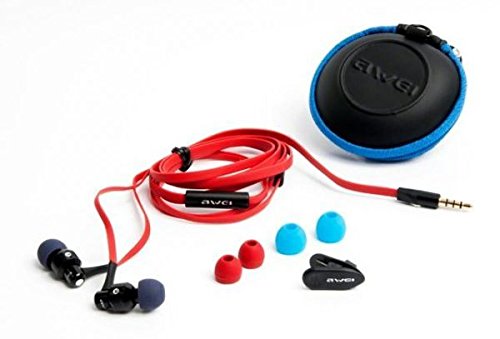
Image: Contents of the Awei ES-500i earphone package, including the earphones, multiple ear cushion sizes, and a carrying case.
Setup
- Select Ear Cushions: Choose the ear cushions that provide the most comfortable and secure fit for your ears. A good seal enhances sound quality and noise isolation.
- Connect to Device: Insert the 3.5mm jack of the earphones firmly into the headphone port of your audio device (smartphone, tablet, MP3 player, etc.).
- Compatibility Note: These earphones are designed for optimal compatibility with Apple, Samsung, HTC, Sony, and Xiaomi devices. Some keys on the inline controller may not function on all Android phones. They are not compatible with Nokia, Karbonn, Micromax, or Lava devices.
Operating Instructions
Wearing the Earphones
- Gently insert the earphone buds into your ear canals.
- Adjust them until they feel secure and comfortable, ensuring the cable hangs naturally.
Using the Inline Controller and Microphone
The Awei ES-500i features an intelligent single-button controller and an integrated microphone for hands-free communication and audio control.
- Play/Pause Music: Press the button once to play or pause audio playback.
- Answer/End Call: Press the button once to answer an incoming call or end an ongoing call.
- Reject Call: Press and hold the button for approximately 2 seconds to reject an incoming call.
- Next Track: Double-press the button to skip to the next track.
- Previous Track: Triple-press the button to go back to the previous track.
- Voice Assistant: On some compatible devices, pressing and holding the button may activate the voice assistant.
Note: Functionality of the inline controller may vary depending on your device's operating system and specific model.
Maintenance
- Cleaning Ear Cushions: Remove the ear cushions from the earphones. Wipe them gently with a soft, damp cloth. Ensure they are completely dry before reattaching.
- Cleaning Earphone Body: Use a dry, soft cloth to wipe the earphone body. Avoid using harsh chemicals or abrasive materials.
- Cable Care: Avoid tangling the cable. When not in use, coil the cable neatly to prevent damage. Do not pull the cable forcefully when disconnecting from a device; always grasp the 3.5mm jack.
- Storage: Store your earphones in a clean, dry place, preferably in a protective pouch or case, to prevent dust accumulation and physical damage.
Troubleshooting
| Problem | Possible Solution |
|---|---|
| No sound or low volume |
|
| Microphone not working |
|
| Inline controller buttons not responding |
|
Specifications
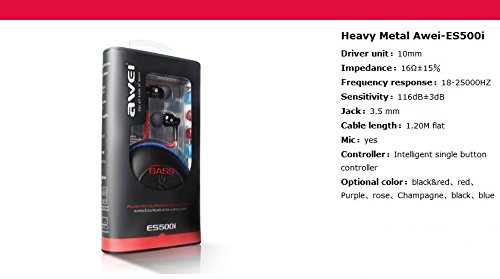
Image: Product packaging highlighting technical specifications of the Awei ES-500i earphones.
| Feature | Detail |
|---|---|
| Model | Awei ES-500i |
| Driver Unit | 10mm |
| Impedance | 16Ω ±15% |
| Frequency Response | 18-25000Hz |
| Sensitivity | 116dB ±3dB |
| Headphones Jack | 3.5 mm |
| Cable Length | 1.20M (flat cable) |
| Microphone | Yes, with inline controller |
| Control Method | Intelligent single button controller |
| Connectivity Technology | Wired (3.5mm Jack) |
| Item Weight | 100 g |
| Ear Placement | In Ear |
| Noise Control | Sound Isolation |
Warranty Information
This product is covered by a standard warranty policy. For details regarding warranty terms, duration, and claims process, please refer to the warranty information provided at the point of purchase or contact your retailer. Please retain your proof of purchase for any warranty claims.
Customer Support
If you encounter any issues not covered in this manual or require further assistance, please contact Cellphonez customer support through the retailer where you purchased the product. Provide your product model (ES-500i) and a detailed description of the issue for efficient support.