
1. Introduction
The AccuMed AP212 Mini Electronic Pulse Stimulator is a portable and battery-powered Transcutaneous Electrical Nerve Stimulation (TENS) device. It functions as an alternative method for pain relief and management. This device delivers electric pulses to tired and sore muscles. These pulses are generated by the device and delivered through connecting wires and electrodes to target body areas such as the lower back, shoulders, hands, and feet. The AP212 features 6 main operation modes with variations within each mode, totaling 16 modes to choose from. It also includes dual channel intensity adjustment (20 levels) and an adjustable timer (10 to 60 minutes). The large backlit LCD clearly shows current settings and remaining time.
2. Safety Information
WARNING: Always consult with a healthcare professional before using this device. Do not use if you have a pacemaker, are pregnant, or have any other medical condition that could be affected by electrical stimulation. Keep the device dry and do not use in or near water. Do not exceed the recommended usage time or intensity levels. If you experience any discomfort or adverse effects, discontinue use immediately and consult a healthcare professional.
Do not use this device while sleeping. Do not use this device in high humidity areas such as a bathroom. Keep the device away from moisture, high temperatures, and direct sunlight. Keep this device out of reach of children. Stop using this device at once if you feel pain, discomfort, dizziness or nausea, and consult your physician. Do not attempt to move the electrode pads while the device is operating. Do not use the device around the heart, on the head, mouth, pudendum, or blemished skin areas.
DO NOT APPLY STIMULATION of this device in the following conditions:
- ACROSS THE CHEST: Introduction of electrical current into the chest may cause rhythm disturbances to the heart, which could be lethal.
- OVER PAINFUL AREAS: Please consult with your physician before using this device if you have painful areas.
- OVER OPEN WOUNDS OR RASHES, OR OVER SWOLLEN, RED, INFECTED, OR INFLAMED AREAS OR SKIN ERUPTIONS (e.g., phlebitis, thrombophlebitis, varicose veins): Apply stimulation only to normal, intact, clean, healthy skin.
- IN THE PRESENCE OF ELECTRONIC MONITORING EQUIPMENT (e.g., cardiac monitors, ECG alarms): The electronic stimulator may not operate properly when the electrical stimulation device is in use.
- WHILE OPERATING MACHINERY: or during any activity in which electrical stimulation can put you at risk of injury.
- ON CHILDREN.
BE AWARE OF THE FOLLOWING:
- Consult with your physician before using this device. The stimulation with the device may:
a. Cause lethal rhythm disturbances to the heart in susceptible individuals.
b. Disrupt the healing process after a recent surgical procedure.
3. What's Included
The AccuMed AP212 package includes the following items:
- 1 AccuMed AP212 TENS Unit
- 1 AC Adapter
- 1 USB Cable
- 2 Electrode Lines
- 4 TENS Pads
- 1 Pad Holder
- 1 User Manual
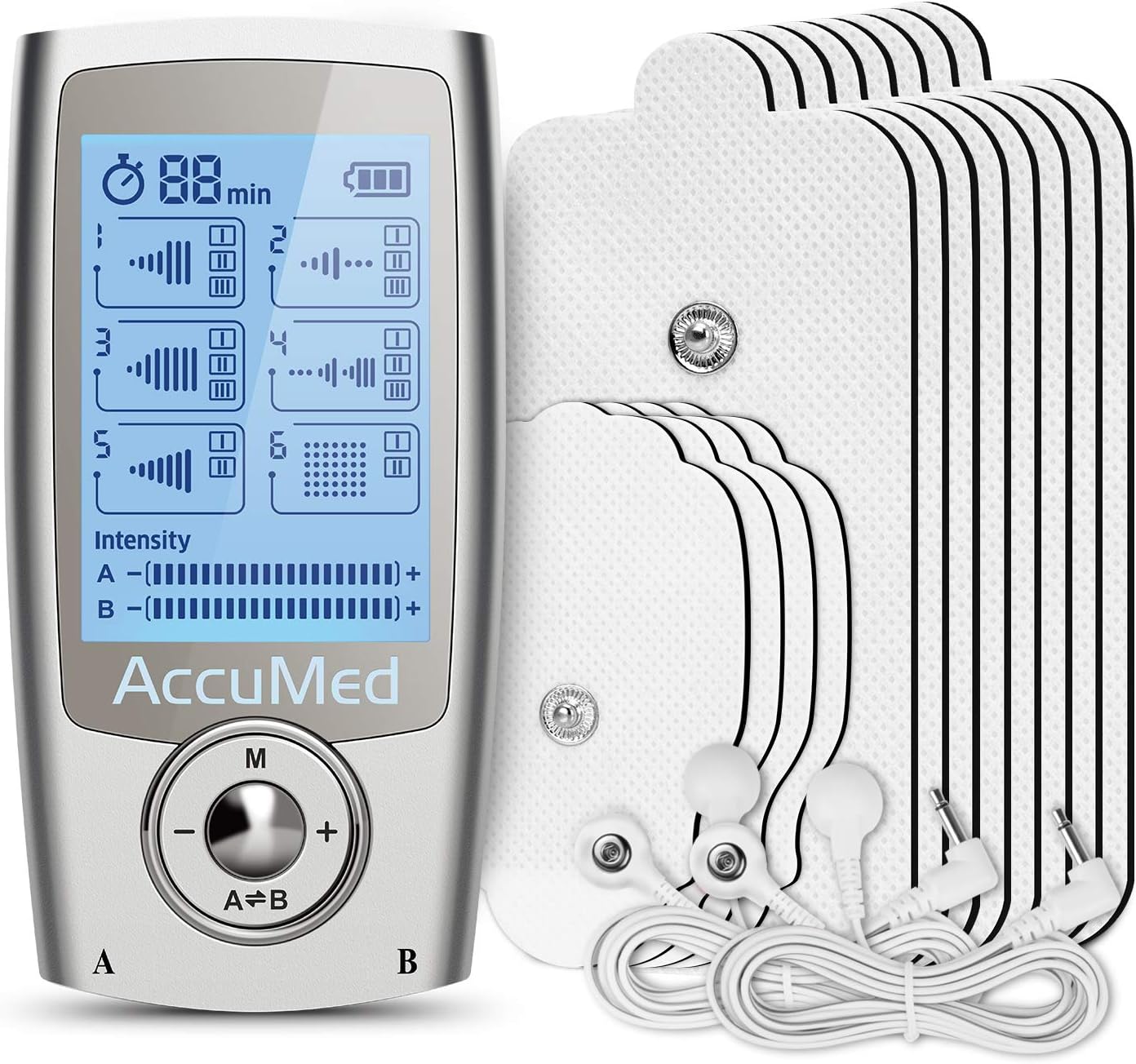
Figure 3.1: The AccuMed AP212 TENS Unit, showing the main device, electrode pads, and connecting cables.
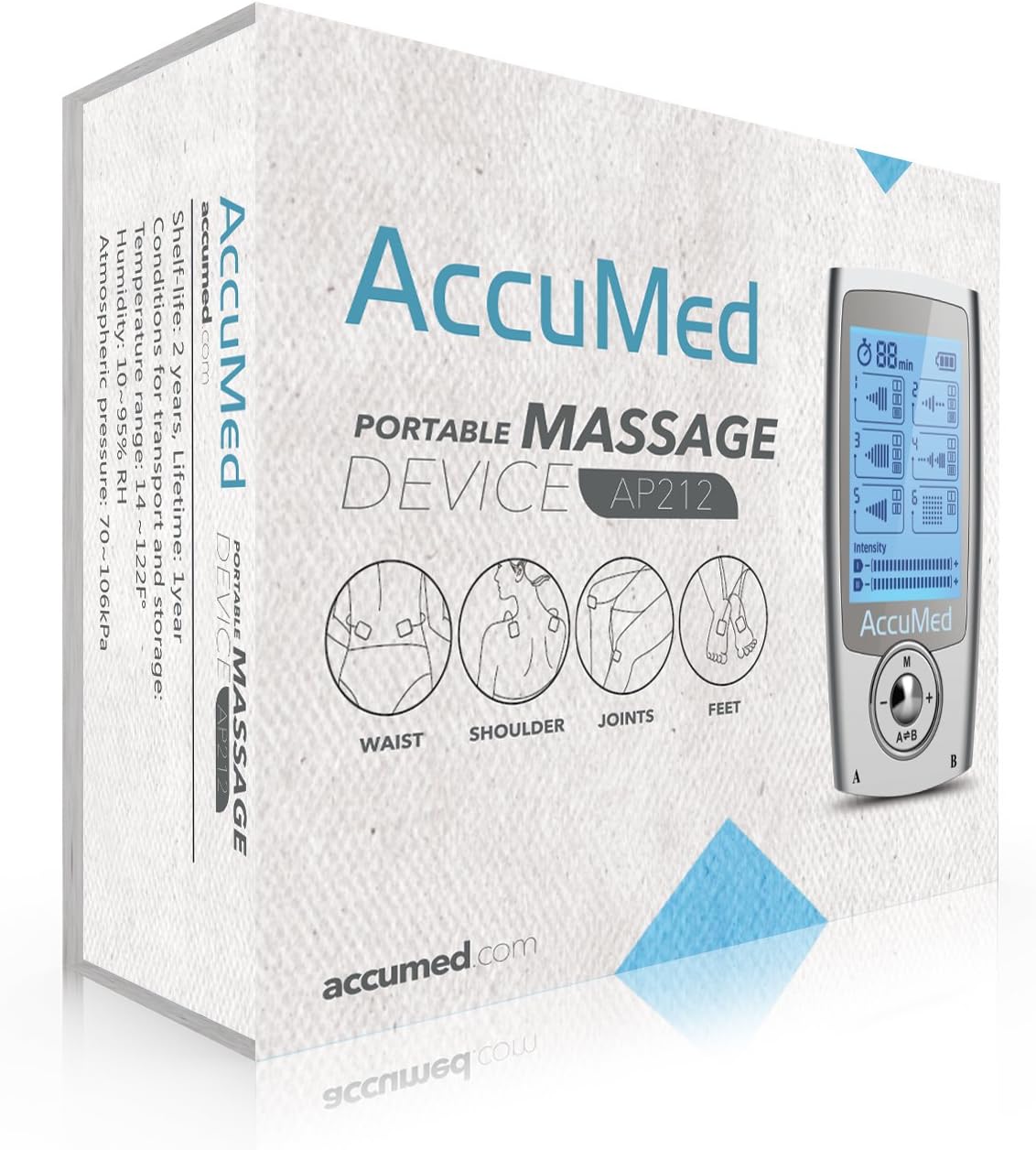
Figure 3.2: The AccuMed AP212 product box, illustrating the device and its application areas.
Video 3.1: An unboxing and overview of the AccuMed AP212 TENS Unit, detailing the contents of the package including the device, cables, pads, charger, and user manual.
4. Setup
Follow these steps to set up your AccuMed AP212 TENS Unit:
- Charge the Unit: Ensure the unit is fully charged before initial use. Connect the USB cable to the unit's charging port and plug the AC adapter into a wall outlet. The battery needs to be charged for up to 10 hours before the first use.
- Connect Electrode Lines: Plug the electrode lines into the output ports at the bottom of the unit. The unit has two output ports, labeled A and B, allowing for dual-channel operation.
- Attach Pads: Snap the adhesive electrode pads onto the metal buttons at the end of the electrode lines.
- Prepare Skin: Clean the treatment area of your skin with a damp towel or wet wipe to ensure it is free of dirt, body oil, and cosmetics. This improves pad adhesion and conductivity.
- Apply Pads: Remove the protective film from the electrode pads and attach them to the treatment area. Ensure both pads are on the skin and not overlapping.
- Power On: Slide the On/Off switch located on the top of the device from 'Off' to 'On'. The device will automatically enter Mode 1 (Massage I) with a default timer of 20 minutes.

Figure 4.1: The AccuMed AP212 TENS Unit with electrode pads and cables properly connected, ready for use.
Video 4.1: Demonstrates connecting the electrode pads to the unit and applying them to the skin, followed by powering on the device and selecting a mode. This video also highlights the charging port and A/B connections.
5. Operating Instructions
The AccuMed AP212 is designed for ease of use. Once the pads are applied and the unit is powered on, you can adjust settings as follows:
- Adjust Intensity: Press the 'A=B' button to switch between channels (A or B). The intensity can be adjusted while the selected channel is flashing. Use the '+' button to increase intensity and the '-' button to decrease it. The output intensity is only increased by pushing the '+' key. Even if the intensity is increased to the maximum, it is within the safe range, but may feel uncomfortable. When the user switches the mode, the intensity will automatically go down to the minimum for safety reasons.
- Change Modes: The device automatically enters Mode 1 (Massage I) when turned on. Press the Play/Pause button to access the next variation within the main illustrated mode. Press the 'M' button to cycle through the 6 illustrated main stimulation modes.
- Adjust Timing: Hold the Play/Pause button for 2-3 seconds. The treatment time will increase by 10 minutes each time. After the time runs out, the device turns off automatically. It can be restarted if treatment needs to be continued.
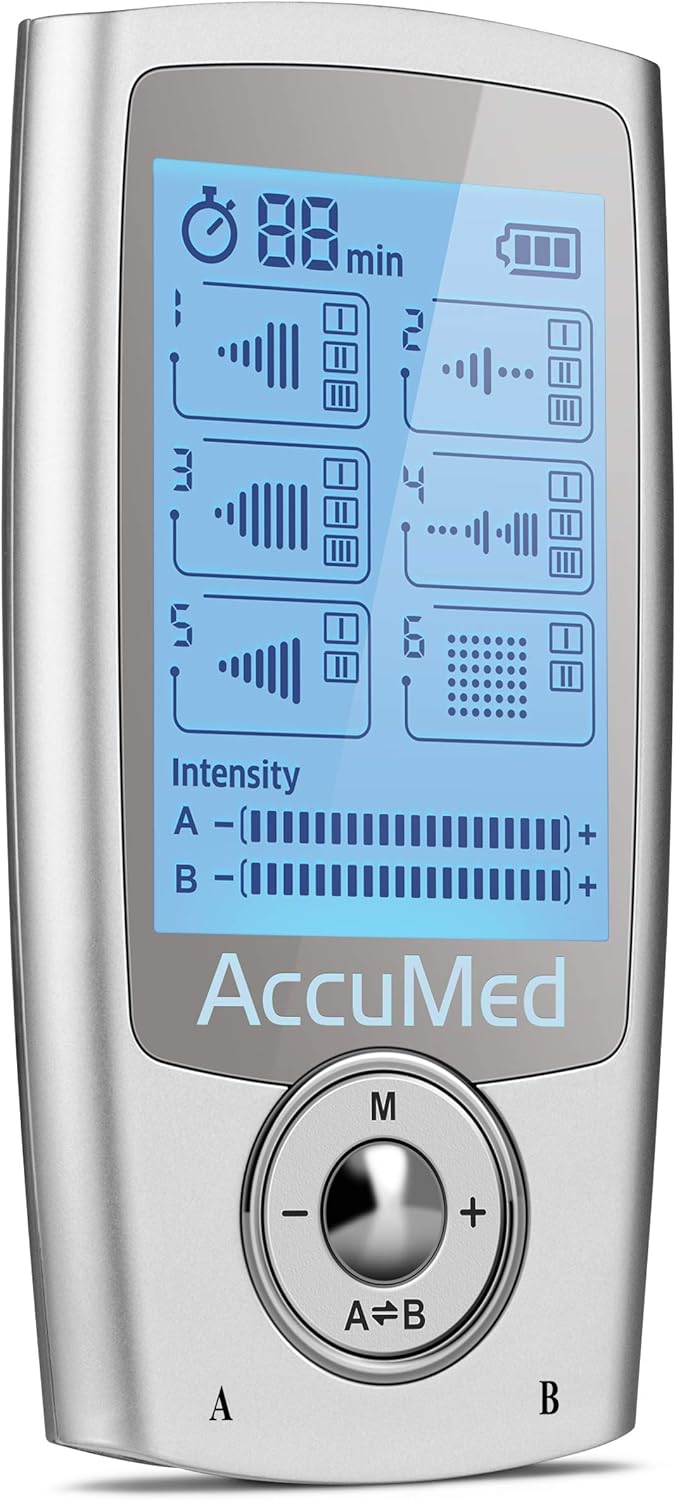
Figure 5.1: A detailed view of the AccuMed AP212's LCD screen, displaying the various modes, timer, battery life, and intensity levels for channels A and B.
Video 5.1: This video demonstrates the operation of the AccuMed AP212, including how to adjust the timer, cycle through the 16 therapy modes, and change intensity levels. It also shows the muscle response to the electrical pulses.
6. Modes and Intended Uses
The AP212 offers 6 main modes, each with variations, providing a total of 16 therapy routines:
- Mode 1 (Massage): Gradually increasing pressure and fades away (a soft squeeze and release). Medium to strong strength pulses, good for all major muscle groups.
- Mode 2 (Acupuncture): Short strong pulses with gradual fade, good for all major muscle groups.
- Mode 3 (Beat): Quick strong rhythmic pulses, good for all major muscle groups.
- Mode 4 (Combo): Mix of Massage, Beat, Scraping, Acupuncture, good for lower back and abs.
- Mode 5 (Sole): Short pulses then a gradual increase in pressure and stop, great for calf area and feet.
- Mode 6 (Ear): Very subtle, for extremely sensitive areas or people with sensitivity to pulse sensations (like pulling on your earlobe).
Start from the lowest intensity, and then gradually adjust to a comfortable level on a scale from 1 to 20.
Video 6.1: This video provides a detailed demonstration of cycling through the various modes of the AccuMed AP212 TENS Unit, explaining the characteristics and intended uses of each mode, such as Massage, Acupuncture, Beat, Combo, Sole, and Ear modes.
7. Electrode Placement
Proper electrode pad placement is crucial for effective and safe stimulation. The user manual provides diagrams for recommended placement areas:
- Twin Mode (Correct): For best relief of pain, place the electrode pair from one channel on either side of the pain. You may also place one electrode pair on the area of pain and the other pair near the area of pain.
- Opposed Mode (Not Recommended): Fixing two or four pads respectively on the opposite sides of the body is not recommended and provides little benefit.
The manual includes charts suggesting where to place electrodes, what mode to choose, and how long to stimulate for various body parts:
- Pain in Neck: Mode 1 (A) for 10-20 minutes, and Mode 3 for 10-20 minutes; twice or 3 times a day. Keep the neck warm and avoid sleeping on a high pillow.
- Pain in Shoulders: Mode 4 (B & C) for 10-20 minutes, and Mode 5 for 10-20 minutes; twice or 3 times a day. Find the pain area and apply the electrodes at the anterior and posterior (inner & outer) shoulders. Keep the area warm. Avoid sudden movements with the aching shoulders. Gentle movements are advisable in the initial stage and full motions at a later stage.
- Pain in Back: Mode 1 for 10-20 minutes, and Mode 5 or 6 for 10-20 minutes; twice or 3 times a day. Apply the electrodes to the pain area. Avoid working in the same position in the initial phase and change the position at times.
- Abdomen: Mode 1 for 10-20 minutes, Mode 2 for 10-20 minutes, and Mode 6 for 10-20 minutes; twice or 3 times a day. Persistent and consistent use can help to improve the abdomen muscles.
- Waist: Mode 2 for 10-20 minutes, Mode 3 for 10-20 minutes, and Mode 6 for 10-20 minutes; twice or 3 times a day. The device exercises the muscles in the waist. It is advisable to do some waist exercises after the application.
- Arms or Legs: Mode 5 for 10-20 minutes, and Mode 6 for 10-20 minutes; twice or 3 times a day. The device can stimulate areas of the legs and thighs so as to improve the muscles.
Video 7.1: This video reviews the user manual, specifically highlighting sections on electrode placement diagrams and recommended massage points for different body areas like waist, shoulder, joints, and feet.
8. Maintenance
To ensure the longevity and effectiveness of your AccuMed AP212, follow these maintenance guidelines:
- Cleaning the Controller: Use a soft, dry cloth for dust or a soft damp cloth for any dirt and smudges. Do not use any cleaning solutions.
- Cleaning Electrode Pads: The lifespan of the electrode pads varies depending on the frequency of use and care. Keeping electrode pads clean and sealed in the zip bag after use will extend their lifespan. Replace the electrode pads when they lose their adhesiveness.
- General Care: Do not use or store the device where there are magnetic fields or electric waves (near TV set or speakers). Do not place the devices in areas of high temperature, high humidity, or under direct sunlight. Keep the device out of reach of children.
9. Storage
Proper storage helps maintain the device's condition:
- Do not store in a damp area. Dampness may affect the device and cause rust.
- Store in normal working ambient temperature: 5°C~40°C (40~104°F).
- Store in normal working ambient humidity: ≤80%RH.
- Store in transport ambient temperature: -20°C~55°C (-4~131°F).
- Store in transport ambient humidity: ≤93%RH.
- Before storing the TENS, use the protective film to cover the electrode pads.
- Put away the connecting wires and electrode pads.
10. Troubleshooting
If your device is not operating properly, please check below for common problems and suggested solutions:
- No power source, no display in LCD: Check if the battery is low and needs to be recharged. If the unit was previously used, switch the power to OFF first, then back to ON.
- Stimulation is weak or nonexistent: Check that the electrode pads are firmly attached to skin.
11. Specifications
| Feature | Specification |
|---|---|
| Display | Backlit LCD |
| Frequency | 110Hz |
| Output Voltage | 42V@500ohms |
| Current | 84mA@500ohms |
| Dimensions | 3.6 x 2 x 0.5 inches |
| Net Weight | 0.09lb |
| Power Source | Battery Powered (Rechargeable Lithium Battery) |
| Material | Acrylonitrile Butadiene Styrene |
| Intensity Adjustment | 20 levels |
| Timer | 10 to 60 minutes |

Figure 11.1: Image illustrating the compact dimensions of the AccuMed AP212 TENS Unit.
12. Warranty and Support
Every authentic AccuMed AP212 TENS unit is guaranteed by a 1 Year USA Warranty from Amcrest Direct (FirstVision Technologies). For further support or inquiries, please refer to the contact information provided in your user manual or visit the official AccuMed website.