
1. Introduction
The Surecom SR-629 is a compact and efficient 2-in-1 Duplex Cross Band Radio Repeater Controller designed to enhance the communication capabilities of your handheld walkie-talkies. This device acts as a relay station, allowing two radios to communicate over a greater distance or across different frequency bands. It features a built-in Li-ion battery for extended operation and supports external 5V DC power. The SR-629 is compatible with most popular handheld radios and offers two distinct operating modes to suit various communication needs.
2. Safety Information
- Do not expose the device to extreme temperatures, direct sunlight, or moisture.
- Use only the provided USB charger cable and a compatible 5V AC adapter.
- Keep the device away from strong electromagnetic fields.
- Ensure proper ventilation when operating for extended periods.
- Do not attempt to disassemble or modify the device. Refer all servicing to qualified personnel.
3. Package Contents
Verify that all items are present in your package:
- 1x SR-629 Duplex Repeater Controller
- 2x K1 Plug Cables (for connecting radios)
- 1x Micro USB Cable (for charging)
- 1x USB AC Adapter (100-240V)
- 1x English User Manual

Image: Contents of the SR-629 package, showing the main controller unit, two K1 plug cables, a micro USB charging cable, and the user manual.
4. Product Overview
The SR-629 controller features a compact design with clearly labeled ports and indicators.

Image: Detailed view of the SR-629 controller, highlighting the Charger In (Micro USB) port, Mode 1/Off/Mode 2 switch, Radio A Input, Radio B Input, Radio A LED (Green RX / Red TX), and Radio B LED (Green RX / Red TX).
Key Components:
- Charger In (Micro USB): Used for charging the internal battery and providing external power.
- Mode 1/Off/Mode 2 Switch: Selects the operating mode or turns the device off.
- Radio A Input: 2-pin K1 port for connecting the first handheld radio.
- Radio B Input: 2-pin K1 port for connecting the second handheld radio.
- LED Status Indicators: Two LEDs (one for Radio A, one for Radio B) indicate transmit (Red) and receive (Green) status.
5. Setup
Follow these steps to set up your SR-629 repeater controller:
- Charge the Device: Connect the micro USB cable to the 'Charger In' port on the SR-629 and the other end to the USB AC adapter. Plug the adapter into a power outlet. The LED indicators may show charging status.
- Prepare Radios: Ensure your two handheld radios are powered on and set to the desired frequencies. Adjust their volume levels appropriately.
- Connect Radios: Use the provided K1 plug cables to connect your handheld radios to the 'Radio A Input' and 'Radio B Input' ports on the SR-629. Ensure the plugs are fully inserted into the sockets on both the controller and the radios.

Image: Illustration demonstrating the importance of fully inserting the K1 plug cables into the SR-629 controller's ports to ensure proper connection.
- Position Radios: For optimal performance and to minimize interference, place the two connected radios and their antennas at a reasonable distance from each other (e.g., several feet apart).
- Select Mode: Use the 'Mode 1/Off/Mode 2' switch to select your desired operating mode (see Section 6 for details).

Image: The SR-629 controller connected via K1 cables to two handheld walkie-talkies, illustrating a typical setup for extending radio communication.
6. Operating
The SR-629 offers two operating modes:
Mode 1: One-Way Relay (A RX → B TX)
In this mode, when Radio A receives a signal, the SR-629 automatically triggers Radio B to transmit that signal. Radio B will not trigger Radio A. This is useful for creating a simple unidirectional repeater link.
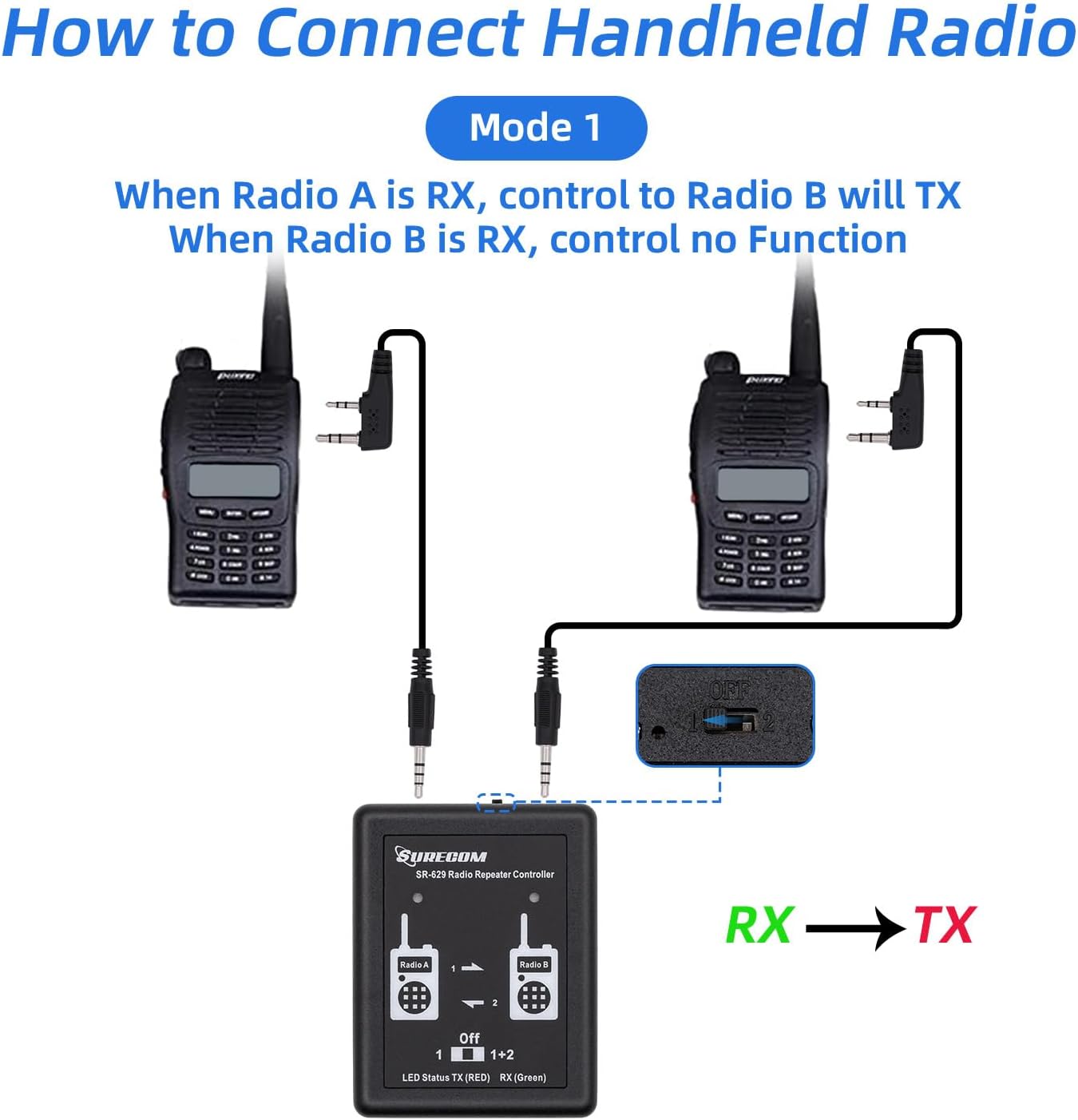
Image: A visual representation of Mode 1, showing audio flow from Radio A (Receive) to Radio B (Transmit) through the SR-629 controller.
Mode 2: Two-Way Relay (A RX → B TX and B RX → A TX)
In this mode, the SR-629 functions as a full duplex repeater. When Radio A receives a signal, Radio B transmits it, and conversely, when Radio B receives a signal, Radio A transmits it. This allows for bidirectional communication between two radios or groups of radios.

Image: A visual representation of Mode 2, showing bidirectional audio flow between Radio A and Radio B through the SR-629 controller, enabling two-way communication.
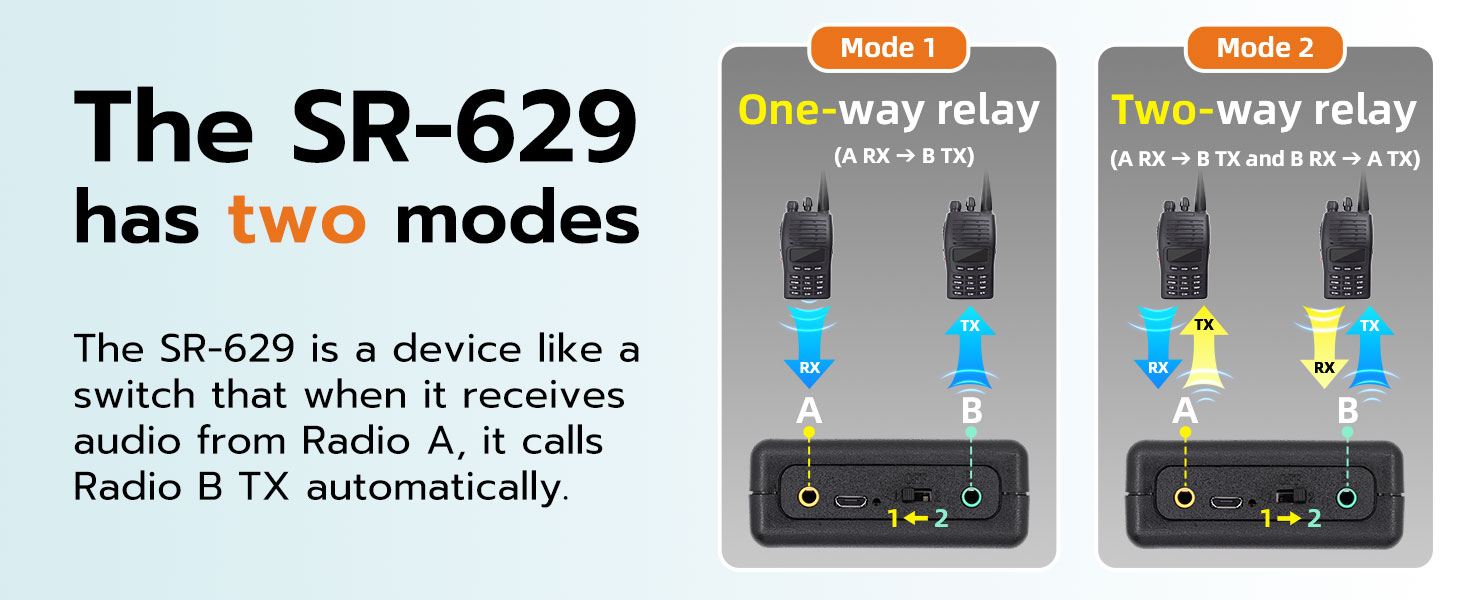
Image: A comparative diagram explaining the two operational modes of the SR-629: Mode 1 for one-way relay (A RX to B TX) and Mode 2 for two-way relay (A RX to B TX and B RX to A TX).
LED Indicators:
- Green LED: Indicates receiving (RX) activity on the corresponding radio.
- Red LED: Indicates transmitting (TX) activity on the corresponding radio.
Volume Adjustment:
The repeater controller uses voice triggering (VOX) to activate the other party's radio. Proper volume adjustment on the connected radios is crucial for reliable operation. If the volume is too low, the delay may be too short, or the VOX sensitivity is not appropriate, it may result in false triggering (transmitting as soon as receiving) or non-triggering (no response at all). Adjust the volume on your handheld radios until the repeater functions smoothly.
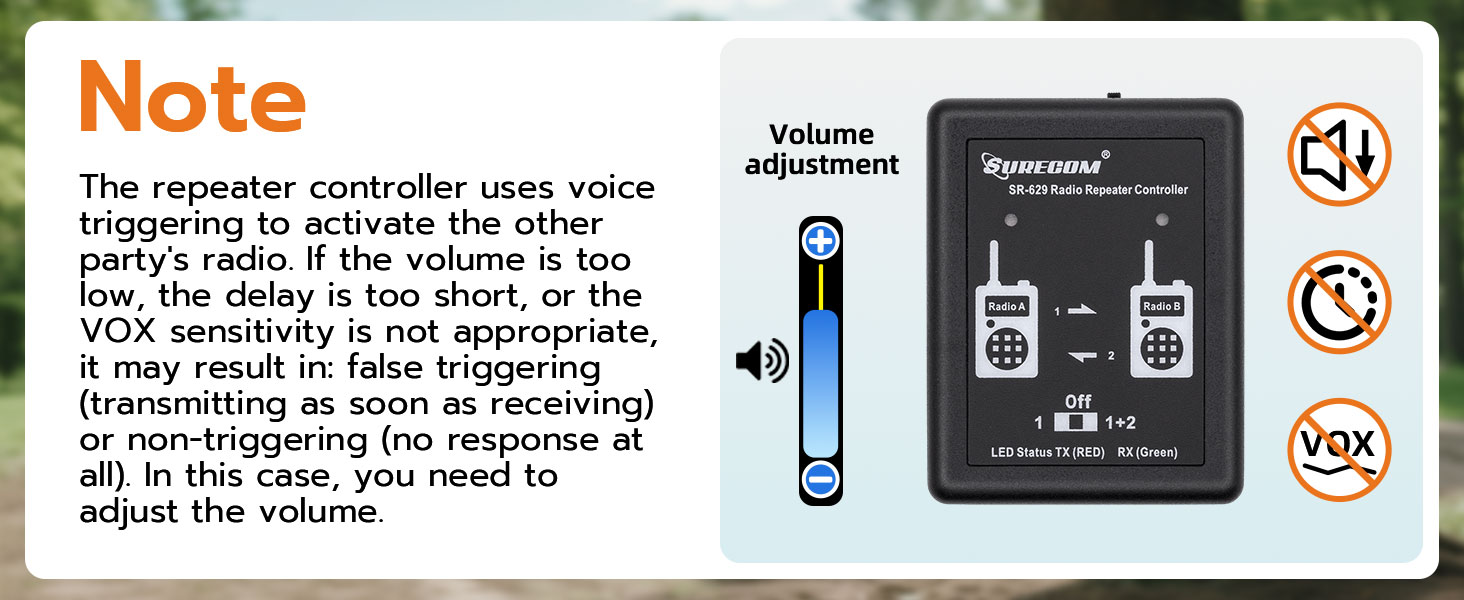
Image: A visual note emphasizing the need for correct volume adjustment on connected radios to ensure proper voice triggering and prevent false or missed transmissions by the SR-629.
DTMF Remote Control Password:
The SR-629 allows users to change the DTMF remote control password directly via a connected radio. Refer to the specific instructions for your handheld radio model on how to input DTMF tones.
7. Maintenance
- Keep the device clean and free from dust. Use a soft, dry cloth for cleaning.
- Store the device in a cool, dry place when not in use.
- Avoid dropping or subjecting the device to strong impacts.
- Regularly check the connection cables for any signs of wear or damage.
8. Troubleshooting
- No Repeater Functionality:
- Ensure the SR-629 is powered on and the mode switch is set to '1' or '2'.
- Check that both K1 cables are fully inserted into the SR-629 and the radios.
- Verify that the radios are powered on and set to appropriate frequencies.
- Adjust the volume on the handheld radios. Insufficient volume can prevent VOX triggering.
- False Triggering or Constant Transmission:
- The volume on the receiving radio might be too high, causing the SR-629 to constantly detect audio. Reduce the volume.
- Ensure the radios are not too close to each other, which can cause feedback or interference.
- Poor Audio Quality or Static:
- Check cable connections for looseness or damage.
- Ensure radios are properly tuned and have good signal strength.
- Increase the physical separation between the two radios and their antennas to reduce desensitization.
- Short Battery Life:
- Ensure the device is fully charged before use.
- If operating for extended periods, consider using the external 5V DC power supply.
9. Specifications
| Feature | Specification |
|---|---|
| Model Number | SR-629 |
| Product Dimensions | 7.48 x 4.72 x 1.97 inches (19 x 12 x 5 cm) |
| Item Weight | 3.17 ounces (90 grams) |
| Power Supply | Built-in Li-ion battery, External DC 5V |
| Battery Life | Up to 72 hours (typical) |
| Number of Channels | 1 (for repeater control) |
| Special Features | Two mode select, Multi-LED display, DTMF remote control password change |
| Included Cables | 2 x K1 plug Cable, 1 x USB charger cable |
10. Warranty and Support
Surecom products are manufactured to high-quality standards. For warranty information and technical support, please refer to the documentation provided with your purchase or visit the official Surecom website. Keep your proof of purchase for warranty claims.
