
1. Introduction
This manual provides essential instructions for the safe and effective use of your AccuMed AP211 Rechargeable TENS Unit Muscle Stimulator. Please read this manual thoroughly before operating the device and retain it for future reference.
2. Important Safety Information
Before using the AccuMed AP211, consult with a healthcare professional. Do not use this device if you have a pacemaker, implanted defibrillator, or other metallic or electronic implanted devices. Do not use on open wounds, swollen, infected, or inflamed areas. Keep out of reach of children. This device is not intended for diagnosis, treatment, or prevention of any disease.
3. Product Overview
The AccuMed AP211 is a portable electronic TENS (Transcutaneous Electrical Nerve Stimulation) and EMS (Electrical Muscle Stimulation) device designed for temporary relief of pain associated with sore and aching muscles due to strain from exercise or normal household and work activities. It features dual channels, 8 therapy modes, and 20 intensity levels.

Figure 3.1: The AccuMed AP211 TENS Unit, showing the main device, electrode pads, and connection wires.

Figure 3.2: The device display illustrating different therapy modes and common application areas for pain relief, including back, shoulder, arm, leg, neck, foot, and abdomen.
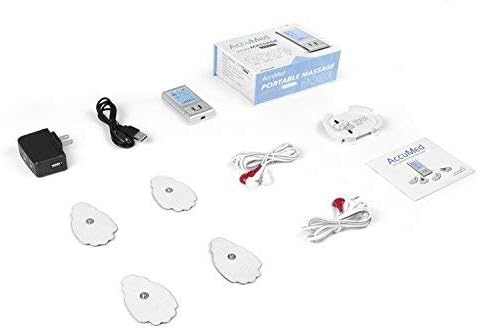
Figure 3.3: The complete package contents, including the AccuMed AP211 device, AC adapter, USB cable, two electrode lines, and twelve TENS pads.
4. Setup
- Charge the Device: Connect the provided USB cable to the AccuMed AP211 and then to the AC adapter. Plug the AC adapter into a wall outlet. The device is rechargeable and typically charges in a few hours.
- Connect Electrode Lines: Plug the electrode pads into the electrode lines. Ensure a secure connection.
- Connect to Device: Plug the electrode lines into the designated ports on the AccuMed AP211 unit.
- Apply Pads: Place the electrode pads firmly on the clean, dry skin of the treatment area. Ensure the pads are not placed over broken skin or sensitive areas.
5. Operating Instructions
- Power On: Press and hold the power button (usually the central button) to turn on the unit. The backlit LCD will display current settings.
- Select Mode: Use the 'M' button to cycle through the 8 available therapy modes. These modes include various pulse patterns such as acupuncture, beat, combo, sole, and ear.
- Adjust Intensity: Use the '+' and '-' buttons to increase or decrease the intensity level for each channel (A and B). Start with the lowest intensity and gradually increase until a comfortable, yet effective, sensation is felt. The device offers 20 levels of intensity.
- Set Timer: Use the 'T' button to adjust the treatment duration. The timer can be set from 10 to 60 minutes.
- Start/Pause Treatment: Press the central button to start or pause the treatment.
- Power Off: Press and hold the power button to turn off the unit after your session.
6. Maintenance
- Cleaning Pads: After each use, gently clean the electrode pads with a damp cloth or as directed by the pad manufacturer to maintain their adhesive quality and longevity.
- Cleaning Jacks: Keep the cord jacks clean to prevent potential power spikes. If power spikes occur when cords are moved, cleaning the jacks may resolve the issue.
- Storage: Store the device and pads in a cool, dry place, away from direct sunlight and extreme temperatures. Ensure pads are re-covered with their protective film after use.
- Battery Care: Recharge the device regularly to maintain battery health. Avoid fully depleting the battery frequently.
7. Troubleshooting
- No Sensation: Ensure pads are firmly attached to the skin and connected correctly. Increase intensity gradually. Check if the battery is charged.
- Weak Sensation: Replace old or worn-out electrode pads. Ensure good skin contact. Increase intensity.
- Device Not Turning On: Ensure the device is fully charged. If charging, check the AC adapter and USB cable connections.
- Irregular Pulses/Power Spikes: This may occur if cord jacks are not clean or if connections are loose. Ensure all connections are secure and clean the cord jacks.
- Pads Not Sticking: Clean the pads as per maintenance instructions. If adhesive is lost, replace the pads.
8. Specifications
| Feature | Specification |
|---|---|
| Display | Backlit LCD |
| Frequency | 110Hz |
| Output Voltage | 42V@500ohms |
| Current | 84mA@500ohms |
| Dimensions | 3.5 x 1.5 x 0.4 inches |
| Net Weight | 0.08 lb |
| Therapy Modes | 8 |
| Intensity Levels | 20 |
| Adjustable Timer | 10 to 60 minutes |
9. Warranty and Support
The AccuMed AP211 comes with a 1 Year US Warranty from Amcrest Direct. For warranty claims, technical support, or customer service inquiries, please refer to the contact information provided with your purchase documentation or visit the official AccuMed website.