1. Important Safeguards
Please read all instructions carefully before using your Zojirushi CD-WCC30 Micom Water Boiler and Warmer. Retain this manual for future reference. Failure to follow these instructions may result in product damage, personal injury, or property damage.
- Do not immerse the appliance, cord, or plug in water or other liquids.
- Ensure the power cord is securely connected and not damaged.
- Keep out of reach of children.
- Do not operate if the appliance malfunctions or is damaged. Contact customer support.
- Use only with potable water.
- Do not fill above the maximum water level indicator.
- Always unplug the appliance before cleaning or when not in use.
- Avoid touching hot surfaces. Use handles or knobs.
2. Product Overview
The Zojirushi CD-WCC30 is a Micom (micro-computerized) water boiler and warmer designed to provide hot water at various temperatures. It features a 3.2-quart capacity, multiple keep-warm settings, and an energy-saving timer.

Figure 2.1: Overall view of the Zojirushi CD-WCC30 Micom Water Boiler and Warmer. This image shows the sleek silver-dark brown design, the control panel on top, and the water level gauge on the front.
Key Components:
- Control Panel: Located on the top, featuring buttons for temperature settings, dispense, timer, and reboil/quick temp.
- Water Level Gauge: A wide window on the front indicates the current water level.
- Dispensing Spout: For safely dispensing hot water.
- Carrying Handle: For easy transport of the unit.
- Non-stick Interior: Facilitates easy cleaning and prevents mineral buildup.
- Swivel Base: Allows for convenient rotation of the unit.
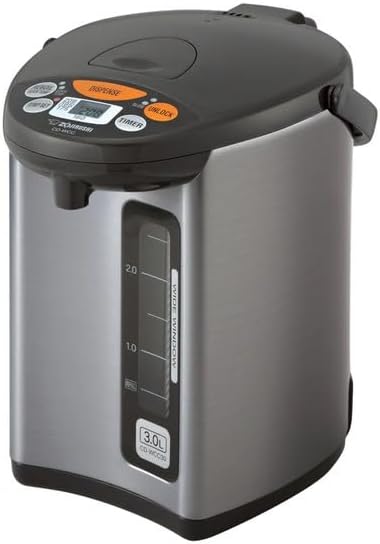
Figure 2.2: Detailed view of the control panel, showing buttons for "Dispense," "Unlock," "Temp Set," "Reboil/Quick Temp," and "Timer," along with the digital display.

Figure 2.3: Product dimensions: 11.25 inches (L) x 8.25 inches (W) x 11.5 inches (H).
3. Setup
3.1 Unpacking
- Carefully remove the water boiler from its packaging.
- Remove all packing materials, including any protective films or stickers.
- Inspect the unit for any signs of damage. If damaged, do not use and contact customer support.
3.2 Initial Cleaning
- Wash the inner pot, lid, and any removable parts with warm water and a mild dish soap. Rinse thoroughly.
- Wipe the exterior of the unit with a damp cloth. Do not immerse the main unit in water.
- Ensure all parts are completely dry before assembly and use.
3.3 Placement
- Place the water boiler on a stable, flat, heat-resistant surface.
- Ensure there is adequate ventilation around the unit.
- Keep away from walls, cabinets, and other appliances to prevent steam damage.
- Plug the power cord into a grounded electrical outlet.
4. Operating Instructions
4.1 Filling the Water Tank
- Open the lid.
- Fill the inner pot with potable water up to the "MAX" fill line indicated on the water level gauge. Do not overfill.
- Close the lid securely.
4.2 Boiling Water
- Standard Boil: After filling, the unit will automatically begin boiling the water to 208°F (98°C). The "Boil" indicator light will illuminate. A sound indicator will alert when boiling is complete.
- Quick Temp Mode: This mode heats water directly to the selected keep-warm temperature without reaching a full boil, reducing steam and energy use. This is suitable for bottled or purified water where dechlorination is not necessary.
- Press the REBOIL/QUICK TEMP button. The "Boil" light will blink.
- The unit will heat the water to the selected keep-warm temperature.
4.3 Keep Warm Settings
The unit offers four keep-warm temperature settings:
- 160°F (71°C)
- 175°F (79°C)
- 195°F (90°C)
- 208°F (98°C)
To select a temperature, press the TEMP SET button repeatedly until the desired temperature is displayed.
4.4 Dispensing Water

Figure 4.1: A hand pressing the "Dispense" button to release hot water from the spout into a mug.
- Press the UNLOCK button to enable dispensing. The "Unlock" indicator will light up.
- Place a cup or container under the dispensing spout.
- Press and hold the DISPENSE button to release hot water. Release the button to stop.
- The unit will automatically lock after a period of inactivity for safety.
4.5 Energy Saving Timer Function
The timer function allows you to set the unit to turn off for a specified duration (6-10 hours) and then automatically resume boiling at the end of the timer period, saving energy during periods of non-use.
- Press the TIMER button. The timer indicator will light up.
- Press the TIMER button repeatedly to cycle through the available timer settings (e.g., 6 hours, 7 hours, ..., 10 hours).
- The unit will stop heating and resume boiling after the set time has elapsed.
5. Maintenance and Cleaning
Regular cleaning ensures optimal performance and extends the lifespan of your water boiler.
5.1 Exterior Cleaning
- Unplug the unit and allow it to cool completely.
- Wipe the exterior with a soft, damp cloth. Do not use abrasive cleaners or solvents.
- Ensure no water enters the electrical components.
5.2 Interior Cleaning (Inner Pot and Lid)
Figure 5.1: View of the water boiler with the lid open, revealing the non-stick coated interior for easy cleaning.
- Unplug the unit and allow it to cool. Empty any remaining water.
- The non-stick interior can be cleaned with a soft sponge and mild dish soap. Avoid using metal scrubbers or harsh detergents.
- Remove the lid and wash it separately. Ensure all parts are rinsed thoroughly.
- Dry all components completely before reassembling.
5.3 Descaling (Mineral Buildup Removal)
Mineral deposits can accumulate over time, especially with hard water. Descaling is recommended every few months or as needed.
- Fill the inner pot with water up to the MAX line.
- Add a descaling agent (e.g., citric acid cleaner specifically designed for water boilers, or a solution of white vinegar and water). Follow the descaling agent's instructions for quantity.
- Close the lid and plug in the unit.
- Initiate a boil cycle. Allow the solution to sit for the recommended time (refer to descaling agent instructions).
- After descaling, empty the unit and rinse the interior thoroughly several times with fresh water to remove any residue.
- Perform a fresh water boil cycle and discard the water before using the unit for beverages.
6. Troubleshooting
If you encounter issues with your water boiler, refer to the following common problems and solutions:
| Problem | Possible Cause | Solution |
|---|---|---|
| Unit does not turn on. | Power cord not connected; no power at outlet. | Ensure power cord is securely plugged into a working outlet. Check circuit breaker. |
| Water is not heating. | Unit is in timer mode; insufficient water. | Check if the timer is active. Ensure water level is above the minimum. |
| Water dispensing is slow or blocked. | Dispense button not pressed; spout clogged; unit locked. | Press UNLOCK then DISPENSE. Clean the dispensing spout. |
| Unpleasant odor or taste in water. | New unit odor; mineral buildup. | Perform initial cleaning. Descale the unit as described in Section 5.3. |
| "Low Water" alert sounds. | Water level is too low. | Refill the water tank to the MAX line. |
If the problem persists after attempting these solutions, please contact Zojirushi customer support.
7. Specifications
| Feature | Detail |
|---|---|
| Brand | Zojirushi |
| Model Name | Micom Water Boiler & Warmer |
| Model Number | CD-WCC30 |
| Capacity | 3.2 Quarts (approx. 101 oz / 3.0 Liters) |
| Dimensions (L x W x H) | 11.25" x 8.25" x 11.5" |
| Item Weight | 5 Pounds |
| Keep Warm Settings | 160°F, 175°F, 195°F, 208°F |
| Special Features | Micro computerized temperature control, One-touch electric dispensing, Energy-saving timer (6-10 hours), Quick Temp Mode, Wide-window water level gauge, Non-stick interior, Locking Spout, Rapid Boil |
| Included Components | Water boiler unit, Power cord |
| Product Care Instructions | Hand Wash (for interior components) |
8. Warranty and Support
Zojirushi products are manufactured with high standards of quality and durability. This product is covered by a manufacturer's warranty against defects in materials and workmanship.
- For specific warranty terms and conditions, please refer to the warranty card included with your product or visit the official Zojirushi website.
- For technical support, service, or to order replacement parts, please contact Zojirushi customer service. Contact information can typically be found on the manufacturer's website or in the product packaging.
- An official user manual in PDF format is available for download: Zojirushi CD-WCC30 User Manual (PDF).


