Introduction
Thank you for choosing the LIFESMART GLOBAL LifePro 3 Element Portable Electric Infrared Fireplace Heater. This manual provides essential information for the safe and efficient operation, maintenance, and troubleshooting of your new heater. Please read all instructions carefully before use and retain this manual for future reference.
This electric infrared fireplace heater is designed to provide supplemental heat for large rooms, featuring a realistic flame effect and a golden oak wood cabinet. It utilizes three infrared tube elements to deliver 5100 BTUs of heat, covering approximately 400 square feet, without significantly affecting room humidity.

Image: Front view of the LifePro 3 Element Portable Electric Infrared Fireplace Heater.
Important Safety Information
Always follow basic safety precautions when using electrical appliances to reduce the risk of fire, electric shock, and injury to persons.
- Read all instructions before using this heater.
- This heater is hot when in use. To avoid burns, do not let bare skin touch hot surfaces.
- Keep combustible materials, such as furniture, pillows, bedding, papers, clothes, and curtains at least 3 feet (0.9 m) from the front of the heater and keep them away from the sides and rear.
- Extreme caution is necessary when any heater is used by or near children or invalids and whenever the heater is left operating and unattended.
- Do not operate any heater with a damaged cord or plug or after the heater malfunctions, has been dropped, or damaged in any manner.
- Do not use outdoors.
- This heater is not intended for use in bathrooms, laundry areas, and similar indoor locations. Never locate heater where it may fall into a bathtub or other water container.
- Do not run cord under carpeting. Do not cover cord with throw rugs, runners, or similar coverings. Arrange cord away from traffic area and where it will not be tripped over.
- To disconnect heater, turn controls to off, then remove plug from outlet.
- Do not insert or allow foreign objects to enter any ventilation or exhaust opening as this may cause an electric shock or fire, or damage the heater.
- To prevent a possible fire, do not block air intakes or exhaust in any manner. Do not use on soft surfaces, like a bed, where openings may become blocked.
- This heater has overheat shut-off protection and tip-over safety features for enhanced safety. The cool-touch exterior makes it safe for children and pets.
- Always plug heaters directly into a wall outlet/receptacle. Never use with an extension cord or relocatable power tap (outlet/power strip).
Package Contents
Upon unpacking, please ensure all items are present and undamaged. If any parts are missing or damaged, do not attempt to assemble or operate the heater. Contact customer service for assistance.
- LifePro 3 Element Portable Electric Infrared Fireplace Heater Unit (x2, as sold in a pair)
- Deluxe Mantel (pre-assembled or requiring minor assembly)
- Caster Wheels (for portability)
- Remote Control
- Instruction Manual
Setup
The LifePro heater is designed for freestanding installation and includes caster wheels for easy portability. Follow these steps for initial setup:
- Unpack: Carefully remove the heater and all components from the packaging. Retain packaging for storage or if return is necessary.
- Positioning: Place the heater on a firm, level surface. Ensure there is at least 3 feet (0.9 m) of clear space around the heater from any combustible materials.
- Caster Wheel Installation: If the caster wheels are not pre-installed, attach them to the bottom of the heater unit according to the diagrams provided in the separate assembly guide (if applicable). Ensure they are securely fastened.
- Power Connection: Plug the heater directly into a grounded 120V AC, 60Hz electrical outlet. Do not use extension cords or power strips.
- Initial Use: For the first use, operate the heater at its highest setting for approximately 10 minutes to eliminate any initial odors from manufacturing. This is normal and will dissipate quickly.
Operating Instructions
Your LifePro heater can be operated using the control panel on the unit or the included remote control.
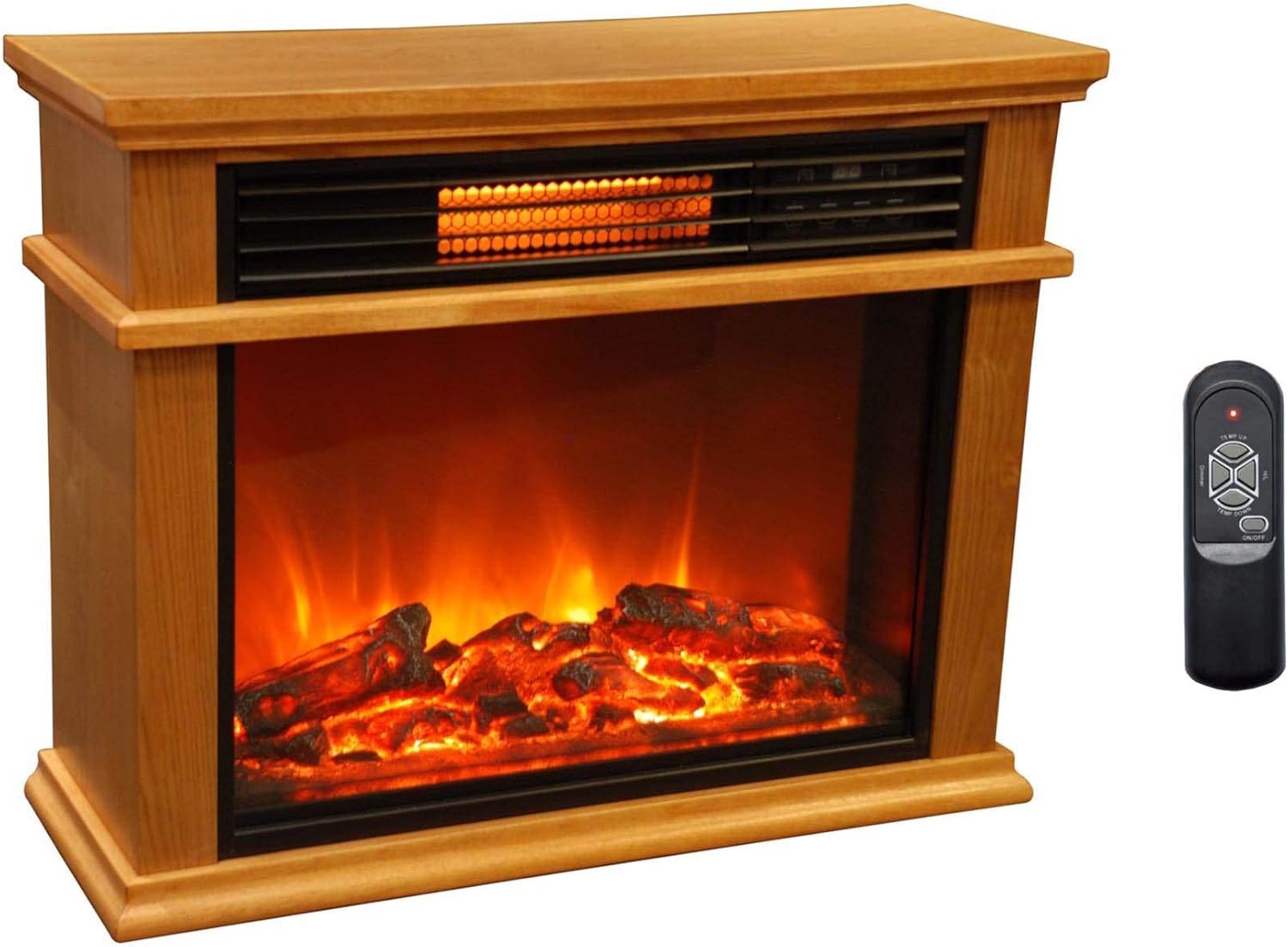
Image: Heater unit with remote control.
Control Panel
The control panel is located on the front of the heater, above the flame effect display. It typically includes buttons for Power, Temperature Up/Down, Mode (Heat/Flame Only), and Timer.
Remote Control
The remote control provides convenient operation from a distance. Ensure batteries are correctly installed.

Image: Close-up of the remote control.
- ON/OFF: Press to turn the heater on or off.
- TEMP UP/DOWN: Adjusts the desired temperature setting. The heater will cycle on and off to maintain the set temperature.
- H/L (High/Low Heat): Selects between high and low heat settings.
- Dimmer: Adjusts the brightness of the realistic flame effect.
- Flame Effect: The heater features a realistic flame effect that can be operated independently of the heating function. Use the Dimmer button to adjust its intensity.
Maintenance
Regular maintenance ensures optimal performance and longevity of your heater. Always unplug the heater before performing any maintenance.
- Cleaning the Exterior: Wipe the exterior surfaces with a soft, damp cloth. Do not use abrasive cleaners or solvents. Ensure the heater is completely dry before plugging it back in.
- Cleaning Air Intakes/Outlets: Periodically vacuum the air intake and outlet grilles to remove dust and debris. Blocked grilles can lead to overheating.
- Storage: If storing the heater for an extended period, unplug it and store it in a cool, dry place, preferably in its original packaging.
- No User-Serviceable Parts: The internal components of the heater are not user-serviceable. Do not attempt to open or repair the unit yourself. Refer all servicing to qualified service personnel.
Troubleshooting
If your heater is not operating correctly, consult the following common issues and solutions:
- Heater does not turn on:
- Ensure the power cord is securely plugged into a grounded outlet.
- Check if the wall outlet is functioning by plugging in another appliance.
- Verify the ON/OFF switch on the heater or remote is activated.
- Check your home's circuit breaker or fuse box.
- Heater stops operating unexpectedly:
- The heater may have overheated. Unplug the heater, wait 10-15 minutes for it to cool down, then plug it back in. Ensure air intakes and outlets are not blocked.
- The tip-over safety switch may have been activated. Ensure the heater is on a stable, level surface.
- No heat, but flame effect works:
- Ensure the heat setting (H/L) is activated and the temperature is set higher than the ambient room temperature.
- Heater is noisy:
- A slight fan noise is normal during operation. If the noise is excessive or unusual, unplug the unit and contact customer support.
If these solutions do not resolve the issue, contact customer support for further assistance.
Specifications
| Brand | LIFESMART GLOBAL |
| Model Name | LifePro |
| Item Model Number | 842372107020 |
| Power Source | Electric |
| Material | Oak, Wood |
| Finish Type | Wood |
| Installation Type | Freestanding |
| Heat Output | 5100 British Thermal Units (BTUs) |
| Heating Coverage | 400 sq ft |
| Special Feature | Portable |
| Style | Portable |
| Color | Golden |
| Room Type | Living Room |
| Ventilation Type | Vent Free |
| Included Components | Mantel, Caster Wheels |
| Specific Uses For Product | Indoor |
| Item Weight | 120 Pounds (for the pair) |
| Shape | Rectangular |
| Burner Type | Quartz |
| Product Dimensions | 30.5 x 26 x 13.5 inches |
| Heating Method | Radiant & Infrared |
Warranty and Support
Warranty Information
This LIFESMART GLOBAL LifePro heater comes with a Limited Warranty. Please refer to the warranty card included with your product for specific terms, conditions, and duration of coverage. Keep your purchase receipt as proof of purchase for warranty claims.
Customer Support
For technical assistance, troubleshooting beyond this manual, or warranty inquiries, please contact LIFESMART GLOBAL customer support. Contact information can typically be found on the product packaging, the official brand website, or your purchase documentation.
When contacting support, please have your model number (LifePro, 842372107020) and purchase date available.