
1. Introduction and Product Overview
The DOCTOR LIFE SP-1000 Sequential Air Compression Leg Massager is designed to provide sequential air compression therapy for your legs. This system aims to improve muscular pain relief and various circulation functions, contributing to faster recovery and overall well-being. It is an FDA-cleared (Medical OTC Grade) device intended for personal use.

Image 1.1: The DOCTOR LIFE SP-1000 Sequential Air Compression Leg Massager system, including the control unit and two leg sleeves.

Image 1.2: The device is FDA 510(K) OTC Certificated, indicating it is cleared for over-the-counter use.
2. Safety Information
Please read all instructions carefully before using this recovery system for the first time. Failure to follow these instructions may result in injury or damage to the device.
- This device is intended for personal use only and is not a substitute for professional medical care.
- Consult with a healthcare professional before use if you have any pre-existing medical conditions, especially those related to circulation, blood clots, or skin sensitivities.
- Do not use the device on open wounds, swollen or inflamed areas, or skin eruptions.
- Keep the device away from water and extreme temperatures.
- Ensure the power cord is not damaged and is properly connected to a 110V-120V outlet.
- Do not attempt to modify or repair the device yourself. Contact customer support for assistance.
3. What's Included
Your DOCTOR LIFE SP-1000 system package should contain the following components:
- SP-1000 Device (Control Unit)
- Connecting Hose
- Foot Pads (optional, may vary by package)
- Leg Attachments (Leg Sleeves)

Image 3.1: Visual representation of the components included with the DOCTOR LIFE SP-1000 system.
4. Setup Instructions
Follow these steps to set up your DOCTOR LIFE SP-1000 system:
- Unpack Components: Carefully remove all items from the packaging.
- Place the Device: Position the SP-1000 control unit on a stable, flat surface near a power outlet.
- Connect the Hose: Connect one end of the connecting hose to the air outlet port on the SP-1000 device. Ensure a secure fit.
- Attach Leg Sleeves: Connect the other end of the connecting hose to the leg attachments (sleeves). Each sleeve will have a corresponding port.
- Power Connection: Plug the device into a standard 110V-120V electrical outlet.
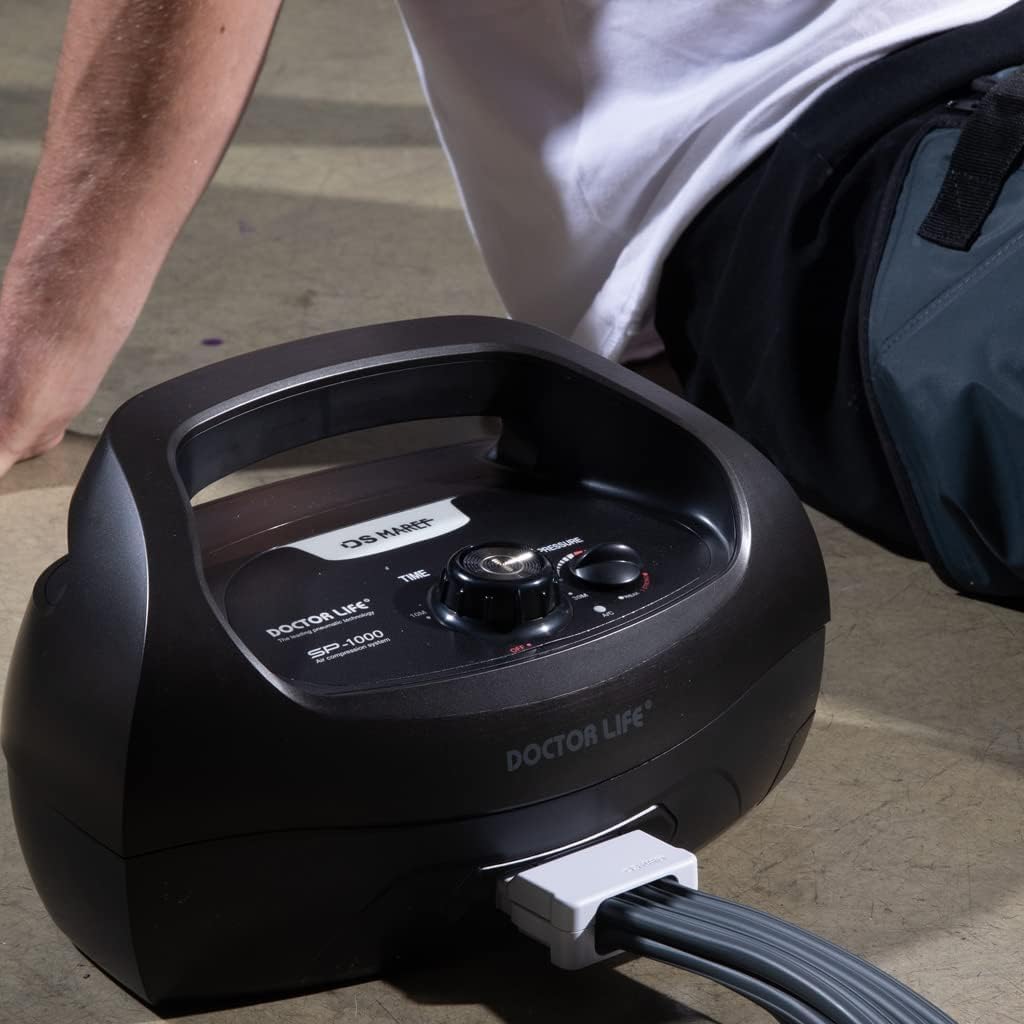
Image 4.1: The SP-1000 control unit with the connecting hose attached to the leg sleeves.
5. Operating Instructions
To use your DOCTOR LIFE SP-1000 system, follow these steps:
- Prepare for Use: Remove any belongings from your pockets, such as watches or jewelry, before wearing the sleeves. For comfort and hygiene, consider wearing thin, comfortable clothing underneath the sleeves.
- Wear the Leg Sleeves: Carefully put on the leg sleeves. Ensure they fit properly. If your sleeves have zippers, make sure to pull the zipper completely to the end and lock it securely.
- Power On: Press and hold the On/Off button (integrated with the Timer knob) on the device to turn it on.
- Set Treatment Time: Rotate the Timer knob to select your desired treatment duration (e.g., 10, 20, or 30 minutes). The device will begin operation after the time is set.
- Adjust Pressure: Rotate the Pressure knob to adjust the compression intensity. The SP-1000 features one pressure knob that controls the overall pressure for the sleeves concurrently. If you are a new user, begin with the lowest pressure setting and gradually increase it to a comfortable level.
- Begin Session: The device will start the sequential compression cycle. Relax and enjoy the session.
- End Session: The device will automatically turn off once the set time has elapsed. You can also manually turn off the device by pressing the On/Off button.

Image 5.1: Visual guide for wearing the leg sleeves and initial device operation.

Image 5.2: The control panel of the SP-1000, highlighting the single pressure knob for concurrent sleeve pressure control.
Leg Sleeve Size Chart
Refer to the following chart to ensure you are using the correct leg sleeve size for optimal comfort and effectiveness.

Image 5.3: Leg Sleeve Size Chart for sizes L, XL, and XXL, including upper thigh circumference, inseam length, and recommended user height.
| Size | Upper Thigh (Inch) | Inseam Length (Inch) | Recommended Height |
|---|---|---|---|
| L | 24.0 | 28.3 | 5' 6.9" and under |
| XL | 29.3 | 30.1 | 5' 7.3" ~ 5' 10.9" |
| XXL | 29.5 | 36.4 | 5' 11.3" and above |
6. Maintenance
Proper maintenance ensures the longevity and optimal performance of your DOCTOR LIFE SP-1000 system.
- Cleaning the Sleeves: Wipe the leg sleeves with a damp cloth and mild soap. Do not immerse them in water or use harsh chemicals. Allow them to air dry completely before storage.
- Cleaning the Control Unit: Wipe the control unit with a dry or slightly damp cloth. Do not use abrasive cleaners or allow liquids to enter the unit.
- Storage: Store the device and sleeves in a cool, dry place, away from direct sunlight and extreme temperatures. Ensure the sleeves are completely dry before folding and storing to prevent mildew.
- Hose Care: Inspect the connecting hose regularly for any kinks, cracks, or damage. Replace if necessary.
7. Troubleshooting
If you encounter any issues with your DOCTOR LIFE SP-1000, refer to the following common troubleshooting tips:
- Device Not Powering On:
- Ensure the power cord is securely plugged into both the device and a working electrical outlet.
- Check if the outlet is functional by plugging in another appliance.
- Confirm the On/Off button is pressed correctly.
- No Compression or Weak Compression:
- Verify that the connecting hose is securely attached to both the control unit and the leg sleeves.
- Check for any leaks in the hose or sleeves.
- Ensure the leg sleeves are properly zipped and sealed.
- Adjust the Pressure knob to a higher setting.
- Unusual Noise:
- A slight humming sound during operation is normal. If you hear loud or unusual noises, turn off the device and contact customer support.
If these steps do not resolve the issue, please contact customer support for further assistance.
8. Specifications
| Feature | Detail |
|---|---|
| Model Number | DL2003V3 |
| Product Dimensions | 13.2 x 8.3 x 6.7 inches |
| Item Weight | 11.46 Pounds (5.2 Kilograms) |
| Material (Device) | Plastic |
| Material (Sleeve) | Nylon |
| Power Source | Corded Electric (110V-120V) |
| Manufacturer | DAESUNG MAREF CO., LTD. |
| FDA Clearance | FDA 510(K) OTC Certificated |
9. Warranty and Support
Warranty Information
DOCTOR LIFE provides a 1-Year Warranty on all sleeves and the device. This warranty is valid only if the product is purchased and operated within the United States.
Please retain your proof of purchase for warranty claims.
Customer Support
For any questions, technical assistance, or warranty claims, please contact DOCTOR LIFE customer support. Refer to the product packaging or the official DOCTOR LIFE website for the most current contact information.