
1. Introduction
The BSIDE AVD03 is a non-contact AC voltage detector designed for electrical professionals and DIY enthusiasts. It provides a safe and convenient way to detect the presence of AC voltage in cables, wires, circuit breakers, lighting fixtures, switches, and outlets without direct contact. This device features a wide voltage detection range from 12V to 1000V, offering both high (Hi) and low (Lo) sensitivity modes for various applications. Its pen-style design makes it portable and easy to use.

Figure 1: Side view of the BSIDE AVD03 Non-Contact Voltage Detector, showing the warning label and battery compartment area.
2. Safety Information
Please read and understand all safety instructions before using this product. Failure to follow these instructions may result in electric shock, fire, or serious injury.
- Always assume live circuits: Do not rely solely on this device to determine if a circuit is de-energized. Always use proper lockout/tagout procedures and verify with a known live source before and after testing.
- Voltage Range: This device is designed to detect AC voltage between 12V and 1000V. Do not attempt to detect voltages outside this range.
- Insulation: Ensure the device's casing is intact and free from damage before each use. Do not use if the insulation is compromised.
- Environmental Conditions: Use the device in dry conditions. Avoid use in rain or wet environments.
- Battery Replacement: Replace batteries promptly when the low battery indicator appears. Do not operate with low batteries as accuracy may be affected.
- Personal Protective Equipment: Always wear appropriate personal protective equipment (PPE), such as insulated gloves and safety glasses, when working with electrical circuits.
- Professional Use: This device is intended for use by qualified personnel or under their direct supervision.
3. Product Overview
Familiarize yourself with the components of your BSIDE AVD03 voltage detector.
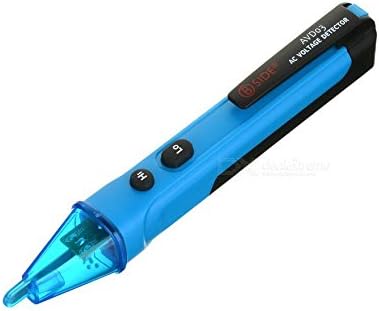
Figure 2: Top view of the BSIDE AVD03, highlighting the "Hi" and "Lo" sensitivity buttons and the tip.
- Detection Tip: The sensing area for detecting AC voltage.
- LED Indicator: Illuminates and/or flashes to indicate voltage presence.
- "Hi" Button: Activates high sensitivity mode (12V-1000V).
- "Lo" Button: Activates low sensitivity mode (48V-1000V).
- Power Button: Turns the device ON/OFF. (Note: Based on images, "Hi" and "Lo" might also function as power/mode buttons. Assuming a combined function or a separate power button not clearly visible. Will clarify in setup.)
- Battery Compartment: Located at the rear, for AAA batteries.
- Pocket Clip: For convenient carrying.
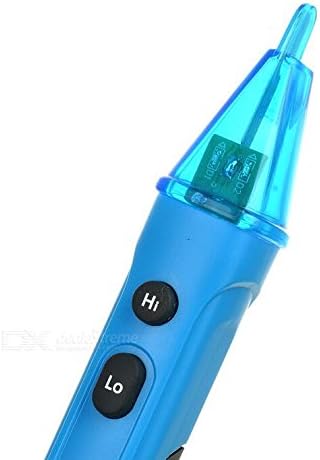
Figure 3: Close-up view of the detection tip and the "Hi" and "Lo" sensitivity selection buttons.
4. Setup
4.1 Battery Installation
The BSIDE AVD03 requires two AAA batteries (not included) for operation.
- Locate the battery compartment cover at the rear of the device.
- Slide the cover downwards or unclip it to open the compartment.
- Insert two AAA batteries, ensuring correct polarity (+ and -) as indicated inside the compartment.
- Close the battery compartment cover securely.
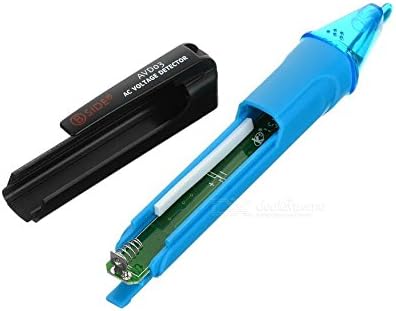
Figure 4: The BSIDE AVD03 with its battery compartment open, showing where to insert AAA batteries.
4.2 Power On/Off
- To turn ON: Press and hold the "Hi" or "Lo" button for approximately 2 seconds. The LED indicator will light up, and a beep may sound, indicating the device is ready.
- To turn OFF: Press and hold the "Hi" or "Lo" button for approximately 2 seconds. The LED indicator will turn off. The device also features an auto-power-off function after a period of inactivity to conserve battery life.
5. Operating Instructions
5.1 Selecting Sensitivity Mode
The AVD03 offers two sensitivity modes:
- High Sensitivity Mode (12V-1000V): Press the "Hi" button. This mode is suitable for detecting lower voltages or for general detection where the exact location of the live wire is not precisely known.
- Low Sensitivity Mode (48V-1000V): Press the "Lo" button. This mode is ideal for detecting standard household voltages and reducing false positives in noisy electrical environments.
Switch between modes by pressing the respective "Hi" or "Lo" button while the device is on.
5.2 Voltage Detection
- Turn on the device and select the desired sensitivity mode.
- Hold the detector by its body, ensuring your hand does not cover the detection tip.
- Bring the detection tip close to the wire, outlet, or component you wish to test.
- If AC voltage is detected, the LED indicator will light up (and may flash), and the device will emit an audible beep. The frequency of beeps and flashes may increase as the detector gets closer to the voltage source.
- Important: Test the detector on a known live circuit before and after use to ensure it is functioning correctly.
Note: The detection distance and sensitivity can be affected by the type of insulation, wire thickness, and environmental factors.
6. Maintenance
- Cleaning: Wipe the device with a dry, clean cloth. Do not use abrasive cleaners or solvents.
- Storage: Store the device in a cool, dry place away from direct sunlight and extreme temperatures.
- Battery Care: Remove batteries if the device will not be used for an extended period to prevent leakage.
- Inspection: Regularly inspect the device for any signs of damage, such as cracks in the casing or a loose detection tip. Do not use a damaged device.
7. Troubleshooting
| Problem | Possible Cause | Solution |
|---|---|---|
| Device does not turn on. | Dead or incorrectly installed batteries. | Check battery polarity. Replace with new AAA batteries. |
| No detection on a known live circuit. | Low batteries; device malfunction; incorrect sensitivity mode. | Replace batteries. Try switching to "Hi" sensitivity mode. If problem persists, the device may be faulty. |
| False positives (detects voltage everywhere). | High sensitivity in a noisy electrical environment; interference. | Switch to "Lo" sensitivity mode. Move away from strong electromagnetic fields. |
| Weak or inconsistent detection. | Low batteries; distance from voltage source; thick insulation. | Replace batteries. Ensure the tip is close to the conductor. Consider the limitations of non-contact detection. |
8. Specifications
| Feature | Detail |
|---|---|
| Model | AVD03 |
| Voltage Detection Range | 12V ~ 1000V AC (High Sensitivity) 48V ~ 1000V AC (Low Sensitivity) |
| Frequency Range | 50/60 Hz |
| Alarm Mode | Sound and Light |
| Power Source | 2 x 1.5V AAA Batteries |
| Auto Power Off | Yes (after inactivity) |
| Operating Temperature | 0°C to 40°C (32°F to 104°F) |
| Storage Temperature | -10°C to 50°C (14°F to 122°F) |
| Humidity | < 80% RH (non-condensing) |
| Dimensions | (Approximate, based on typical pen-style detectors) 150mm x 20mm x 20mm |
| Weight | (Approximate, without batteries) 45g |
9. Warranty and Support
For warranty information and technical support, please refer to the documentation provided with your purchase or contact the retailer/manufacturer directly. Keep your purchase receipt as proof of purchase.
Manufacturer: China


