
Pyle PPHP1049KT
Pyle Wireless Portable PA System User Manual
Model: PPHP1049KT
Introduction
This manual provides essential information for the setup, operation, and maintenance of your Pyle Wireless Portable PA System. Please read it thoroughly before using the product to ensure proper function and longevity.
The Pyle PPHP1049KT is a dual 10-inch high-powered loudspeaker PA system designed for versatile audio projection. It includes one active speaker, one passive speaker, two speaker stands, a wired microphone, and a remote control. Key features include Bluetooth wireless streaming, USB flash drive and SD memory card readers, and multiple input options for various audio sources.
What's in the Box

Image: Overview of the Pyle PPHP1049KT PA system, showing the active and passive speakers mounted on their stands, along with the included wired microphone and remote control. This image illustrates the complete package contents.
- (1) 10'' Active PA Speaker
- (1) 10'' Passive PA Speaker
- (2) Speaker Stands
- Wired Microphone
- Remote Control
- Power Cable

Image: A visual representation of the items included in the Pyle PPHP1049KT package, highlighting the active and passive speakers, speaker stands, remote control, wired microphone, and power cable with clear labels.
Setup
Speaker Stand Assembly
The included speaker stands are designed for optimal sound performance and stability. Each stand features reinforced steel support construction and a safety lock-in pin.
- Unfold the tripod feet base of the speaker stand.
- Extend the main pole to the desired height (adjustable from 59.1'' to 82.7'').
- Secure the height adjustment with the safety lock-in pin.
- Carefully mount the PA speaker onto the 35mm speaker stand mount. Ensure the speaker is firmly seated.
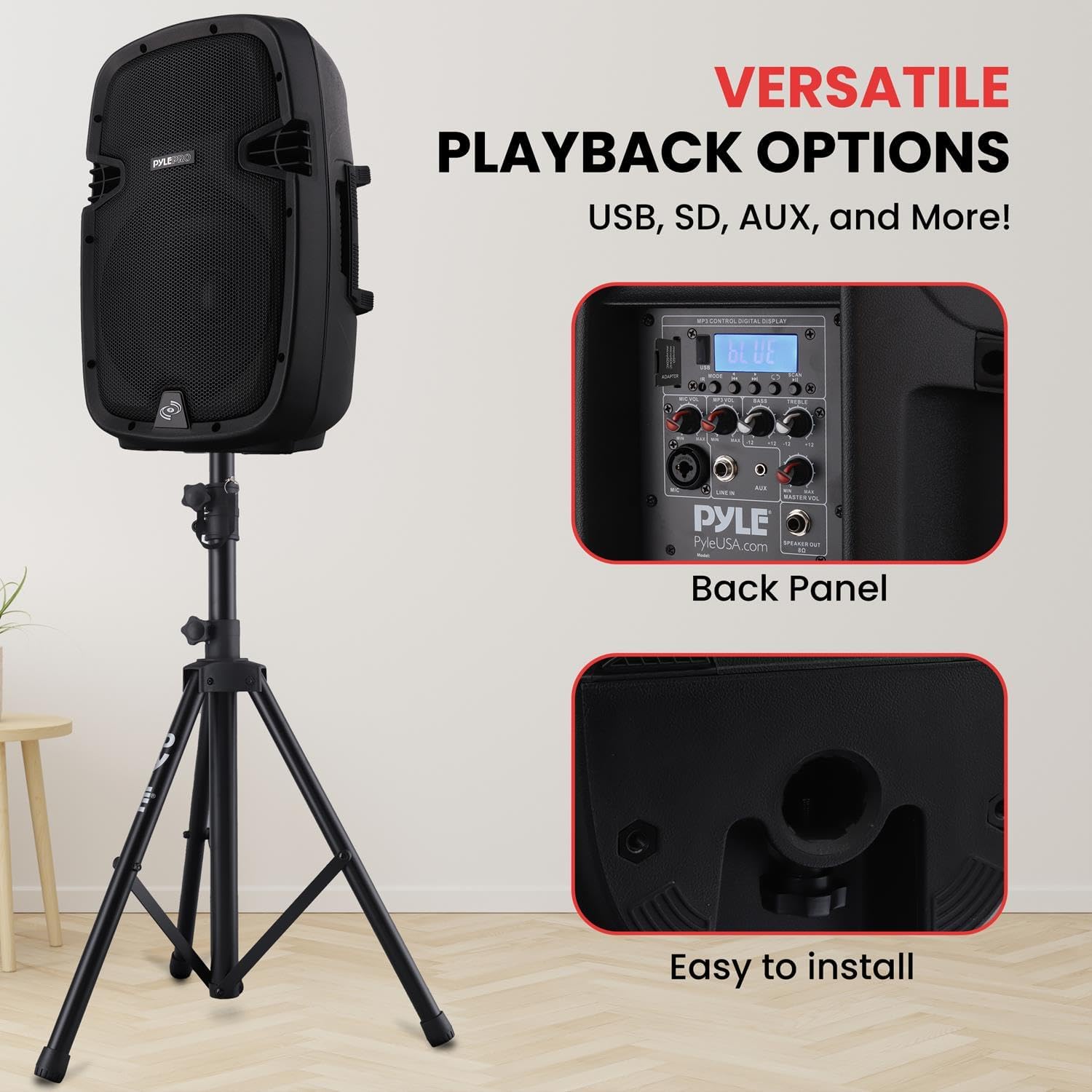
Image: A detailed view of the bottom of the Pyle PA speaker, illustrating the circular opening designed for mounting onto a standard 35mm speaker stand. This shows the ease of installation.
Connecting the Speakers
The system includes one active speaker and one passive speaker. The active speaker contains the amplifier and control panel, while the passive speaker connects to the active unit.
- Place the active speaker and passive speaker on their respective stands in the desired location.
- Connect the passive speaker to the active speaker using a 1/4'' SpeakOn (8 Ohm) speaker cable. The output jack is located on the rear panel of the active speaker.
- Connect the power cable to the active speaker and then to a suitable power outlet (120/240V).

Image: The back panel of the Pyle PA speaker, clearly displaying the various input and output ports such as USB, SD card slot, AUX input, and the 1/4-inch SpeakOn output for connecting the passive speaker. This panel also features the digital LCD display and control knobs.
Operating Instructions
Powering On and Basic Controls
Once connected, turn on the power switch located on the rear panel of the active speaker. The digital LCD display will illuminate.
- Master Volume: Adjusts the overall output volume of the system.
- Mic Volume: Controls the volume of the connected microphone.
- Treble/Bass: Adjusts the high and low frequencies for sound equalization.
- Mode Button: Cycles through input modes (Bluetooth, USB, SD, AUX, FM Radio).

Image: A detailed view of the Pyle PA speaker's control panel, highlighting the digital LCD display and the various adjustable rotary knobs for microphone volume, bass, and treble. This interface allows for precise sound customization.
Bluetooth Wireless Streaming
The system supports Bluetooth 4.0 for wireless audio streaming from compatible devices.
- Press the "Mode" button on the active speaker's control panel until "Bluetooth" is selected on the LCD display.
- On your Bluetooth-enabled device (e.g., smartphone, tablet), search for Bluetooth devices.
- Select "Pyle" from the list of available devices to pair.
- Once paired, you can stream audio wirelessly to the PA system. The Bluetooth wireless range is 100+ feet.

Image: The Pyle PA speaker with graphical icons representing its versatile connectivity options: Bluetooth for wireless streaming, Karaoke for microphone input, MP3 input, and USB input. This highlights the system's "Wireless Freedom" and multiple playback choices.
USB Flash Drive & SD Memory Card Readers
The system can play digital audio files (MP3, WMA) directly from USB flash drives and SD memory cards (up to 32GB).
- Insert your USB flash drive or SD memory card into the corresponding slot on the rear panel.
- The system will automatically switch to USB/SD mode or you can select it using the "Mode" button.
- Use the control buttons on the rear panel or the remote control to navigate tracks and adjust playback.
Microphone and AUX Input
- XLR Microphone Input: Connect the wired microphone (or another compatible microphone) to the XLR input on the rear panel. Adjust the "Mic Volume" knob for desired microphone level.
- Aux (3.5mm) Input Jack: Connect external audio devices (e.g., smartphones, laptops) using a 3.5mm audio cable to the Aux input.
Maintenance
- Cleaning: Use a soft, dry cloth to clean the exterior of the speakers and stands. Avoid using abrasive cleaners or solvents.
- Storage: When not in use, store the PA system in a cool, dry place. Disassemble the speaker stands and store all components securely to prevent damage.
- Cable Management: Ensure all cables are properly coiled and stored to prevent tangling and damage.
- Ventilation: Ensure adequate ventilation around the active speaker to prevent overheating. Do not block any ventilation openings.
Troubleshooting
| Problem | Possible Cause | Solution |
|---|---|---|
| No power | Power cable not connected; Power outlet faulty; Power switch off. | Check power cable connection; Try a different outlet; Ensure power switch is ON. |
| No sound output | Volume too low; Incorrect input mode selected; Cables not connected properly. | Increase Master Volume; Select correct input mode (Bluetooth, USB, SD, AUX); Check all audio cable connections. |
| Bluetooth pairing failure | Device too far; Bluetooth not enabled on device; Incorrect pairing procedure. | Ensure device is within 100ft range; Enable Bluetooth on your device; Re-attempt pairing by selecting "Pyle". |
| Microphone not working | Mic volume too low; Microphone not connected; Faulty microphone. | Increase Mic Volume; Ensure microphone is securely connected to XLR input; Test with another microphone if available. |
Specifications
- MAX Power Output: 1000 Watt
- Amplifier: Class D
- Impedance: 8 Ohm
- Sensitivity: 92dB (+/-2dB)
- Frequency Response: 65-18kHz
- Digital Audio File Compatibility: MP3, WMA
- Maximum SD/USB Flash Memory Support: 32GB
- Power Supply: 120/240V
- Single Speaker Weight: 18.08 lbs.
- Speaker Height Adjustable (Stands): 59.1'' to 82.7'' MAX.
- Speaker Stand Load Capacity: 100 lbs. (50 kgs.) - Each
- Bluetooth Version: 4.0
- Bluetooth Wireless Range: 100'+ Feet
- Product Dimensions (L x W x H): 30 x 24.5 x 47 inches (assembled with stands, approximate)
- Material: Acrylonitrile Butadiene Styrene (ABS)
Warranty and Support
For warranty information and technical support, please refer to the official Pyle website or contact their customer service directly. Keep your purchase receipt for warranty claims.
User Manual (PDF): Download PDF
User Guide (PDF): Download PDF
Pyle Store: Visit Pyle Store on Amazon
Product Videos
Below are relevant product videos from the seller, demonstrating features or usage.
No official seller videos are available for this product at this time.
Related documentsPPHP1049KT


Ask a question about this manual
Ask about setup, troubleshooting, compatibility, parts, safety, or missing instructions. Manuals+ will review the question and use this page’s manual context to help answer it.