
Introduction
Thank you for purchasing the Pyle PT272AUBT Hybrid Amplifier Receiver. This unit is designed to provide high-quality audio amplification for your home theater system, featuring Bluetooth streaming, USB/SD card playback, AM/FM radio, and microphone inputs for versatile audio experiences. This manual will guide you through the setup, operation, and maintenance of your new amplifier to ensure optimal performance and longevity.

Figure 1: Pyle PT272AUBT Hybrid Amplifier Receiver with its included remote control. This image provides an overview of the product's front panel and the remote for general reference.
Important Safety Instructions
To reduce the risk of electric shock, fire, or damage to the unit, please observe the following safety precautions:
- Ventilation: Ensure adequate ventilation. Do not block any ventilation openings. Install in accordance with the manufacturer's instructions.
- Heat: Do not install near any heat sources such as radiators, heat registers, stoves, or other apparatus (including amplifiers) that produce heat.
- Power Source: Only use the power supply specified by the manufacturer. Ensure the voltage selector switch on the rear panel matches your local power supply (110V/220V).
- Water and Moisture: Do not expose this apparatus to rain or moisture. Do not place objects filled with liquids, such as vases, on the apparatus.
- Cleaning: Unplug this apparatus from the wall outlet before cleaning. Clean only with a dry cloth.
- Servicing: Do not attempt to service this product yourself. Refer all servicing to qualified service personnel. Servicing is required when the apparatus has been damaged in any way, such as power-supply cord or plug is damaged, liquid has been spilled or objects have fallen into the apparatus, the apparatus has been exposed to rain or moisture, does not operate normally, or has been dropped.
Controls and Connections Overview
Familiarize yourself with the front and rear panels of your amplifier to understand its various controls and connection points.

Figure 2: Detailed view of the Pyle PT272AUBT's front and rear panels, highlighting all controls, inputs, and outputs. This diagram is essential for proper setup and operation.
Front Panel Controls:
- Power Switch: Turns the unit on or off.
- SD/MMC Card Reader: For playing digital audio files from SD/MMC cards.
- USB Port: For playing digital audio files from USB flash drives.
- MIC 1/MIC 2 Inputs: 1/4'' jacks for connecting microphones.
- MIC VOL/BASS/TREBLE/ECHO: Controls for microphone audio adjustments.
- Digital LCD Display: Shows current input, track information, and radio frequency.
- Input Selector: Switches between various audio sources (USB, SD, Bluetooth, AM/FM, AUX, CD).
- PREV/NEXT/PLAY/PAUSE: Controls for media playback.
- TUNING +/- / AUTO SCAN: For AM/FM radio tuning.
- MUTE: Mutes audio output.
- A/B Speaker Selector: Selects speaker output (A, B, or A+B).
- BASS/TREBLE/SUB VOL: Controls for main audio tone adjustments.
- VOLUME Control: Adjusts the overall master volume.
Rear Panel Connections:
- AUDIO INPUT JACKS (RCA L/R): For connecting external audio devices like CD players, DVD players, or other line-level sources.
- TUNER ANT (AM/FM): Connections for AM and FM antennas.
- SPEAKER OUTPUT TERMINALS (A/B): Banana binding post jacks for connecting speakers.
- COOLING FAN: Ensures proper heat dissipation.
- VOLTAGE SELECTOR: Switch to select between 110V and 220V power supply.
- POWER CORD: Connects the unit to an AC power outlet.
Setup Guide
Follow these steps to set up your Pyle PT272AUBT amplifier:
- Unpacking and Placement: Carefully remove the amplifier from its packaging. Place the unit on a flat, stable surface with adequate ventilation around it. Ensure the cooling fan on the rear panel is not obstructed.
- Voltage Selection: Before connecting the power cord, verify that the VOLTAGE SELECTOR switch on the rear panel is set to match your local power supply (110V or 220V). Incorrect voltage selection can damage the unit.
- Speaker Connection: Connect your speakers to the SPEAKER OUTPUT TERMINALS on the rear panel. Ensure correct polarity (+ to + and - to -) for each speaker. The amplifier supports speakers with 4-8 Ohm impedance. You can connect two pairs of speakers (A and B).
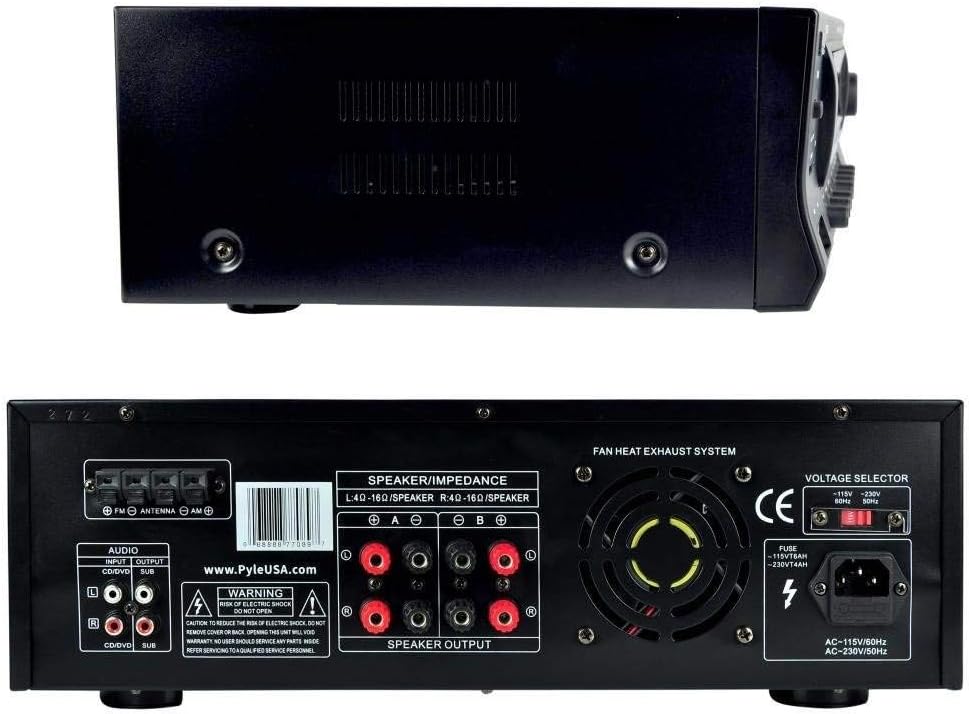
Figure 3: Top and rear view of the amplifier, illustrating the speaker output terminals and the cooling fan. Proper speaker connection and ventilation are crucial for performance.
- Audio Input Connection: Connect your desired audio sources (e.g., CD player, DVD player, TV) to the AUDIO INPUT JACKS (RCA L/R) on the rear panel. For USB flash drives or SD/MMC cards, insert them into the respective slots on the front panel.

Figure 4: Close-up of the front panel, detailing the USB and SD/MMC card slots, and the two 1/4-inch microphone inputs. These are used for connecting digital media and microphones.
- Microphone Connection: If using microphones, plug them into the MIC 1 or MIC 2 1/4'' input jacks on the front panel.
- Antenna Connection: Connect the supplied AM and FM antennas to their respective terminals on the rear panel for radio reception. Extend the FM antenna for better reception.
- Power Connection: Once all connections are made, plug the power cord into a wall outlet.
Operating Instructions
This section details how to operate your Pyle PT272AUBT amplifier.
- Power On/Off: Press the POWER switch on the front panel to turn the unit on. The LCD display will illuminate. Press it again to turn off.
- Source Selection: Use the INPUT SELECTOR buttons on the front panel or the remote control to choose your desired audio source (e.g., USB, SD, Bluetooth, AM/FM, AUX, CD). The selected input will be shown on the LCD display.
- Volume Adjustment: Rotate the large VOLUME knob on the front panel or use the volume buttons on the remote to adjust the master volume level.
- Tone Controls: Adjust the BASS, TREBLE, and SUB VOL knobs on the front panel to fine-tune the main audio output to your preference.
- USB/SD Playback: Insert a USB flash drive or SD/MMC card into the corresponding slot. The unit will automatically switch to USB/SD mode and begin playback. Use the PREV/NEXT/PLAY/PAUSE buttons to control playback.
- AM/FM Radio Operation: Select the AM or FM input. Use the TUNING +/- buttons to manually tune to a station. Press AUTO SCAN to automatically scan and store available stations.
- Bluetooth Streaming:
- Select 'Bluetooth' as the input source. The LCD display will show 'Bluetooth'.
- On your Bluetooth-enabled device (smartphone, tablet, etc.), search for Bluetooth devices.
- Select 'Pyle Speaker' from the list of available devices.
- If prompted for a password, enter '0000' (four zeros).
- Once paired, you can stream audio wirelessly from your device to the amplifier.
- Microphone Usage: Plug in your microphones. Adjust MIC VOL, MIC BASS, MIC TREBLE, and ECHO knobs to achieve desired vocal effects.
- A/B Speaker Selection: Use the A/B SPEAKER SELECTOR button to choose which set of speakers (A, B, or both A+B) will output sound. By default, both A and B speakers are active when the unit is turned on.
Maintenance
Proper maintenance ensures the longevity and performance of your amplifier:
- Cleaning: Disconnect the power cord before cleaning. Use a soft, dry cloth to wipe the exterior of the unit. Do not use liquid cleaners or aerosol cleaners.
- Ventilation: Regularly check that the ventilation openings and the cooling fan on the rear panel are free from dust and obstructions. Blocked vents can lead to overheating.
- Storage: If storing the unit for an extended period, ensure it is in a cool, dry place, away from direct sunlight and extreme temperatures.
Troubleshooting
If you encounter issues with your amplifier, refer to the following common problems and solutions:
| Problem | Possible Cause | Solution |
|---|---|---|
| No power | Power cord not connected; Power outlet not active; Voltage selector incorrect. | Ensure power cord is securely plugged in. Check the wall outlet with another device. Verify voltage selector matches local power. |
| No sound output | Incorrect input selected; Volume too low; Speaker connections loose; Mute function active. | Select the correct input source. Increase master volume. Check all speaker wire connections. Deactivate mute. |
| Bluetooth connection issues | Device not in pairing mode; Amplifier too far from device; Incorrect password. | Ensure amplifier is in Bluetooth mode. Move device closer to amplifier. Re-enter '0000' password if prompted. Try restarting both devices. |
| Poor radio reception | Antenna not connected or poorly positioned. | Connect the AM/FM antennas securely. Adjust the position of the FM wire antenna for better signal. |
| Distorted sound | Volume too high; Incorrect speaker impedance; Damaged speakers or cables. | Reduce volume. Ensure speakers are 4-8 Ohm. Check speaker wires for damage. |
Specifications
Detailed technical specifications for the Pyle PT272AUBT amplifier:
| Feature | Detail |
|---|---|
| MAX Power Output | 300 Watt |
| Power Output (8 Ohm) | 30 Watt x 2 |
| Power Output (4 Ohm) | 60 Watt x 2 |
| Frequency Response | 40-15kHz (+/-2dB) |
| T.H.D. | <1% |
| Signal-to-Noise Ratio | 76dB |
| Input Sensitivity (Aux) | 400mV |
| Input Sensitivity (Mic) | 6mV |
| Radio Station Memory | 50 Presets |
| Tuner Type | Quartz Synthesizer |
| Max USB/SD Card Support Size | Up to 32 GB |
| Digital Media File Support | MP3, WMA |
| Power Supply | 110/220V, Switchable |
| Product Dimensions (L x W x H) | 19.0'' x 11.8'' x 3.2'' |
| Item Weight | 10.7 pounds |
| Bluetooth Version | 3.0 |
| Bluetooth Network Name | Pyle Speaker |
| Bluetooth Password | '0000' (4 Zeroes) |
What's in the Box
Your Pyle PT272AUBT package includes the following items:
- Hybrid Amplifier Receiver (PT272AUBT)
- Remote Control
- Power Cable
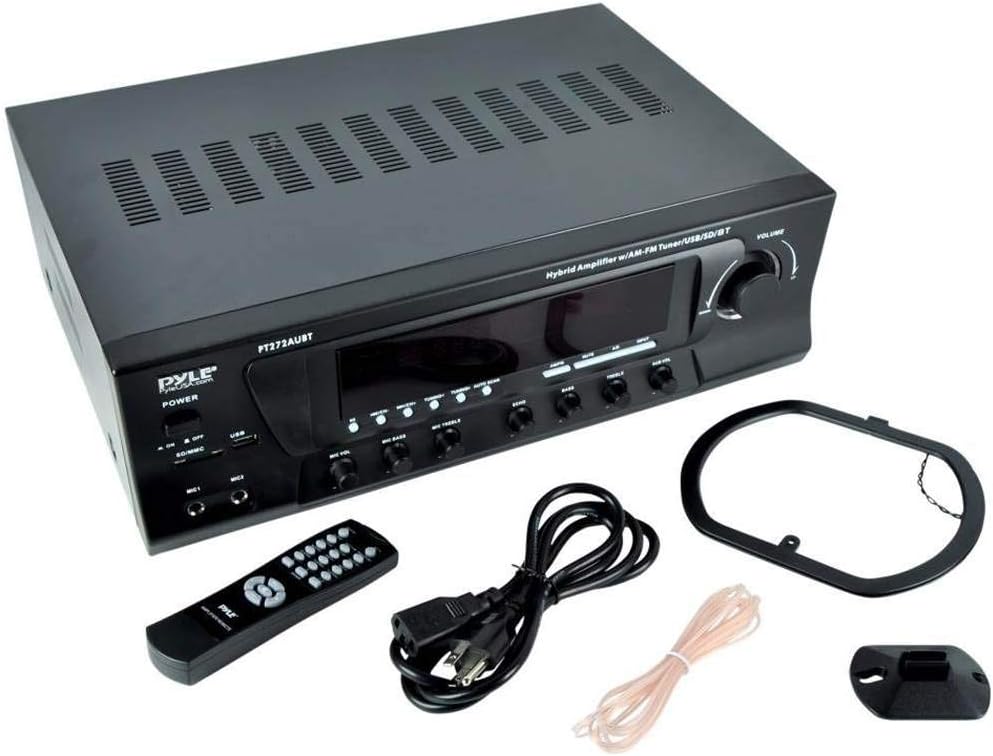
Figure 5: The Pyle PT272AUBT amplifier shown with all its included accessories: the remote control, power cable, and antennas. Ensure all components are present upon unboxing.
Warranty and Support
Pyle products are designed for reliability and performance. For warranty information, technical support, or service inquiries, please refer to the official Pyle USA website or contact their customer service directly. Keep your purchase receipt as proof of purchase for any warranty claims.


