
Introduction
This manual provides essential information for the safe and efficient operation, maintenance, and troubleshooting of your Bionaire BAP600HBK Air Purifier. Please read these instructions thoroughly before using the appliance and retain them for future reference.
The Bionaire BAP600HBK is a 33-watt room air purifier designed to improve indoor air quality by removing airborne particles such as pollen, dust, and odors. It utilizes a High-Efficiency Particulate Arrestant (HEPA) filter and an optional air ionizer for comprehensive purification.
Important Safety Instructions
When using electrical appliances, basic safety precautions should always be followed to reduce the risk of fire, electric shock, and injury to persons, including the following:
- Read all instructions before using the appliance.
- Always place the air purifier on a firm, level surface.
- Do not operate any appliance with a damaged cord or plug, or after the appliance malfunctions or has been dropped or damaged in any manner.
- Do not use the air purifier in wet or damp locations, such as bathrooms or laundry areas.
- Keep the cord away from heated surfaces.
- Do not block air openings or place the appliance on a soft surface, such as a bed or sofa, where openings may become blocked.
- Never insert or allow fingers or foreign objects to enter any ventilation or exhaust opening.
- Unplug the air purifier from the power outlet before moving, cleaning, or replacing filters.
- This appliance is for household use only.
Product Components
Familiarize yourself with the main components of your Bionaire BAP600HBK Air Purifier:
- Main Unit with Control Panel
- HEPA Filter
- Pre-filter / Carbon Filter (integrated or separate)
- Base
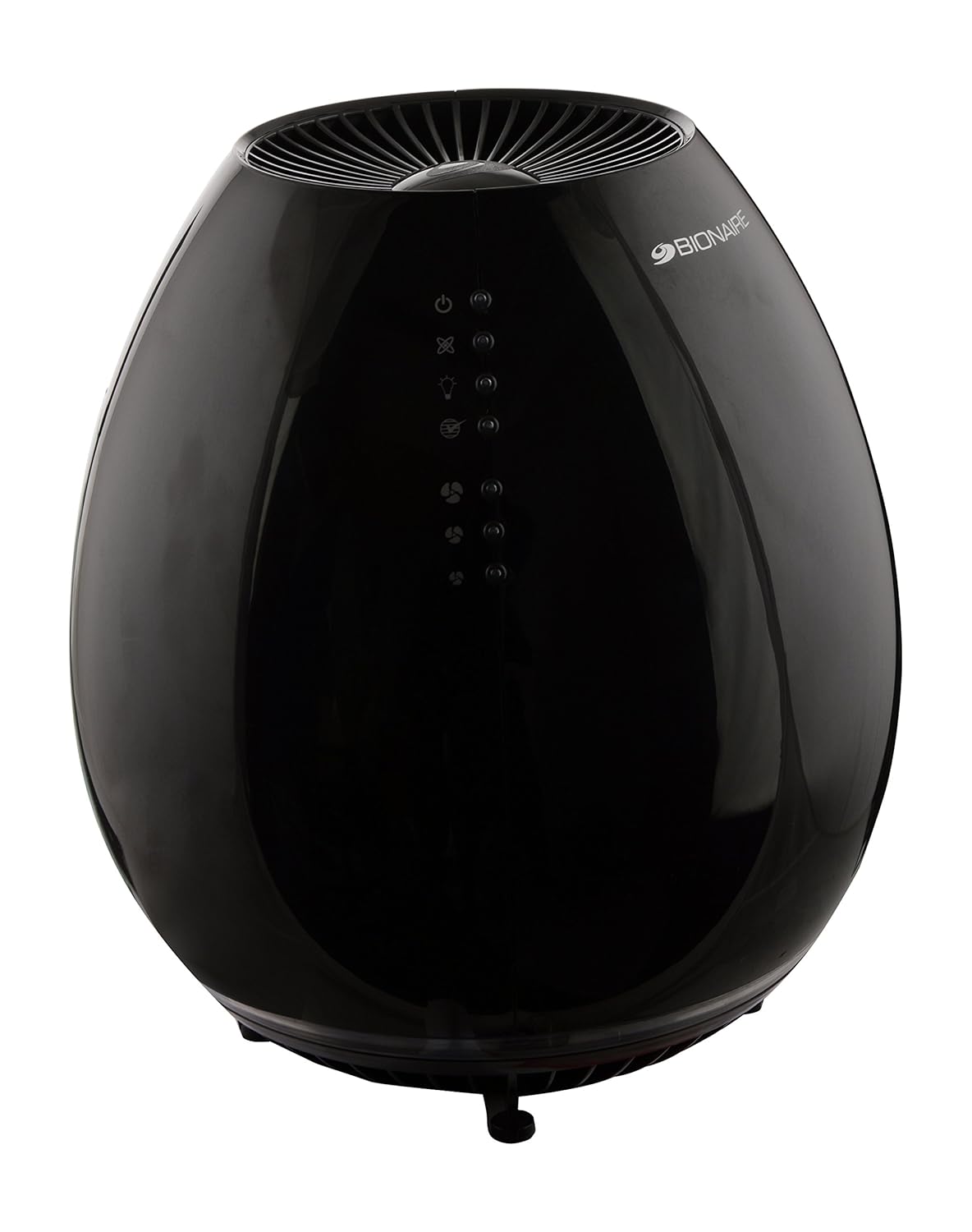
Figure 1: Bionaire BAP600HBK Air Purifier Main Unit. This image shows the complete air purifier in its black, oval design, featuring the touch control panel on the front surface.

Figure 2: HEPA Filter. This image displays the cylindrical HEPA filter, which is a key component for capturing fine airborne particles.

Figure 3: Pre-filter / Carbon Filter. This image shows a circular filter with a honeycomb-like pattern, typically used as a pre-filter to capture larger particles and/or an activated carbon filter for odor removal.
Setup
- Unpack the Unit: Carefully remove the air purifier from its packaging. Retain packaging materials for future storage or transport.
- Prepare Filters: Open the filter compartment (refer to the diagram in the manual for location, typically at the bottom or back). Remove any plastic packaging from the HEPA filter and pre-filter/carbon filter before installation.
- Install Filters: Insert the filters back into their designated slots. Ensure they are seated correctly. Close the filter compartment securely.
- Placement: Place the air purifier on a firm, level surface. For optimal performance, position the unit away from walls or furniture to allow for proper airflow. Ensure there is at least 20-30 cm (8-12 inches) of space around the air intake and outlet.
- Power Connection: Plug the power cord into a 220-240V AC electrical outlet.
Operating Instructions
The Bionaire BAP600HBK features a touch control panel for easy operation.
- Power On/Off: Press the Power button (usually indicated by a circle with a vertical line) to turn the unit on or off.
- Fan Speed: Press the Fan Speed button (often indicated by fan blades or multiple lines) to cycle through the 3 available speed settings: Low, Medium, and High. Select the desired speed based on room size and air quality needs.
- Ionizer Function: Press the Ionizer button (often indicated by an ion symbol) to activate or deactivate the optional ionizer. The ionizer helps to clump small particles together, making them easier for the filter to capture.
- Filter Change Indicator: The unit is equipped with a filter change indicator light. When this light illuminates, it signifies that the filters require inspection or replacement. Refer to the Maintenance section for details.
Maintenance
Regular maintenance ensures optimal performance and extends the life of your air purifier.
Filter Replacement
The HEPA filter and pre-filter/carbon filter have a limited lifespan and must be replaced periodically. The filter change indicator light will signal when replacement is needed, typically every 6-12 months depending on usage and air quality.
- Power Off and Unplug: Always turn off and unplug the air purifier before attempting any maintenance.
- Access Filters: Open the filter compartment.
- Remove Old Filters: Carefully remove the used HEPA and pre-filter/carbon filters. Dispose of them according to local regulations.
- Install New Filters: Insert new, genuine Bionaire replacement filters. Ensure they are correctly oriented and seated.
- Close Compartment: Securely close the filter compartment.
- Reset Filter Indicator: After replacing filters, you may need to reset the filter change indicator. Consult your unit's specific instructions for this step, often involving pressing and holding the filter indicator button for a few seconds while the unit is powered on.
Cleaning the Unit
- Exterior: Wipe the exterior surfaces of the air purifier with a soft, damp cloth. Do not use abrasive cleaners or solvents.
- Air Intake/Outlet: Use a soft brush or vacuum cleaner with a brush attachment to gently clean dust from the air intake and outlet grilles.
- Do not immerse the air purifier in water or any other liquid.
Troubleshooting
| Problem | Possible Cause | Solution |
|---|---|---|
| Unit does not turn on. | No power supply. Power cord not securely plugged in. |
Check if the unit is plugged into a working outlet. Ensure the power cord is firmly connected to both the unit and the wall outlet. |
| Reduced airflow or purification. | Clogged filters. Air intake/outlet blocked. |
Check and replace filters if necessary. Ensure nothing is obstructing the air intake or outlet grilles. |
| Unusual noise. | Loose filter. Foreign object inside. |
Ensure filters are properly seated. Unplug the unit and carefully inspect for any foreign objects. |
| Odor persists. | Carbon filter saturated. Ionizer not active. |
Replace the carbon filter. Activate the ionizer function. |
Specifications
- Model Number: BAP600HBK
- Brand: Bionaire
- Type: Room Air Purifier
- Purification Method: HEPA filter + Air Ionizer
- Wattage: 33 Watts
- Control Method: Touch
- Fan Speeds: 3 (Low, Medium, High)
- Item Weight: 3 kg 440 g
- Item Dimensions (LxWxH): 24.4 x 24.4 x 27.5 Centimeters
- Color: Black
- Recommended Floor Area: Up to 50 Square Meters
Warranty and Support
Warranty Information
This Bionaire BAP600HBK Air Purifier comes with a 1-year warranty on the product from the date of purchase. Please retain your proof of purchase for warranty claims. The warranty covers manufacturing defects under normal household use. It does not cover damage resulting from misuse, accident, alteration, or unauthorized repair.
Customer Support
For technical assistance, warranty claims, or to purchase replacement filters, please contact Bionaire customer support. Refer to the contact information provided with your product packaging or visit the official Bionaire website for the most up-to-date support details.
When contacting support, please have your model number (BAP600HBK) and proof of purchase readily available.