
One For All SV 9357
One for All SV 9357 Mono Outdoor TV Antenna User Manual
Model: SV 9357
1. Introduction
This manual provides comprehensive instructions for the installation, operation, and maintenance of your One for All SV 9357 Mono Outdoor TV Antenna. This antenna is designed to receive digital terrestrial television (DVB-T, DVB-T2) and digital audio broadcasting (DAB, DAB+) signals. Please read this manual carefully before installation and use to ensure optimal performance and safety.
2. Safety Information
- Outdoor Installation: Exercise extreme caution when installing the antenna outdoors, especially on rooftops or near power lines. Consider hiring a professional installer if you are not comfortable with heights or electrical work.
- Weather Conditions: Avoid installation during stormy weather, high winds, or when lightning is present.
- Grounding: Ensure the antenna and mast are properly grounded according to local electrical codes to protect against lightning strikes.
- Cable Management: Secure all cables to prevent tripping hazards and damage from wind or animals.
- Power Supply: If using an amplified version or external amplifier, ensure the power supply is correctly connected and rated for outdoor use if applicable.
3. Package Contents
Verify that all components are present in the package before beginning installation.

Figure 1: One for All SV 9357 antenna packaging box, showing the antenna and product details.
- One for All SV 9357 Mono Outdoor TV Antenna
- Mounting hardware (e.g., clamps, bolts, nuts)
- Instruction Manual (this document)
- Note: Coaxial cable and mast are typically sold separately.
4. Setup and Installation
Proper installation is crucial for optimal signal reception.
4.1 Antenna Assembly
- Carefully unpack all components from the box.
- Extend the antenna elements as shown in the diagram. Ensure all elements click into place securely.
- Attach the reflector elements (if separate) to the main boom.
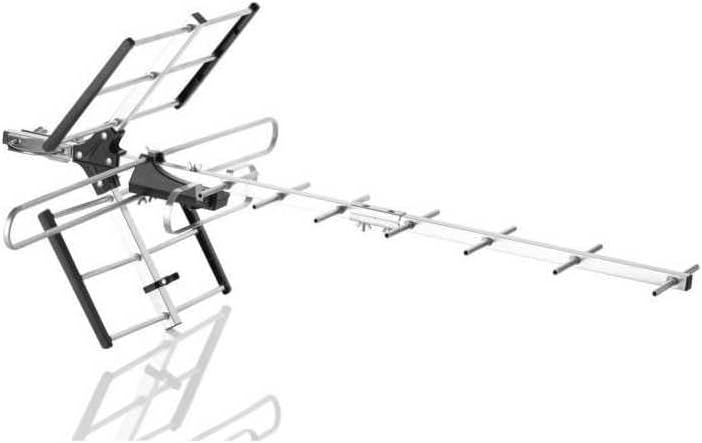
Figure 2: Fully assembled One for All SV 9357 antenna, ready for mounting.
4.2 Mounting Location
Choose a mounting location that is as high as possible and has a clear line of sight to the broadcast towers. Avoid obstructions like buildings, trees, or hills.
- Rooftop: Provides the best elevation and clear line of sight.
- Attic: Can be an option in strong signal areas, but may reduce signal strength.
- Wall/Chimney: Ensure secure mounting to a sturdy structure.

Figure 3: The SV 9357 antenna is designed for outdoor use and is resistant to various weather conditions.
4.3 Antenna Mounting
- Attach the antenna to a mast using the provided mounting hardware. Ensure the antenna is level and securely fastened.
- Mount the mast to your chosen location (rooftop, wall, chimney) using appropriate brackets and fasteners.
- Connect a high-quality coaxial cable (F-type connector) to the antenna's output port.
- Route the coaxial cable neatly and securely down to your television or set-top box, avoiding sharp bends or kinks. Use cable clips to secure the cable.
- Connect the other end of the coaxial cable to the "Antenna In" or "RF In" port on your television or digital receiver.

Figure 4: Basic tools like a screwdriver may be required for assembly and mounting.
5. Operating Instructions
5.1 Channel Scan
- Turn on your television or digital receiver.
- Access the TV's menu and navigate to the "Channel Setup," "Antenna Setup," or "Scan" section.
- Select "Antenna" or "Air" as the input source.
- Initiate an "Auto Scan" or "Auto Program" to search for available channels. This process may take several minutes.
- Once the scan is complete, your TV should display the received channels.
5.2 Antenna Orientation
For optimal reception, the antenna should be pointed towards the local broadcast towers. You can find the direction of your local towers using online resources or signal finder apps.
- Adjust the antenna's direction incrementally.
- Perform a channel scan after each adjustment to check for improved signal strength and more channels.
- Fine-tune the direction until you achieve the best possible reception for all desired channels.

Figure 5: Use a signal meter or smartphone app to assist with antenna orientation for optimal signal reception.

Figure 6: The antenna includes technology to filter out interference from 5G mobile signals.
6. Maintenance
- Regular Inspection: Periodically inspect the antenna, mast, and cables for any signs of damage, corrosion, or loose connections, especially after severe weather.
- Cleaning: Gently clean the antenna elements with a soft cloth and mild detergent if necessary. Avoid abrasive cleaners or solvents.
- Cable Integrity: Ensure coaxial cables are not frayed, cracked, or exposed to excessive moisture. Replace damaged cables promptly.
7. Troubleshooting
| Problem | Possible Cause | Solution |
|---|---|---|
| No signal or poor picture quality |
|
|
| Missing channels |
|
|
| Interference from mobile signals (e.g., 5G) |
|
|
8. Specifications
| Brand | One For All |
| Model Number | SV 9357 |
| Antenna Type | Mono Outdoor TV Antenna |
| Reception | DAB, DAB+, DVB-T, DVB-T2 (UHF/VHF) |
| Impedance | 50 ohms |
| Special Features | Digital reception support, Frequency response, 5G filter |
| Dimensions (approx.) | 420 mm (width), 870 mm (length), 737 mm (height) - Note: These dimensions seem to be for the packaging or a specific orientation, actual antenna dimensions may vary slightly. |
| Max Range | 50000 Meters (50 km) |
9. Warranty and Support
For warranty information and technical support, please refer to the documentation provided with your purchase or visit the official One For All website. Keep your proof of purchase for warranty claims.
Related documentsSV 9357

Ask a question about this manual
Ask about setup, troubleshooting, compatibility, parts, safety, or missing instructions. Manuals+ will review the question and use this page’s manual context to help answer it.