
1. Introduction
The Black Diamond Icon Headlamp is designed for demanding outdoor activities, providing powerful illumination and versatile lighting modes. This manual provides instructions for the proper setup, operation, maintenance, and troubleshooting of your headlamp to ensure optimal performance and longevity.
Safety Information
- Do not look directly into the LED light when it is on, as this may cause temporary vision impairment.
- Keep batteries out of reach of children. If swallowed, seek medical attention immediately.
- Ensure correct battery polarity when installing. Incorrect installation can damage the device.
- Remove batteries if the headlamp will not be used for an extended period to prevent leakage.
- Dispose of batteries according to local regulations.
2. What's in the Box
Your Black Diamond Icon Headlamp package includes the following components:
- Head Lamp unit
- Removable battery pack (with longer cable included)
- 4 AA Batteries
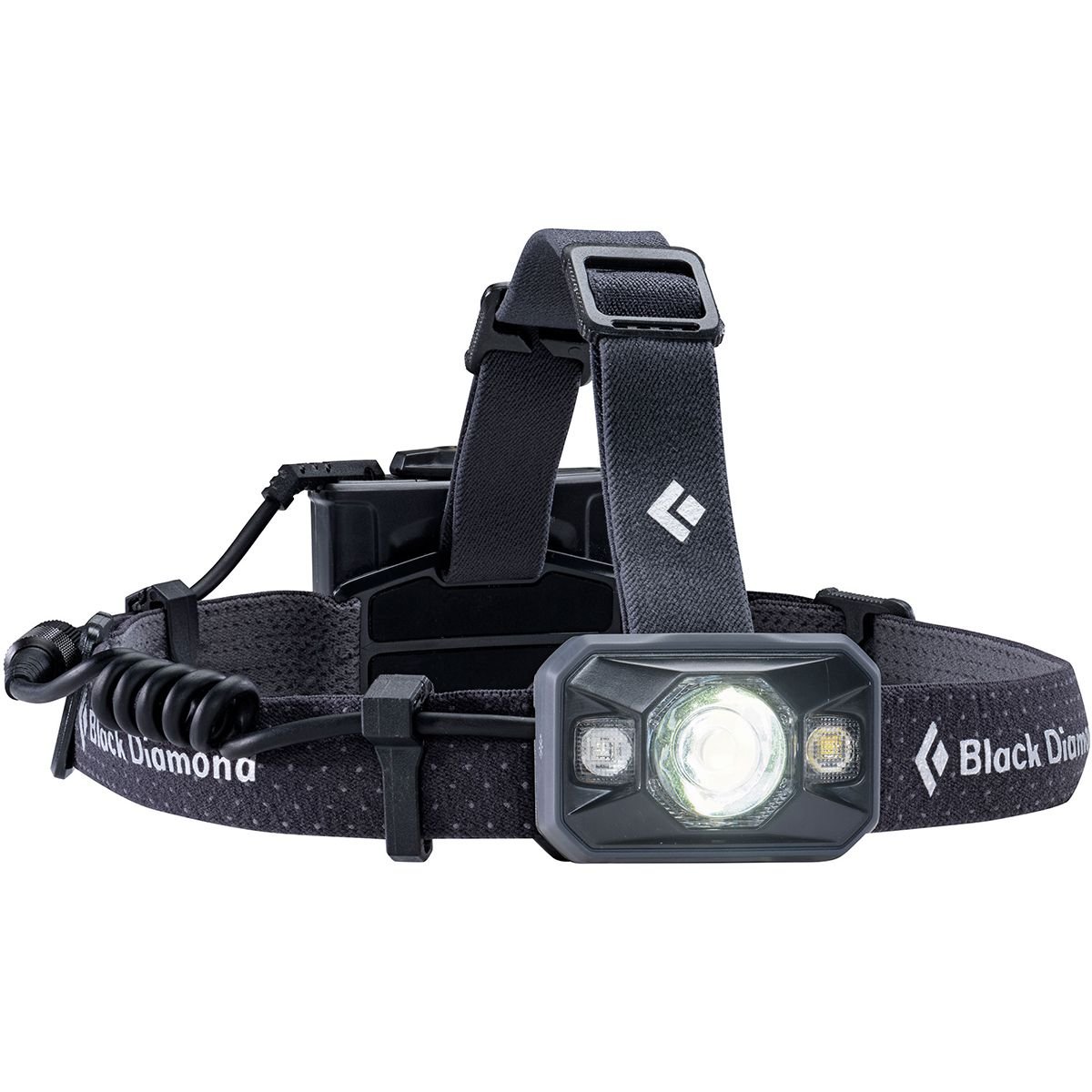
Image: The Black Diamond Icon Headlamp, showing the main light unit, the separate battery pack, and the connecting cable. This illustrates the components included in the package.
3. Setup
3.1 Battery Installation
- Locate the battery compartment on the removable battery pack.
- Open the battery compartment latch.
- Insert 4 AA batteries, ensuring correct polarity (+/-) as indicated inside the compartment.
- Close the battery compartment latch securely until it clicks.
3.2 Head Strap Adjustment
The elastic head strap can be adjusted to fit comfortably around your head or over a helmet. Use the sliding buckles to tighten or loosen the strap until a secure, comfortable fit is achieved. The battery pack is designed to sit at the back of the head for balanced weight distribution.
3.3 Attaching/Detaching the Battery Pack
The battery pack connects to the headlamp unit via a cable. Ensure the cable connector is firmly screwed into place to establish a reliable connection. A longer cable is provided for situations where the battery pack needs to be stowed in a pocket or backpack, separate from the headlamp unit.
4. Operation
4.1 Powering On/Off and Brightness Adjustment
- To Turn On/Off: Press and hold the power button located on the top of the headlamp unit.
- Brightness Adjustment: While the headlamp is on, tap the power button to cycle through different brightness levels. The headlamp features a Quad Power LED spotlight and a Double Power white LED, emitting up to 500 lumens on the maximum setting.
- Brightness Memory: The headlamp remembers the last brightness setting used. When turned back on, it will revert to this chosen brightness without automatically returning to full power.
4.2 Night Vision Modes (Red, Green, Blue)
The Icon Headlamp includes red, green, and blue night vision modes to preserve your natural night vision and for specific applications:
- Activating Night Vision: With the headlamp off, press and hold the power button until the desired colored light activates.
- Cycling Colors: Once a colored light is on, tap the power button to cycle through red, green, and blue modes.
- Dimming Night Vision: Hold the power button while a colored light is active to dim or brighten it.
4.3 Power Meter
A three-level power meter indicates the remaining battery life. This indicator will display for three seconds after the headlamp is switched on, allowing you to monitor battery status.
4.4 Lock Mode
To prevent accidental activation during transport or storage, the headlamp features a lock mode. Consult the Black Diamond website or included quick-start guide for specific instructions on activating and deactivating the lock mode, as this can vary slightly between models or firmware versions.
5. Maintenance
5.1 Cleaning
Wipe the headlamp and battery pack with a damp cloth to remove dirt and debris. Do not use harsh chemicals or abrasive cleaners, as these can damage the housing or seals. Ensure the battery compartment is clean and dry before closing.
5.2 Battery Care and Storage
- Always use fresh, high-quality AA alkaline batteries.
- Remove batteries if the headlamp will not be used for an extended period (e.g., several weeks or months) to prevent corrosion from battery leakage.
- Store the headlamp and batteries in a cool, dry place away from direct sunlight.
5.3 Waterproofing (IP67 Rating)
The Black Diamond Icon Headlamp is rated IP67, meaning it is waterproof and dustproof. It is designed to operate up to 1 meter underwater for 30 minutes. To maintain this rating, ensure all seals, including the battery compartment and cable connection, are clean and properly secured before exposure to water or dusty environments.
6. Troubleshooting
| Problem | Possible Cause | Solution |
|---|---|---|
| Headlamp does not turn on. |
|
|
| Light is dim or flickers. |
|
|
| Cannot switch between modes. |
|
|
7. Specifications
- Model: BD620629
- Light Output (Max): 500 Lumens
- Light Source Type: LED (Quad Power LED spotlight, Double Power white LED)
- Power Source: 4 AA Batteries (Alkaline recommended)
- Battery Life (Max Setting): Approximately 70 Hours (Note: Battery life can vary based on brightness setting, battery quality, and environmental conditions.)
- Water Resistance: IP67 (Waterproof and dustproof; tested to operate up to 1 meter underwater for 30 minutes)
- Special Features: Night Vision (Red, Green, Blue modes), Brightness Memory, Three-level Power Meter
- Item Weight: Approximately 9.6 ounces (272 grams)
- Color: Black
8. Warranty and Support
Black Diamond Equipment stands behind its products. For detailed warranty information, please refer to the warranty card included with your purchase or visit the official Black Diamond website. If you encounter any issues not covered in this manual or require further assistance, please contact Black Diamond customer support through their official website or the contact information provided with your product.
Official Website: www.blackdiamondequipment.com


