
1. Introduction
This manual provides essential instructions for the safe and efficient use of your SUPERNIGHT 12V 30A 360W Switching Power Supply. This device converts alternating current (AC) from a standard wall outlet into stable direct current (DC) at 12 volts, suitable for a wide range of electronic applications.
Please read this manual thoroughly before installation and operation to ensure proper functionality and to prevent potential hazards.
2. Safety Information
WARNING: Risk of electric shock. This unit contains high voltage. Do not open the casing. Installation should only be performed by qualified personnel.
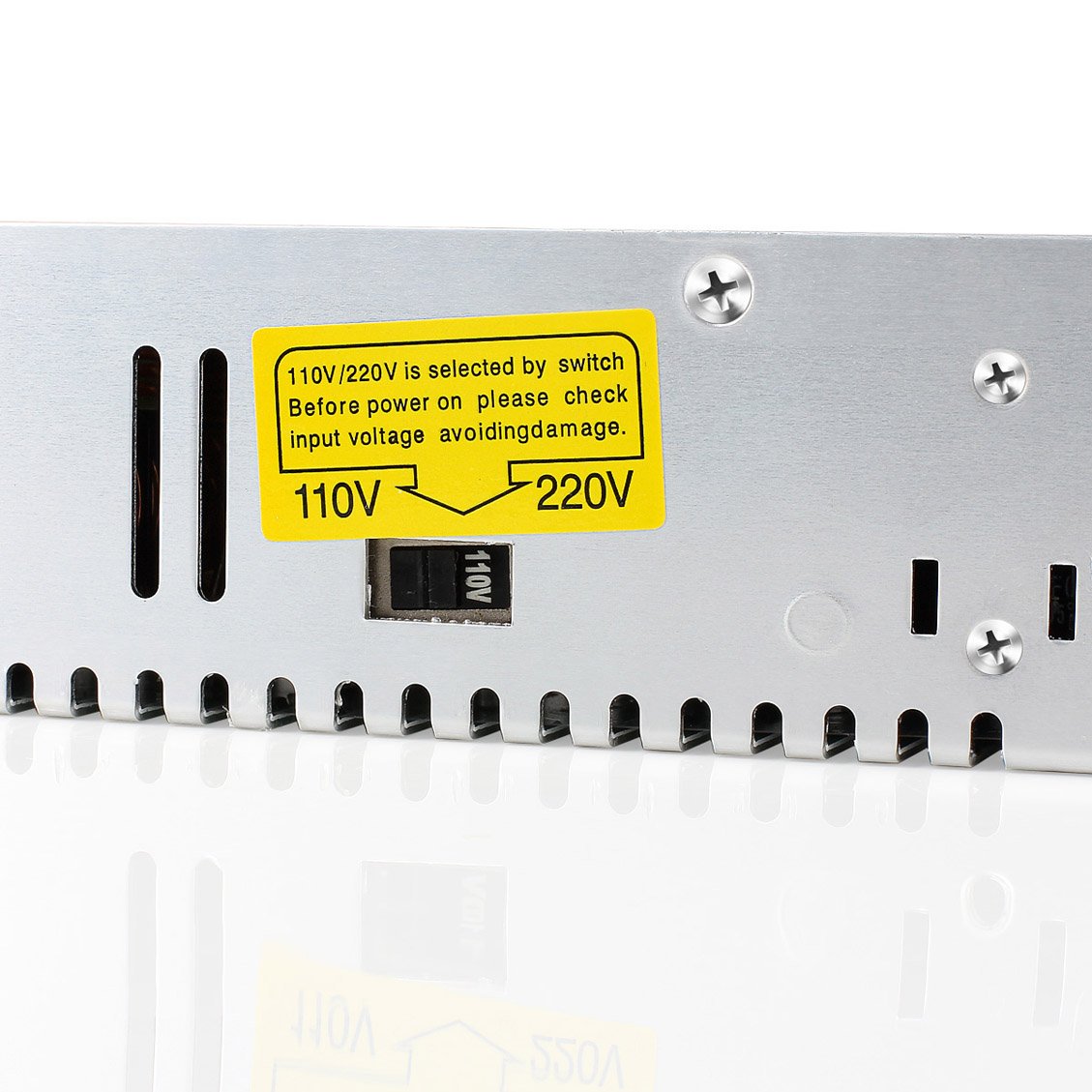
- Ensure the input voltage selector switch is set correctly for your region (110V or 220V) before connecting to power. Incorrect setting can cause severe damage to the unit and connected devices.
- Always disconnect the power supply from the AC outlet before making any connections or adjustments.
- Do not expose the unit to moisture or extreme temperatures.
- Ensure adequate ventilation around the power supply to prevent overheating.
- Do not exceed the maximum output current of 30A. Overloading can damage the unit and connected devices.
- Use appropriate gauge wiring for both AC input and DC output connections to handle the current safely.
- Ensure proper grounding for safety.
3. Product Overview
The SUPERNIGHT 12V 30A 360W Switching Power Supply is designed for reliability and stable performance. It features built-in protection mechanisms against overcharge, overload, short-circuit, and over-heat conditions.
Key Features:
- Universal AC Input: 100-240V, 50/60Hz
- Stable DC Output: 12V, 0-30A
- Adjustable Output Voltage Range: ±10%
- Integrated Cooling Fan
- Overload, Short-Circuit, and Over-Temperature Protection
Components:


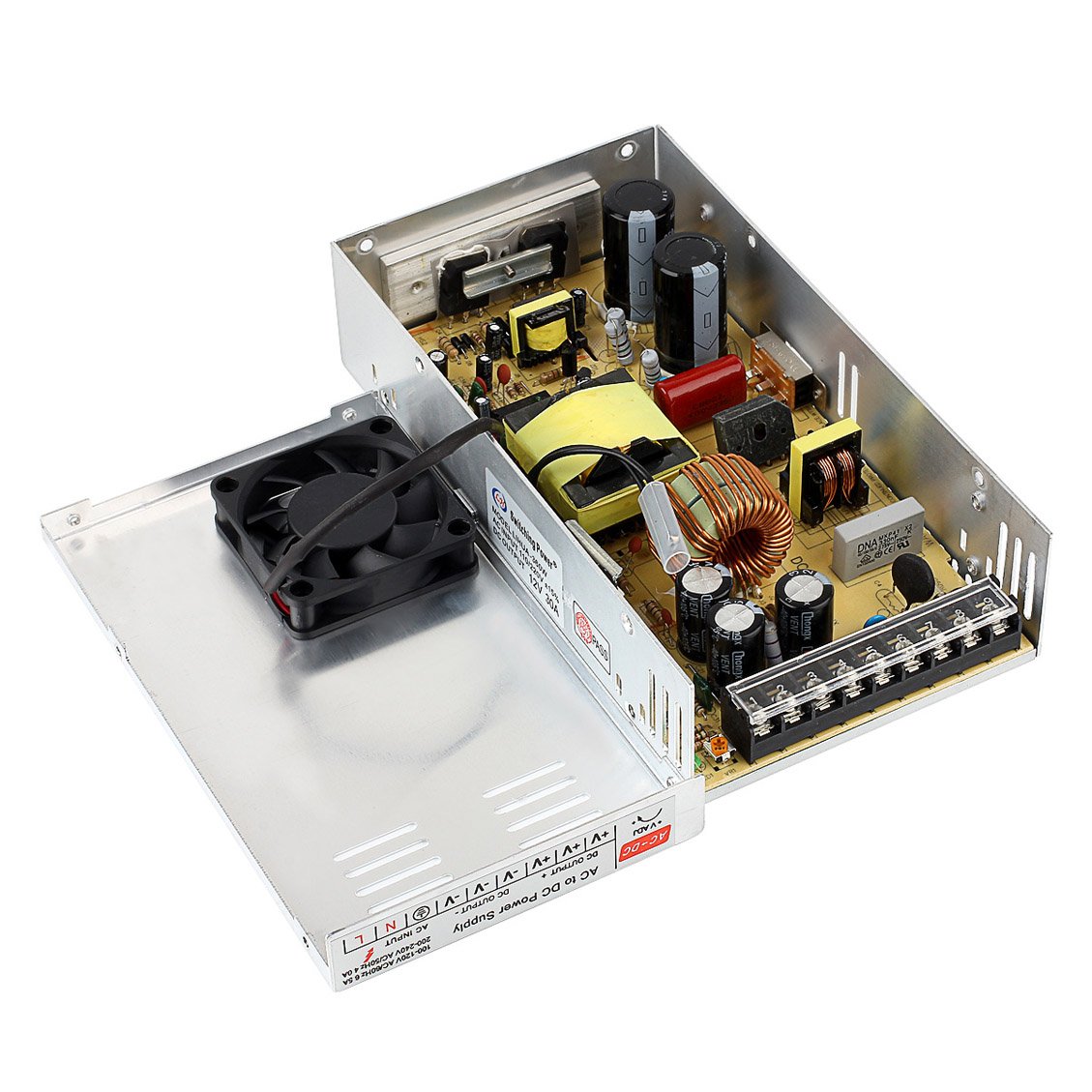
4. Specifications
| Parameter | Value |
|---|---|
| Input Voltage | 100-240V AC |
| Input Frequency | 50/60Hz |
| Output Voltage | 12V DC |
| Output Current | 0-30A |
| Output Power | 360W |
| Voltage Adjustment Range | ±10% |
| Product Dimensions (L x W x H) | 8.46 x 4.53 x 1.97 inches (21.5 x 11.5 x 5 cm) |
| Weight | 1.5 Pounds (0.68 kg) |
| Model Number | 4328505387 |
| Mounting Type | Rack Mount |
5. Setup and Installation
5.1 Input Voltage Selection
Before connecting the power supply to an AC source, verify the input voltage selector switch is set to match your local mains voltage (110V or 220V). This switch is typically located on the side of the unit.
5.2 Wiring Connections
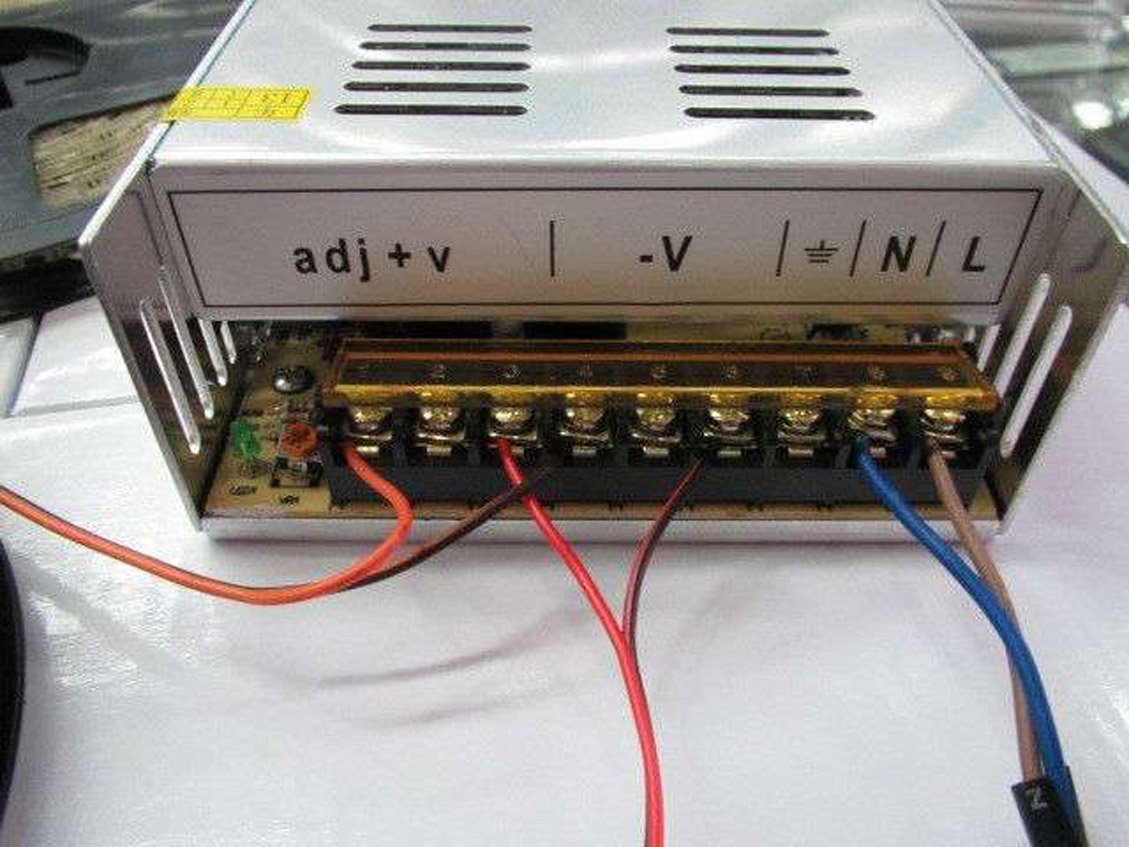
The power supply features a terminal block for secure wiring. Refer to the diagram below for correct connections.

- AC Input: Connect your AC power cord to the L, N, and Ground (⌽) terminals. Ensure proper polarity and a secure ground connection.
- DC Output: Connect your 12V DC devices to the +V and -V terminals. Multiple +V and -V terminals are provided for convenience and to distribute current. Ensure correct polarity for your devices.
- Voltage Adjustment: The small potentiometer labeled 'V ADJ' allows for fine-tuning the output voltage within the ±10% range. Use a small screwdriver to adjust if necessary.
6. Operation
Once all connections are securely made and the input voltage is correctly selected, connect the power supply to an AC outlet. The internal cooling fan will activate as needed to maintain optimal operating temperature. The power supply will provide a stable 12V DC output to your connected devices.
Monitor the total current draw of your connected devices to ensure it does not exceed 30A. Overloading can trigger the unit's protection mechanisms or cause damage.
7. Maintenance
- Keep the power supply clean and free from dust. Dust accumulation can impede cooling and affect performance.
- Ensure ventilation openings are not obstructed.
- Periodically check all wiring connections for tightness and signs of wear or corrosion.
- Do not attempt to service the unit yourself. Refer to qualified technicians for repairs.
8. Troubleshooting
Common Issues and Solutions:
- No Output Power:
- Check if the AC input power cord is securely connected.
- Verify the input voltage selector switch is set correctly (110V/220V).
- Inspect for tripped circuit breakers or blown fuses in your AC supply.
- Ensure the power supply is not in an overload or short-circuit protection state. Disconnect all loads and re-test.
- Unstable Output Voltage:
- Check for loose wiring connections.
- Ensure the load does not exceed the maximum rated current (30A).
- Verify the 'V ADJ' potentiometer has not been accidentally moved.
- Overheating:
- Ensure adequate ventilation around the unit. Clear any obstructions from the fan and vents.
- Reduce the load if it is consistently near the maximum rating.
- Clean any dust accumulation on the unit.
- Fan Noise:
- The fan operates to cool the unit. Increased noise may indicate higher internal temperatures due to load or ambient conditions.
- If the fan is excessively loud without significant load, ensure it is not obstructed.
If issues persist after following these steps, contact customer support.
9. Warranty and Support
SUPERNIGHT provides the following assurances for this product:
- Return Policy: 30 days worry-free return.
- Replacement Assurance: 1 year replacement assurance.
- After-Sale Service: Lifetime after-sale service.
- Customer Service: 24 hours x 7 days customer service support.
For support, please refer to the contact information provided with your purchase or visit the official SUPERNIGHT website.