
1. Product Overview
The Brightown Outdoor Light Timer is a versatile and durable electrical timer designed for automating outdoor lighting and other electrical devices. Featuring a photocell light sensor and multiple timing modes, it offers convenience and energy efficiency for various applications, from holiday decorations to garden lighting and pool pumps. Its waterproof design ensures reliable performance in outdoor environments.

Figure 1: Brightown Outdoor Light Timer with 3 grounded outlets.
2. Key Features
- Automatic Light Sensitivity: Equipped with a photocell light sensor, the timer automatically turns on at dusk and off at dawn, adapting to natural light conditions.
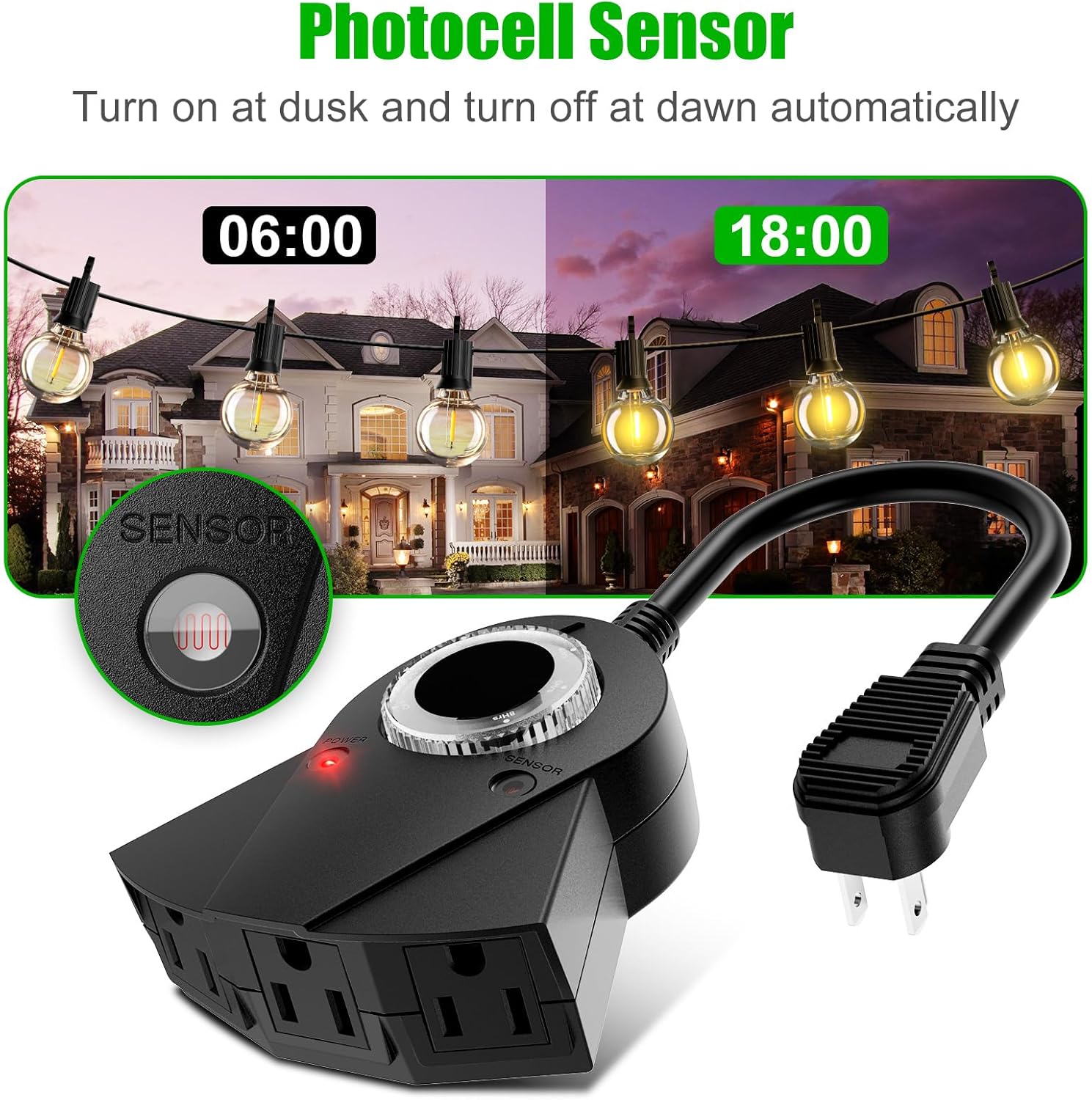
Figure 2: Photocell sensor for automatic dusk-to-dawn operation.
- Multifunctional Timing Modes: Offers ON/OFF, Dusk-Dawn, and countdown modes (2, 4, 6, or 8 hours) for flexible control. The countdown timer activates at dusk and turns off after the set duration.

Figure 3: Timer dial with various timing options.
- Waterproof and Durable Design: Constructed with high-quality, eco-friendly materials, this timer is waterproof and designed for outdoor use, with UL certification for safety.

Figure 4: Weatherproof design for outdoor reliability.
- Three Grounded Outlets: Provides three grounded electrical outlets, allowing simultaneous control of multiple devices.

Figure 5: Three grounded outlets for multiple connections.
- Energy Saving: The smart switch and timing functions contribute to energy conservation by ensuring devices operate only when needed.
- Wide Application: Suitable for various outdoor lights (garden, rope, string lights), fans, swimming pool lights, small outdoor fountains, and pool pumps.

Figure 6: Versatile applications for the outdoor timer.
3. Setup Instructions
- Unpack the Timer: Carefully remove the timer from its packaging. Inspect for any damage.
- Choose a Mounting Location: Select a suitable outdoor location for mounting. The timer should be mounted vertically with the receptacles facing downwards, at least 2 feet above ground level to prevent water accumulation.

Figure 7: Mounting hole for secure vertical installation.
- Plug into Power Source: Plug the timer's three-prong adapter into a standard 110-volt outdoor GFCI (Ground Fault Circuit Interrupter) protected outlet.
- Connect Devices: Plug your outdoor lights or other electrical devices into the three grounded outlets on the timer.
4. Operating Instructions
The timer features a rotary dial for selecting various operating modes:
- OFF: The timer will remain off, and connected devices will not receive power.
- ON: The timer will provide continuous power to attached devices until manually switched off or to another operating mode.
- Dusk-Dawn: The photocell sensor will automatically turn on connected devices at dusk and turn them off at dawn. This mode is ideal for continuous automatic operation based on natural light.
- 2 Hrs / 4 Hrs / 6 Hrs / 8 Hrs Countdown: In these modes, the timer will activate at dusk and remain on for the selected duration (2, 4, 6, or 8 hours), then turn off. This cycle repeats every 24 hours.
Note: For countdown modes to function correctly, ensure the timer is initially set to Dusk-Dawn mode once before setting the desired countdown.
Video 1: Demonstration of the Brightown Outdoor Light Timer's functions, including dusk-to-dawn and countdown settings. This video is provided by Brightown USA.
Video 2: Overview of the Brightown Outdoor Lights Timer with Photocell Sensor. This video is provided by Brightown USA.
5. Maintenance
- Regular Cleaning: Periodically wipe the timer's exterior with a damp cloth to remove dirt and debris. Ensure the photocell sensor is clear of obstructions for optimal performance.
- Inspect Cords and Plugs: Regularly check the power cord and connected plugs for any signs of wear, fraying, or damage. Replace if necessary.
- Proper Storage: When not in use for extended periods, store the timer in a dry, cool place away from direct sunlight and extreme temperatures.
6. Troubleshooting
| Problem | Possible Cause | Solution |
|---|---|---|
| Devices not turning on. | No power to the timer; incorrect mode selection; photocell sensor obstructed. | Check power source and connections. Ensure the timer is set to ON, Dusk-Dawn, or a valid countdown mode. Clear any obstructions from the photocell sensor. |
| Lights stay on continuously. | Timer set to ON mode; photocell sensor not detecting light (e.g., in a shaded area). | Switch the timer to OFF, Dusk-Dawn, or a countdown mode. Relocate the timer to an area where the photocell sensor receives adequate daylight. |
| Lights turn on/off at incorrect times. | Photocell sensor interference; incorrect countdown setting. | Ensure no external light sources (e.g., headlights, street lamps) are interfering with the photocell. Verify the correct countdown duration is selected. |
7. Specifications
- Model Number: LYSB01LAS876Y-ELECTRNCS
- Power Source: Plug-in Electric
- Voltage: 110 Volts
- Outlets: 3 Grounded Outlets
- Material: ppo
- Product Dimensions: 4"D x 7.5"W x 4"H
- Item Weight: 7.8 ounces
- Certification: UL Certified
- Timer Functions: ON, OFF, Dusk-Dawn, 2 Hrs, 4 Hrs, 6 Hrs, 8 Hrs
8. Warranty and Support
For warranty information or technical support, please refer to the contact details provided on the product packaging or visit the official Brightown website. Keep your purchase receipt for warranty claims.
For additional resources and product information, you may visit the Brightown Store on Amazon.