
Introduction
This manual provides comprehensive instructions for the VINABTY RM-YD092 replacement remote control. This remote is designed to function as a direct replacement for various Sony LED HDTV models, offering immediate usability without complex setup procedures. Please read this manual thoroughly to ensure proper operation and maintenance of your remote control.
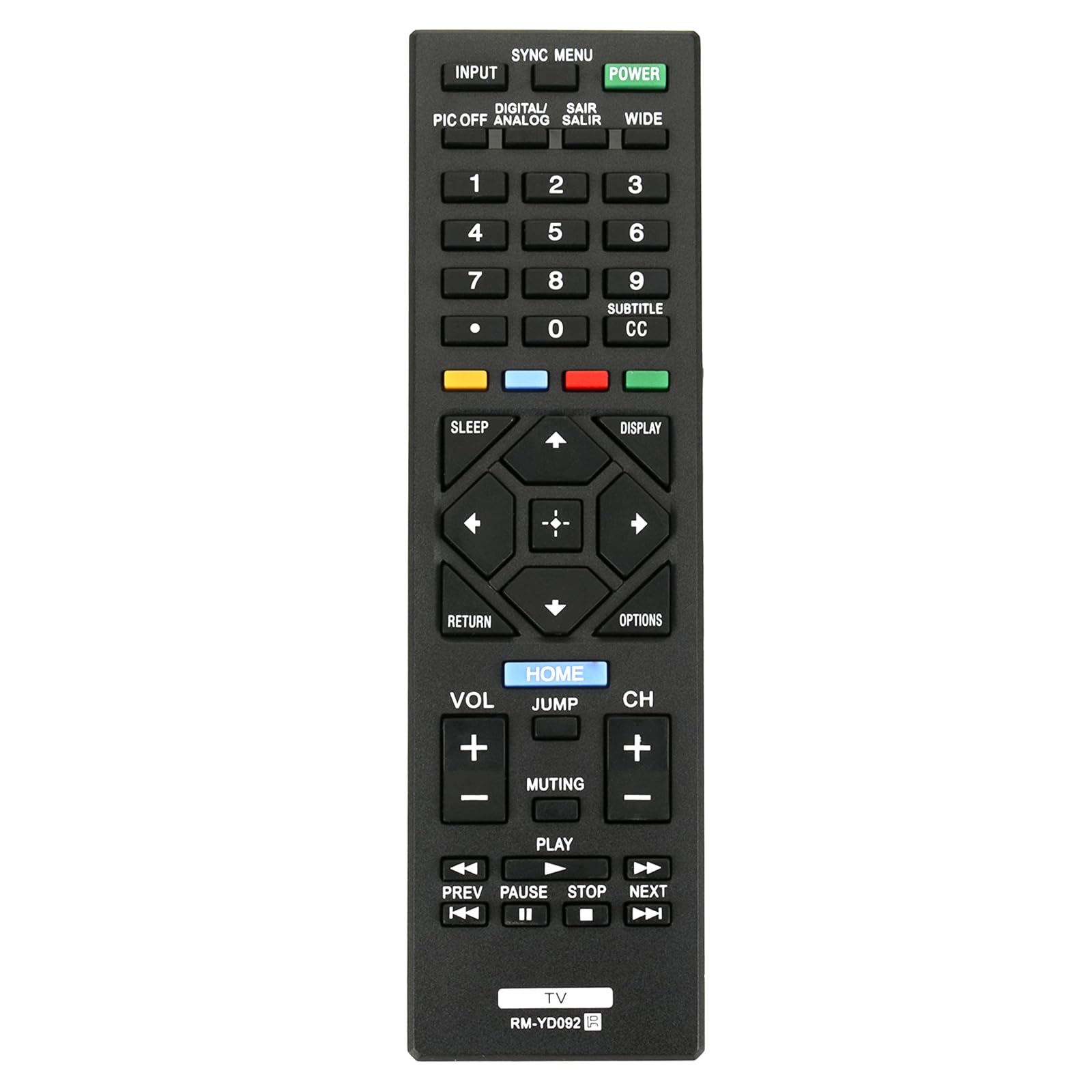
Image: Front view of the VINABTY RM-YD092 replacement remote control, showing all buttons and its ergonomic design.
Compatibility
The VINABTY RM-YD092 remote control is compatible with a wide range of Sony LED HDTV models. Some of the compatible models include:
- KDL-32R300C, KDL-32R330B, KDL-32R420B, KDL-32R421A
- KDL-46R450A, KDL-46R453A, KDL-46R471A
- KDL-48R470B, KDL-50R450, KDL-50R450A
- KDL-32R300B, KDL-32R400A, KDL-40R450A, KDL-40R350B
This list is not exhaustive. If your original remote was RM-YD092, this replacement will function correctly.

Image: The RM-YD092 remote control displayed next to a television screen, illustrating its compatibility with various Sony TV models.
Setup
Battery Installation
The VINABTY RM-YD092 remote control requires two (2) AAA batteries (not included) for operation.
- Locate the battery compartment on the back of the remote control.
- Slide the battery compartment cover downwards to open it.
- Insert two AAA batteries, ensuring the positive (+) and negative (-) terminals align correctly with the markings inside the compartment.
- Slide the battery compartment cover back into place until it clicks securely.
Once batteries are installed, the remote is ready for use. No programming or pairing is required.

Image: Rear view of the RM-YD092 remote control, highlighting the battery compartment cover.
Operating Instructions
The RM-YD092 remote control features a standard layout for Sony televisions. Below is a general overview of common button functions:

Image: Close-up view of the RM-YD092 remote control, detailing the layout and labels of its 45 buttons.
| Button | Function |
|---|---|
| POWER | Turns the TV on or off. |
| INPUT | Selects the input source (e.g., HDMI 1, AV). |
| SYNC MENU | Accesses the BRAVIA Sync (HDMI CEC) menu. |
| Number Buttons (0-9) | Direct channel selection. |
| VOL +/- | Adjusts the volume level. |
| CH +/- | Changes TV channels. |
| MUTING | Mutes or unmutes the TV sound. |
| HOME | Accesses the TV's Home menu or Smart TV features. |
| RETURN | Goes back to the previous screen or menu. |
| OPTIONS | Displays context-sensitive options for the current screen. |
| Navigation Pad (Up, Down, Left, Right, Enter) | Navigates through menus and confirms selections. |
| SLEEP | Sets the sleep timer. |
| DISPLAY | Shows on-screen information (e.g., channel, time). |
| SUBTITLE CC | Activates or deactivates subtitles/closed captions. |
| Media Control Buttons (PLAY, PAUSE, STOP, PREV, NEXT) | Controls playback of media content (e.g., USB, streaming apps). |
Note: Specific button functions may vary slightly depending on your Sony TV model.
Maintenance
Cleaning the Remote
- Wipe the remote control with a soft, dry cloth.
- For stubborn dirt, slightly dampen the cloth with water or a mild cleaning solution. Avoid excessive moisture.
- Do not use abrasive cleaners, alcohol, or benzene, as these can damage the remote's surface or internal components.
Battery Replacement
Replace batteries when the remote control's response becomes sluggish or stops working. Always replace both batteries at the same time with new AAA alkaline batteries. Do not mix old and new batteries, or different types of batteries.
Storage
If the remote control will not be used for an extended period, remove the batteries to prevent leakage and potential damage to the device.
Troubleshooting
| Problem | Possible Cause / Solution |
|---|---|
| Remote is not working. |
|
| Remote works intermittently. |
|
| Certain buttons do not work. |
|
If troubleshooting steps do not resolve the issue, please refer to the support section.
Specifications
| Feature | Detail |
|---|---|
| Model Name | RM-YD092 |
| Brand | VINABTY |
| Connectivity Technology | Infrared (IR) |
| Compatible Devices | Sony LED HDTVs (various models) |
| Power Source | 2 x AAA Alkaline Batteries (not included) |
| Maximum Range | 33 Feet (approx. 10 meters) |
| Button Quantity | 45 |
| Color | Black |
| Special Feature | Ergonomic design |
| Dimensions (L x W x H) | Approximately 5" x 1.9" x 0.5" (12.7 cm x 4.8 cm x 1.3 cm) |

Image: The RM-YD092 remote control shown with its length (6.30 inches) and width (1.77 inches) indicated.
Warranty Information
VINABTY replacement remote controls typically come with a standard replacement warranty. For specific warranty terms and conditions, please refer to the product packaging or contact the seller directly. Keep your purchase receipt as proof of purchase.
Customer Support
If you encounter any issues or have questions regarding your VINABTY RM-YD092 replacement remote control that are not covered in this manual, please contact the seller or VINABTY customer support for assistance.
When contacting support, please provide the following information:
- Product Model: RM-YD092
- Your TV Model (e.g., Sony KDL-32R300C)
- A detailed description of the issue
- Date of purchase
For general inquiries or to report a problem, you may also visit the product page on Amazon or contact the seller "Promotion-Shopping store" directly through the Amazon platform.


