
1. Introduction
This manual provides detailed instructions for the installation, operation, and maintenance of your RISEPRO Wireless Bicycle Computer YT-813. This device is designed to provide essential cycling data, including speed, distance, and time, with a clear 4-line display and backlight for enhanced visibility. It is suitable for various bicycles, electric bikes, and motorcycles with wheel sizes ranging from 4 to 40 inches.

Image 1.1: RISEPRO Wireless Bicycle Computer YT-813 in use, demonstrating its waterproof design.
2. Key Features
- Large & Clear 4-Line Display: Provides easy and clear viewing of cycling data.
- Two Bike Settings (Bike A & Bike B): Allows pre-programming for two different bicycles, enabling data comparison without re-setting.
- Multi-Functionality: Includes Odometer, Maximum Speed, Average Speed, Driving Time, Calorie Consumption, Speedometer, and more.
- Wireless Induction: Features a 60cm reception range between the computer and transmitter, and a 1cm range between the transmitter and magnet.
- Wide Compatibility: Compatible with wheel sizes from 4 to 40 inches.
- Backlight: Designed for night riding visibility.
- Waterproof Design: Suitable for use in various weather conditions.

Image 2.1: Overview of the major functions displayed on the computer.

Image 2.2: Compatibility of the bicycle computer with various vehicle types.
3. Setup and Installation
Proper installation is crucial for accurate readings. Follow these steps carefully:
- Battery Installation: Install the two CR2032 batteries into the computer unit and the wireless transmitter. Ensure correct polarity.
- Mounting the Computer: Fix the bicycle computer onto your handlebar using the provided mount and cable ties. Ensure it is securely fastened and does not rotate during use.
- Mounting the Transmitter: Attach the wireless transmitter to the front fork of your bike.
- Attaching the Magnet: Secure the adhesive speed magnet to a spoke on your wheel.
- Positioning:
- Ensure the distance between the transmitter and the computer is less than 60cm.
- Ensure the distance between the transmitter and the magnet is no more than 1cm. Precise alignment is critical for consistent signal pickup.
- Wheel Circumference Setting: After installation, power on the computer. You will need to set the wheel circumference for accurate speed and distance measurements. Refer to the manual's specific section for programming this value. It is recommended to manually measure your wheel's circumference for best accuracy, rather than relying solely on default values.
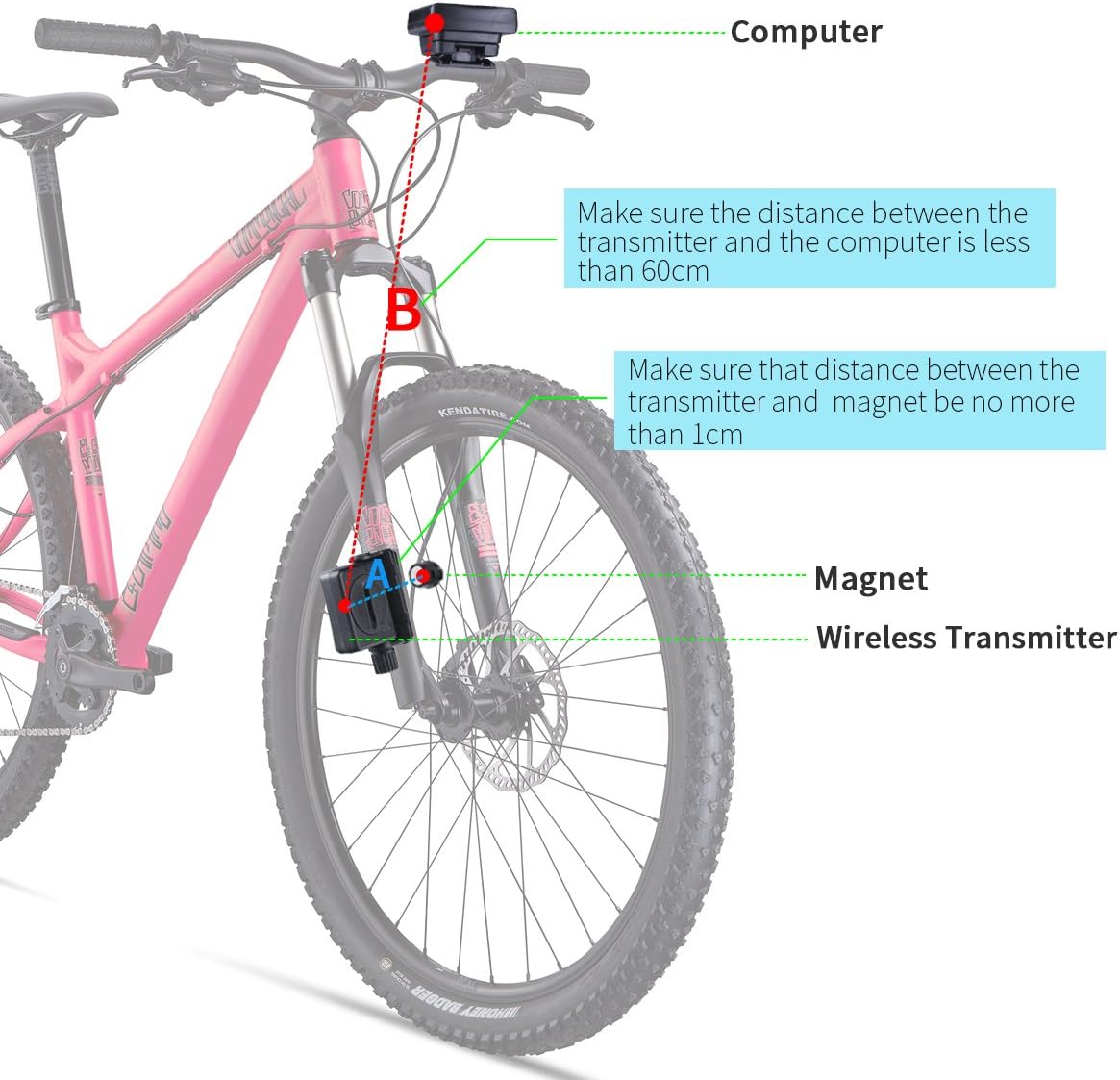
Image 3.1: Step-by-step installation guide for the bicycle computer components.

Image 3.2: Wireless setup diagram showing optimal distances between components.

Image 3.3: All components included with the RISEPRO Bicycle Computer.
4. Operation
The RISEPRO Bicycle Computer features a user-friendly interface with multiple display modes and functions.
4.1 Display Modes and Functions
The computer cycles through various data displays. Press the 'MODE' button to switch between different screens. Common displays include:
- Current Speed (SPD)
- Maximum Speed (MAX)
- Average Speed (AVS)
- Odometer (ODO) - Total distance
- Trip Distance (DST)
- Riding Time (RAT)
- Calorie Consumption (CAL)
- Temperature (Th) - Can be set to Celsius or Fahrenheit.
- Stopwatch (SW)

Image 4.1: Detailed view of the computer's multi-line display.
4.2 Backlight Function
The backlight feature allows for clear visibility during night riding or in low-light conditions. Activate the backlight by pressing the designated button (refer to your specific unit's button layout, often the 'MODE' button held for a few seconds or a dedicated light button). The backlight typically stays on for a few seconds before turning off automatically to conserve battery.
Image 4.2: Comparison of Night Mode (with backlight) and Day Mode display.
4.3 Two Bike Settings (Bike A / Bike B)
This model supports settings for two different bikes. This allows you to store distinct wheel circumference values and track data separately for each bike. Consult the full user manual for detailed instructions on how to switch between Bike A and Bike B settings and how to program each profile.
5. Maintenance
To ensure the longevity and optimal performance of your RISEPRO Bicycle Computer, follow these maintenance guidelines:
- Cleaning: Wipe the unit with a soft, damp cloth. Do not use abrasive cleaners or solvents.
- Water Resistance: The unit is waterproof, but avoid submerging it in water for extended periods or exposing it to high-pressure water jets.
- Battery Replacement: When the display becomes dim or erratic, replace the CR2032 batteries in both the computer and the transmitter. Ensure proper disposal of old batteries.
- Storage: If storing the computer for an extended period, remove the batteries to prevent leakage. Store in a cool, dry place.
6. Troubleshooting
If you encounter issues with your bicycle computer, refer to the following common problems and solutions:
| Problem | Possible Cause | Solution |
|---|---|---|
| No speed reading / Inconsistent readings | Magnet and transmitter misalignment or distance too large. Low battery in transmitter. | Ensure magnet and transmitter are within 1cm. Check and replace transmitter battery. Verify transmitter is securely mounted and not shifting. |
| Display is blank or dim | Low battery in computer unit. | Replace the CR2032 battery in the computer unit. |
| Computer does not stay clipped to handlebar | Mount not secure or insufficient grip. | Ensure cable ties are pulled very tight. Consider adding a thin piece of rubber under the bracket for better grip and to prevent rotation. |
| Difficulty entering programming mode or setting values | Incorrect button sequence or timing out. | Refer to the detailed programming section in the full user manual. Ensure you complete steps before the unit times out. |
| Inaccurate distance/speed readings | Incorrect wheel circumference setting. | Re-measure your wheel's circumference precisely and re-enter the value in the settings. |
7. Specifications
| Attribute | Detail |
|---|---|
| Model Number | YT-813 |
| Product Dimensions | 4.5 x 1.8 x 5.4 cm |
| Item Weight | 82 g |
| Display Type | LCD |
| Display Size | 40 Inches (diagonal) |
| Power Source | 2 x CR2032 batteries (required) |
| Connectivity Technology | Proprietary Wireless |
| Sensor Type | Speed Sensor |
| Material | Plastic |
| International Protection Rating | Waterproof (no specific IP rating provided) |
| Included Components | 1 bicycle computer, sensor, 2 CR2032 batteries, mount, cable ties, adhesive speed magnet, user manual |
8. Warranty and Support
For warranty information or technical support, please refer to the contact details provided with your product packaging or visit the official RISEPRO website. Keep your purchase receipt as proof of purchase for any warranty claims.