
Scott Aerator 1/2 HP-400 gpm 115v
Scott Aerator Aquasweep with Oscillator User Manual
Model: 1/2 HP-400 gpm 115v
Introduction
This manual provides comprehensive instructions for the installation, operation, and maintenance of your Scott Aerator Aquasweep with Oscillator. This device is designed to effectively clear muck, silt, and debris from lake and pond bottoms, improving water quality and maintaining clear areas around docks and swimming areas. Please read this manual thoroughly before use to ensure safe and optimal performance.
Safety Information
WARNING: Risk of Electric Shock. Always disconnect power before handling or servicing the unit.
- Ensure the power supply matches the unit's voltage (115V).
- Do not operate the unit if the power cord is damaged.
- Keep children and pets away from the operating unit.
- Always use a Ground Fault Circuit Interrupter (GFCI) with this product.
- Do not attempt to open or repair the sealed motor housing. Refer all servicing to qualified personnel.
- Ensure proper ventilation around the control unit.
Package Contents
Verify that all components are present before beginning installation:
- Aquasweep Muck Blaster Unit with Motor and Propeller Guard
- Oscillator Control Unit
- Mounting Hardware (Dock Mount Bracket, Poles, Clamps)
- Power Cord (50ft)
- User Manual (this document)
Setup and Installation
The Aquasweep is designed for dock mounting. Follow these steps for secure installation:
Assemble the Mounting Poles:
Connect the two vertical poles to the dock mount bracket using the provided clamps and bolts. Ensure they are securely fastened.

Image: The Aquasweep's blue control unit mounted atop two vertical poles, ready for attachment to the main unit and dock.
Attach the Aquasweep Unit:
Secure the Aquasweep motor unit to the lower end of the assembled poles. The propeller guard should face away from the dock. Adjust the height so the propeller is submerged at the desired depth, typically 1-2 feet above the bottom for muck blasting.
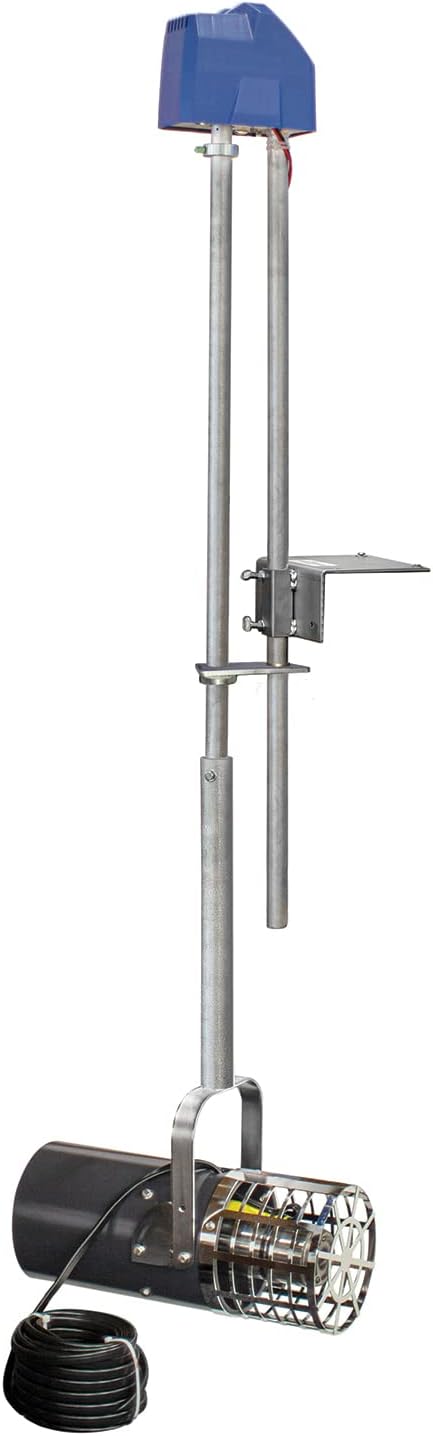
Image: The complete Aquasweep unit, featuring the submersible motor with propeller guard at the bottom, connected to two vertical support poles, and topped by the blue oscillator control unit.
Mount to Dock:
Position the entire assembly on your dock. Use appropriate fasteners (not included, as dock materials vary) to securely attach the dock mount bracket to a sturdy part of your dock. Ensure the unit is stable and will not shift during operation.

Image: The Aquasweep unit securely mounted to the side of a wooden dock, with the motor submerged in the water, demonstrating a typical installation scenario.
Connect Power:
Route the 50ft power cord from the Aquasweep motor to the oscillator control unit, and then to a dedicated 115V GFCI-protected outdoor electrical outlet. Ensure all connections are dry and secure. Avoid kinks or sharp bends in the power cord.

Image: A detailed view of the blue oscillator control unit, showing indicator lights for Power, Setup, and Status, along with control buttons and contact information for support.
Operating Instructions
Once installed and powered, the Aquasweep with Oscillator is ready for operation.
Power On:
Plug the unit into the GFCI-protected outlet. The "Power" indicator light on the control unit should illuminate.
Adjust Oscillation (if applicable):
The oscillator feature allows the unit to sweep a wider area. Refer to the control unit's specific buttons for adjusting the sweep angle or activating/deactivating oscillation. The "Setup" button may be used to enter configuration mode for oscillation settings.
Monitor Performance:
Observe the "Status" indicator light for normal operation. The unit will begin to push water, clearing muck and debris. Adjust the depth or position as needed to optimize performance for your specific area.
Run Time:
The duration of operation depends on the amount of muck and the desired clarity. For initial clearing, continuous operation for several hours or days may be required. For maintenance, shorter, periodic runs are usually sufficient.
Power Off:
To turn off the unit, simply unplug it from the GFCI outlet.
Maintenance
Regular maintenance ensures the longevity and efficiency of your Aquasweep.
Periodic Cleaning:
Periodically inspect the propeller guard for debris such as weeds, fishing lines, or plastic bags. Disconnect power before removing any obstructions. A clogged guard can reduce performance and strain the motor.
Winter Storage:
In freezing climates, remove the unit from the water before temperatures drop below freezing. Clean the unit thoroughly with fresh water, dry it, and store it in a dry, protected area away from direct sunlight and extreme temperatures.
Cord Inspection:
Regularly inspect the power cord for any signs of damage, fraying, or cuts. If damage is found, discontinue use immediately and contact customer support for replacement or repair.
Troubleshooting
| Problem | Possible Cause | Solution |
|---|---|---|
| Unit does not turn on. | No power, tripped GFCI, damaged cord. | Check power outlet, reset GFCI, inspect cord for damage. |
| Reduced water flow/muck clearing. | Clogged propeller guard, incorrect depth. | Disconnect power and clear debris from guard. Adjust unit depth. |
| Unit makes unusual noise. | Debris in propeller, motor issue. | Disconnect power and check for debris. If noise persists, contact support. |
| Oscillation not working. | Oscillator setting incorrect, internal issue. | Refer to operating instructions for oscillation setup. If problem persists, contact support. |
Specifications
- Model: 1/2 HP-400 gpm 115v
- Brand: Scott Aerator
- Material: Stainless Steel
- Style: Submersible
- Power Source: Corded Electric
- Item Weight: 70 Pounds
- Maximum Flow Rate: 500 Gallons Per Minute
- Maximum Lifting Height: 7 Feet
- Voltage: 115 Volts
- Product Dimensions: 84 x 4 x 84 inches
- UPC: 065500385620
Warranty and Support
For warranty information or technical assistance, please contact Scott Aerator customer support. Refer to the contact information provided on the product packaging or the control unit (e.g., "For Support call 701-325-9876" as seen in image).
Manufacturer: Scott Aerator Company LLC
Website: www.scottaerator.com
Phone: (Refer to product for specific number, e.g., 701-325-9876)
Ask a question about this manual
Ask about setup, troubleshooting, compatibility, parts, safety, or missing instructions. Manuals+ will review the question and use this page’s manual context to help answer it.