
Micro Trader B01KVFF2AQ
Throttle Trigger Strimmer Trimmer Handle Switch User Manual
Brand: Micro Trader
1. Introduction
This manual provides essential information for the proper installation, operation, and maintenance of your Micro Trader Throttle Trigger Strimmer Trimmer Handle Switch. This component is designed as a replacement part for various strimmers, trimmers, and brush cutters, offering a complete throttle trigger, switch, and throttle cable assembly.
2. Safety Information
Always prioritize safety when working with power tools and replacement parts. Read and understand all instructions before installation and operation.
- Ensure the power tool is turned off and disconnected from its power source (e.g., spark plug wire removed, battery disconnected) before attempting any installation or maintenance.
- Wear appropriate personal protective equipment (PPE), including gloves and eye protection.
- If you are unsure about any installation step, consult a qualified technician.
- Keep children and bystanders away from the work area.
- Verify all connections are secure before operating the equipment.
3. Product Overview
The Throttle Trigger Strimmer Trimmer Handle Switch is a comprehensive unit that integrates the throttle control, an on/off switch, and the necessary throttle cable for connecting to your equipment's carburetor or engine. It is designed for universal fitment on various strimmers, trimmers, and brush cutters.

Figure 3.1: Overall view of the Throttle Trigger Strimmer Trimmer Handle Switch, showing the black handle, orange trigger, and the coiled cable extending from it.
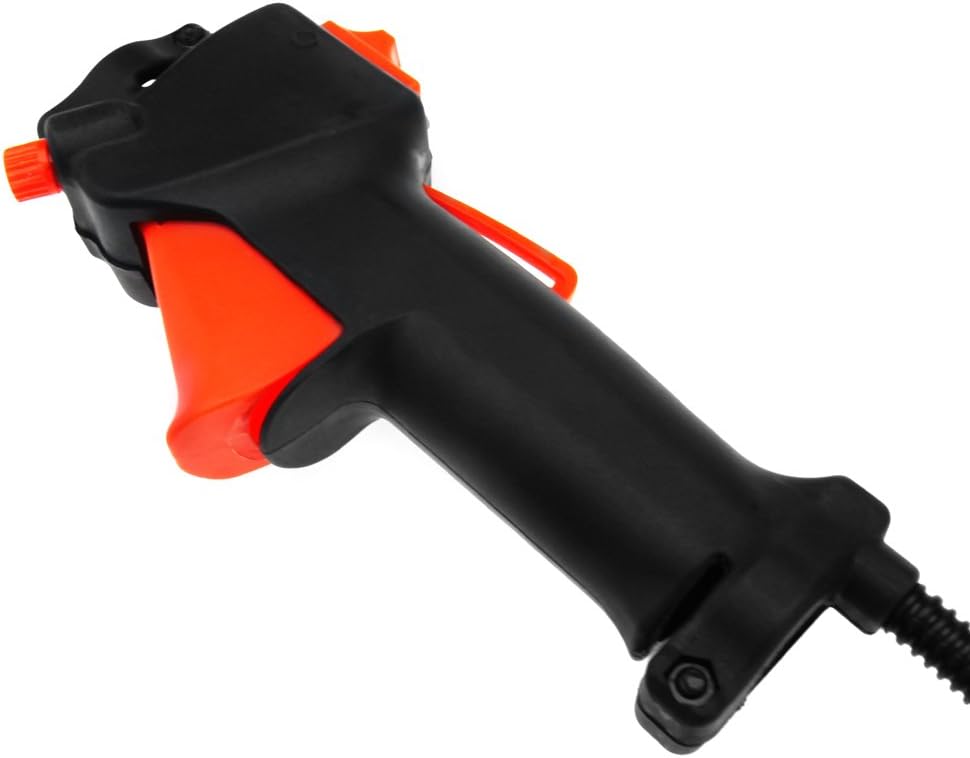
Figure 3.2: Side view of the handle switch, highlighting the orange throttle trigger and the integrated safety lock mechanism.

Figure 3.3: Close-up view of the cable's termination, showing the exposed throttle wire and the two electrical connectors (red and black wires) for the switch.
4. Setup and Installation
This section outlines the general steps for replacing your existing handle switch with the new unit. Specific installation procedures may vary depending on your equipment model.
4.1 Pre-Installation Checklist
- Ensure the equipment is off and cooled down.
- Gather necessary tools (e.g., screwdrivers, wrenches).
- Review your equipment's specific service manual for detailed instructions on throttle cable and switch replacement.
4.2 Installation Steps
- Remove Old Handle Switch: Carefully disconnect the throttle cable from the carburetor and the electrical wires from the engine or ignition system. Loosen any clamps or screws securing the old handle switch to the equipment's handle tube and remove it.
- Install New Handle Switch: Slide the new handle switch onto the equipment's handle tube. The tube diameter for this switch is approximately 26mm. Secure it in place using the integrated mounting points.
- Connect Throttle Cable: Route the new throttle cable (approx. 114cm in length) to the carburetor. Connect the end of the throttle cable to the carburetor linkage, ensuring it moves freely and without binding.
- Connect Electrical Wires: Connect the electrical wires (red and black) from the new switch to the corresponding terminals on your equipment's engine or ignition system. Pay attention to polarity if specified by your equipment's manual.
- Test Functionality: Before starting the engine, manually operate the throttle trigger to ensure smooth movement and proper engagement of the throttle cable. Verify the on/off switch functions correctly.

Figure 4.1: Top view of the handle switch, illustrating the position of the red on/off switch and its markings.
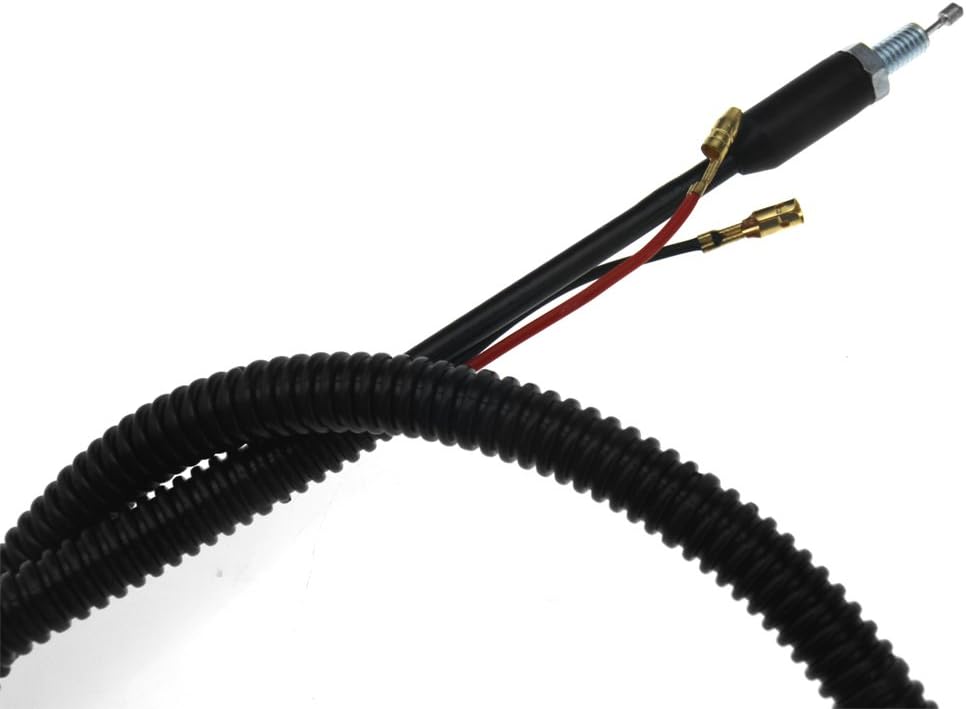
Figure 4.2: Detailed view of the cable emerging from the handle, showing the protective corrugated tubing and the individual red and black electrical wires with their connectors.
5. Operating Instructions
Once installed, the handle switch provides intuitive control over your equipment's engine speed and power.
- Engine Start/Stop: Use the red on/off switch located on the top of the handle to control the engine's power. Move the switch to the "ON" position to allow the engine to start, and to the "OFF" position to stop the engine.
- Throttle Control: The orange trigger on the underside of the handle controls the engine's RPM. Squeeze the trigger to increase engine speed and release it to decrease speed.
- Safety Lock: A safety lock mechanism is integrated with the throttle trigger to prevent accidental acceleration. This typically requires the safety lever to be depressed before the throttle trigger can be squeezed.
6. Maintenance
Regular maintenance ensures the longevity and proper function of your handle switch.
- Cleaning: Keep the handle switch clean from dirt, debris, and grass clippings. Use a damp cloth to wipe down the exterior. Avoid using harsh chemicals or solvents.
- Cable Inspection: Periodically inspect the throttle cable for any signs of fraying, kinks, or damage. Ensure it moves freely within its casing. Lubricate the cable if necessary, following your equipment's recommendations.
- Electrical Connections: Check electrical connections for corrosion or looseness. Ensure they are secure.
- Storage: When not in use, store the equipment in a clean, dry place, protected from extreme temperatures and direct sunlight.
7. Troubleshooting
If you encounter issues with your handle switch, consider the following common problems and solutions:
| Problem | Possible Cause | Solution |
|---|---|---|
| Engine does not stop when switch is set to "OFF". | Faulty electrical connection or switch. | Check electrical wires for secure connection. Inspect the switch for damage. |
| Throttle trigger is stiff or does not return smoothly. | Throttle cable kinked, dirty, or damaged. Debris in trigger mechanism. | Inspect and clean the throttle cable and trigger area. Lubricate cable if needed. Replace cable if damaged. |
| Engine does not respond to throttle input. | Throttle cable disconnected or broken. Carburetor linkage issue. | Verify throttle cable is securely connected at both ends. Check carburetor linkage. |
If problems persist after attempting these solutions, it is recommended to consult a qualified service technician.
8. Specifications
| Feature | Specification |
|---|---|
| Product Type | Throttle Trigger Strimmer Trimmer Handle Switch |
| Brand | Micro Trader |
| Throttle Cable Length | Approx. 114 cm (44.9 inches) |
| Handle Length | Approx. 20 cm (7.9 inches) |
| Tube Diameter (for mounting) | Approx. 26 mm (1.02 inches) |
| Item Weight | Approx. 7.4 ounces (210 grams) |
| Package Dimensions | 9.69 x 7.05 x 1.77 inches |
| Country/Region of Manufacture | Hong Kong |
9. Warranty and Support
For warranty information or technical support, please refer to the retailer or manufacturer's official website where the product was purchased. Keep your proof of purchase for any warranty claims.
Ask a question about this manual
Ask about setup, troubleshooting, compatibility, parts, safety, or missing instructions. Manuals+ will review the question and use this page’s manual context to help answer it.