
Introduction
Thank you for choosing the Gosasa Solar Power LED Digital Watch, Model 1405. This watch is designed for outdoor sports enthusiasts, offering multiple functions and reliable performance. Its solar power feature ensures long-lasting operation, while its 50M water resistance makes it suitable for various activities. Please read this manual carefully to understand the features and proper operation of your new watch.

Image: Front view of the Gosasa Solar Power LED Digital Watch, Model 1405, displaying the time and date.
Product Overview
The Gosasa Model 1405 watch combines solar power with a robust digital display and multiple functions, making it ideal for daily wear and outdoor activities. Key features include:
- Solar Power: Environmentally friendly solar charging for extended battery life.
- Multifunctionality: Auto date, alarm, 12/24h format, water resistant, LED display, shock resistant, stopwatch, and backlight.
- Durability: Shock-resistant design with 50M water resistance.
- Clear Display: Large, easy-to-read digital display with LED backlight for low-light conditions.
Watch Components
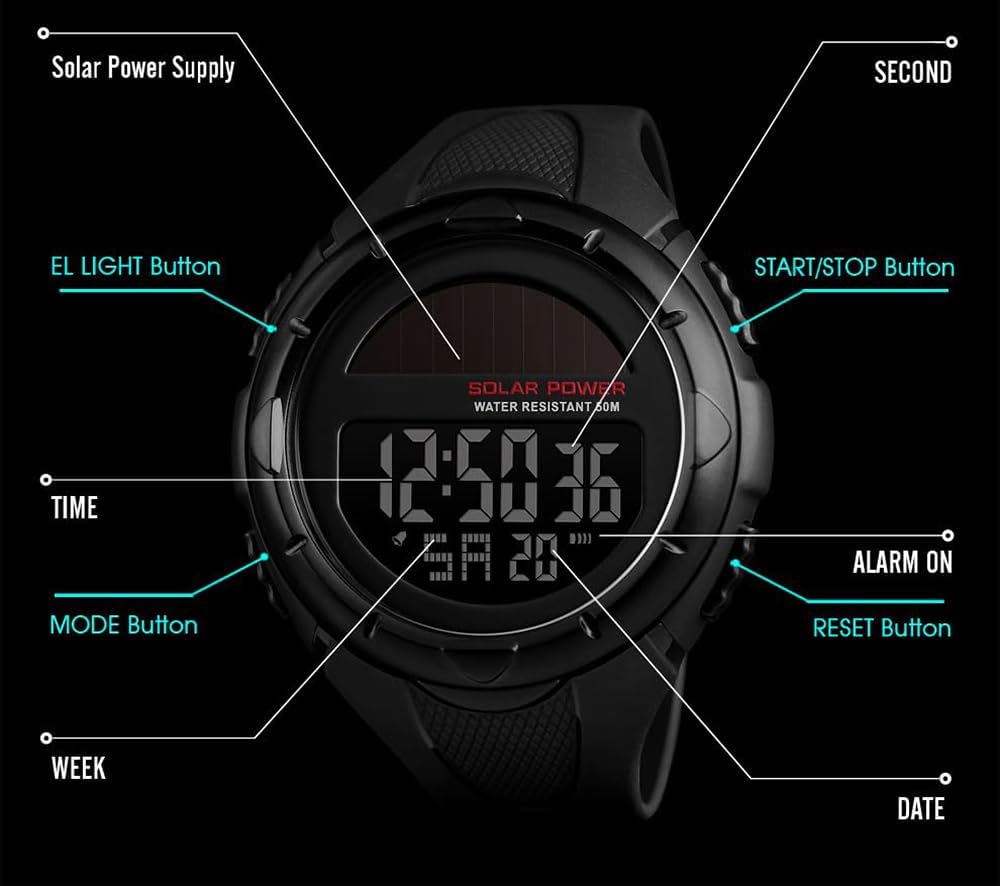
Image: Diagram illustrating the watch's buttons and display features, including Solar Power Supply, EL LIGHT Button, MODE Button, TIME, WEEK, DATE, SECOND, START/STOP Button, ALARM ON, and RESET Button.
- EL LIGHT Button: Activates the LED backlight.
- MODE Button: Cycles through different watch modes (Time, Stopwatch, Alarm).
- START/STOP Button: Used to start and stop functions like the stopwatch.
- RESET Button: Used to reset functions or adjust settings.
Video: An official product video from Gosasa showcasing the features and design of the Multifunction Solar Power LED Digital Watch.
Setup
Initial Charging
Your Gosasa watch is equipped with solar power. For optimal performance, expose the watch face to light (natural sunlight or strong artificial light) for several hours before initial use. This will ensure the built-in battery is sufficiently charged.

Image: A close-up of the watch face, highlighting the solar panel, indicating its solar charging capability.
Setting Time and Date
To set the time and date:
- In normal time display mode, press the MODE button repeatedly until the seconds begin to flash. This indicates you are in setting mode.
- Press the RESET button to cycle through the setting options: seconds, hours, minutes, year, month, day.
- Use the START/STOP button to adjust the flashing value.
- Once all settings are correct, press the MODE button to exit the setting mode.
To switch between 12-hour and 24-hour format, while in time setting mode, adjust the hour using the START/STOP button. The 'A' (AM) or 'P' (PM) indicator will appear for 12-hour format, or no indicator for 24-hour format.
Operating Functions
Mode Selection
Press the MODE button to cycle through the following functions:
- Normal Time Display
- Stopwatch
- Alarm
Stopwatch Function
- From normal time display, press the MODE button once to enter stopwatch mode. The display will show '00:00:00'.
- Press the START/STOP button to start the stopwatch.
- Press the START/STOP button again to pause the stopwatch.
- Press the RESET button to reset the stopwatch to '00:00:00'.
Alarm Function
- From normal time display, press the MODE button twice to enter alarm setting mode. The alarm time will flash.
- Press the RESET button to select hours or minutes.
- Use the START/STOP button to adjust the flashing value.
- Press the MODE button to confirm and exit alarm setting.
To turn the alarm on or off, in alarm mode, press the START/STOP button. An alarm icon will appear or disappear on the display.
LED Backlight
Press the EL LIGHT button (top left) to illuminate the display for a few seconds, allowing you to read the time in low-light conditions.

Image: The watch display illuminated by its LED backlight, showing clear visibility in the dark.
Maintenance
Water Resistance
This watch is 50M (5ATM) water resistant, suitable for daily use, hand washing, rain, sweating, and swimming. However, do not press any buttons while the watch is submerged in water, as this can compromise the water seal and cause damage.

Image: The watch partially submerged in water, illustrating its 50M water-resistant capability.
Cleaning and Care
- Wipe the watch regularly with a soft, dry cloth to remove dirt and moisture.
- Avoid exposing the watch to extreme temperatures or direct sunlight for prolonged periods when not in use, as this can affect battery life and display.
- Keep the watch away from strong magnetic fields.
Solar Charging Tips
To maintain optimal battery charge, ensure the watch is regularly exposed to light. If stored in darkness for extended periods, the battery may deplete, requiring a longer exposure to light to fully recharge.
Troubleshooting
Common Issues and Solutions
| Problem | Possible Cause | Solution |
|---|---|---|
| Display is blank or dim. | Low battery charge. | Expose the watch face to strong light for several hours to recharge the solar battery. |
| Time is incorrect. | Time settings need adjustment. | Refer to the "Setting Time and Date" section to reset the time. |
| Alarm does not sound. | Alarm is turned off or set incorrectly. | Ensure the alarm is activated (alarm icon visible) and the time is set correctly. |
| Water inside the watch. | Buttons pressed underwater or exceeding water resistance limits. | Immediately stop using the watch and seek professional repair. Avoid pressing buttons underwater. |
Specifications
Detailed technical specifications for the Gosasa Solar Power LED Digital Watch, Model 1405:
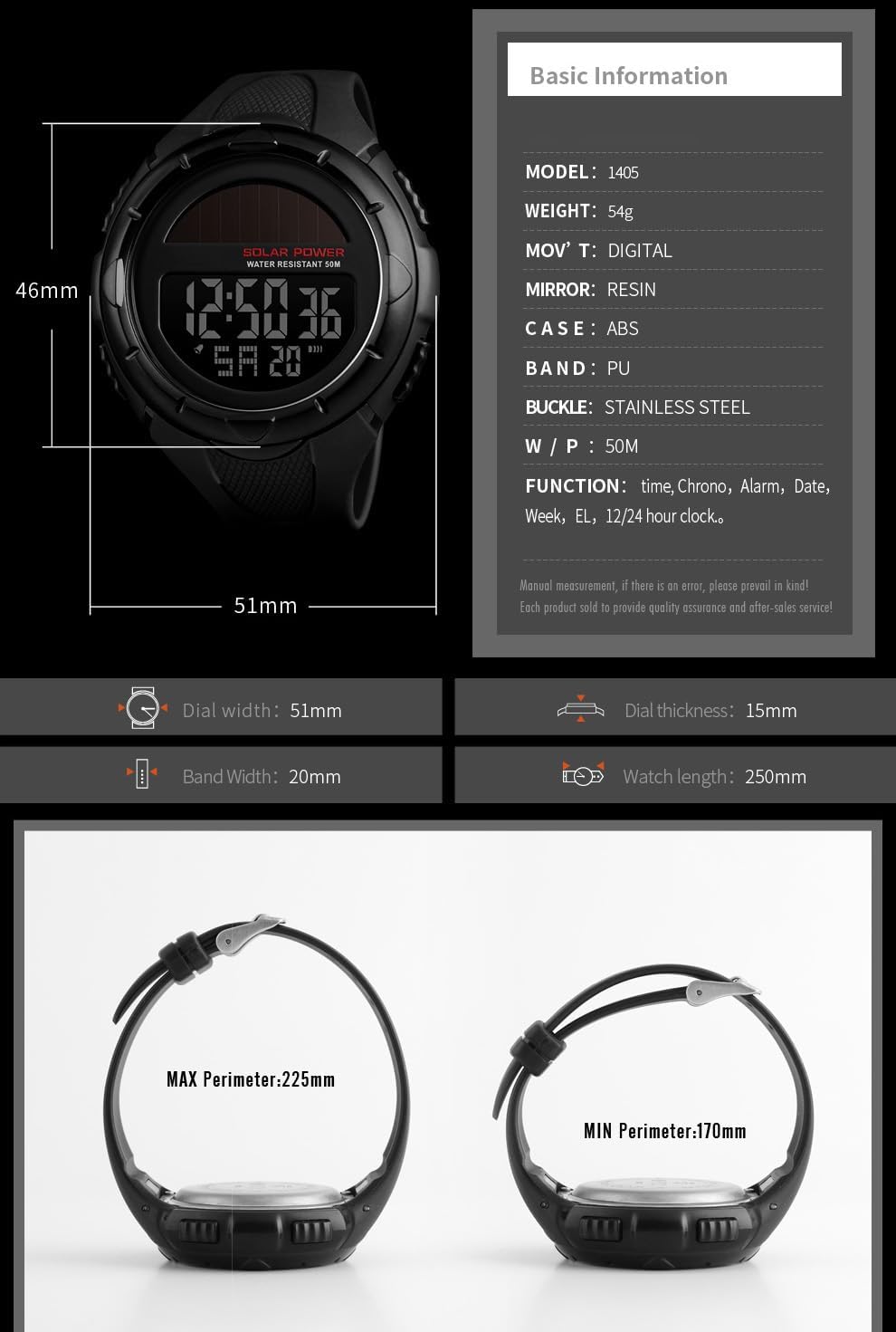
Image: Infographic detailing the watch's basic information and dimensions, including model, weight, movement type, mirror material, case material, band material, buckle type, water resistance, and functions.
| Feature | Detail |
|---|---|
| Model Number | 1405 |
| Brand | Gosasa |
| Display Type | Digital |
| Movement Type | Digital |
| Case Material | Resin |
| Band Material | Resin |
| Water Resistance Depth | 50 Meters (5ATM) |
| Special Features | Chronograph, Shock resistant, Stopwatch, LED backlight, Alarm, Auto Date, 12/24h format |
| Item Weight | 2.4 ounces (approx. 68g) |
| Band Length | 250 Millimeters |
| Clasp Type | Buckle |
Warranty and Support
Warranty Information
The Gosasa Solar Power LED Digital Watch, Model 1405, comes with a 12-month (1 year) warranty from the date of purchase. This warranty covers manufacturing defects under normal use. It does not cover damage caused by misuse, accidents, unauthorized repairs, or normal wear and tear.
Customer Support
For any product issues, questions, or warranty claims, please contact Gosasa customer support. We are committed to providing a satisfactory solution and will respond to all inquiries within 24 hours.
Please refer to the seller's contact information on the platform where you purchased the watch for direct support channels.