
1. Product Overview
The Mikado MD-99BT is a versatile portable Bluetooth speaker that combines high-quality audio with practical features such as an FM radio, digital clock, and alarm function. Designed for ease of use and portability, it offers multiple connectivity options for your audio needs.
Key Features:
- 6W Audio Output Power (3W+3W)
- Rechargeable Battery for portability
- Supports Bluetooth, FM Radio, USB, SD Card, and AUX input
- Integrated Digital Clock and Alarm Function
- Adjustable Sleep Mode (up to 120 minutes)
- Blue Backlight LED Display for clear visibility
- 45mm Driver Unit for enhanced sound
Package Contents:
- Mikado MD-99BT Bluetooth Speaker
- User Manual (this document)
- Charging Cable
- Audio Cable (AUX)
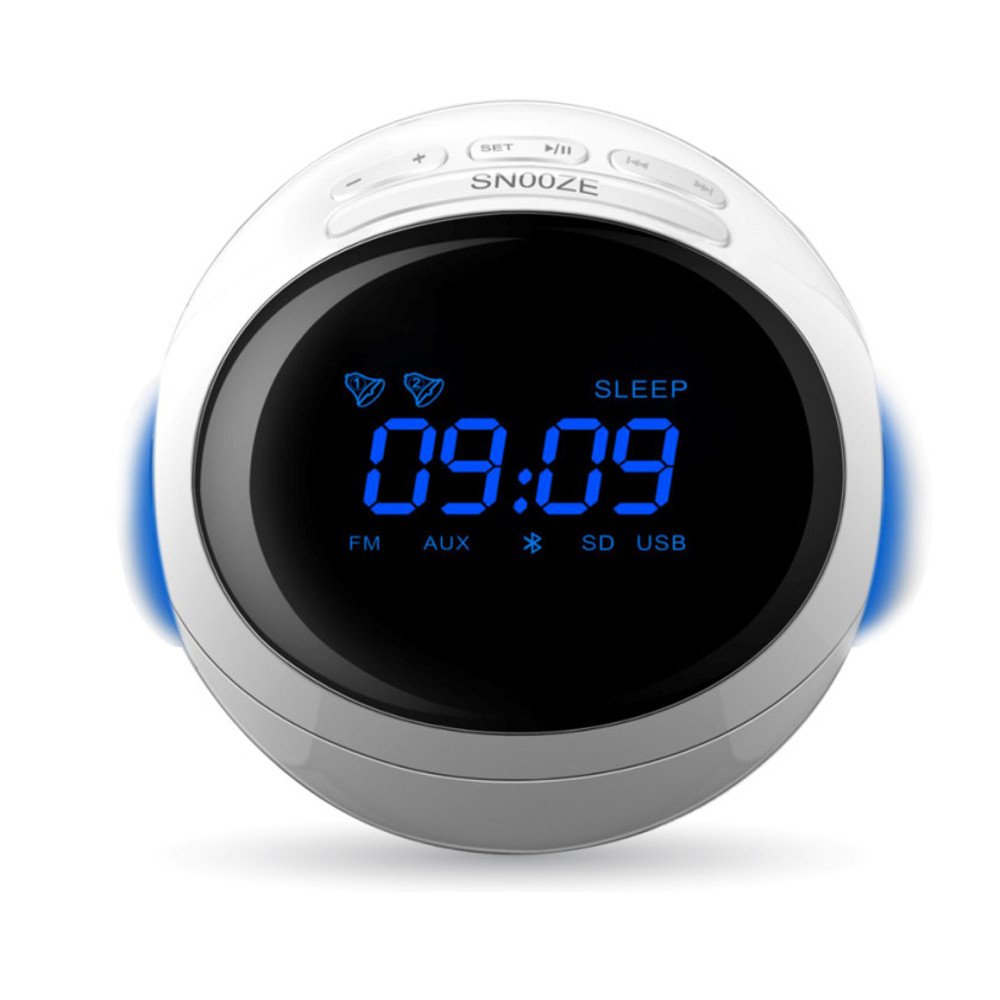
Figure 1: Mikado MD-99BT Bluetooth Speaker and its retail packaging. The speaker is white with a blue LED display showing '09:09'. The packaging box is visible on the left.
2. Setup
2.1 Initial Charging
- Connect the provided charging cable to the speaker's charging port.
- Plug the other end of the cable into a standard USB power adapter (not included) or a computer's USB port.
- The charging indicator light will illuminate. Allow approximately 3-4 hours for a full charge before first use. The indicator light will change or turn off once fully charged.
2.2 Powering On/Off
- To power on, press and hold the SNOOZE/POWER button for a few seconds until the display lights up.
- To power off, press and hold the SNOOZE/POWER button again until the display turns off.
2.3 Setting the Clock
- In standby mode or while powered on, press and hold the SET button. The hour digits will begin to flash.
- Use the + (Next) or - (Previous) buttons to adjust the hour.
- Press the SET button again to confirm the hour. The minute digits will flash.
- Use the + or - buttons to adjust the minutes.
- Press the SET button one more time to confirm the minutes and exit clock setting mode.
2.4 Setting the Alarm
- Press the SET button once (do not hold). The alarm icon will appear, and the alarm hour digits will flash.
- Use the + or - buttons to set the desired alarm hour.
- Press SET again to confirm the hour. The alarm minute digits will flash.
- Use the + or - buttons to set the desired alarm minutes.
- Press SET again to confirm the minutes. You can then choose the alarm source (e.g., FM radio or a built-in tone) using + or -.
- Press SET one last time to activate the alarm and exit alarm setting mode. The alarm icon will remain on the display.
- To turn off the alarm, press the SET button until the alarm icon disappears from the display.
3. Operating Instructions
3.1 Mode Selection
Press the MODE button (often integrated with SNOOZE or a dedicated button) repeatedly to cycle through available modes: Bluetooth, FM Radio, AUX, USB, SD Card.
3.2 Bluetooth Pairing
- Power on the speaker. The display will show "BT" or a Bluetooth icon, indicating it's in Bluetooth pairing mode. If not, press the MODE button until Bluetooth mode is selected.
- Enable Bluetooth on your mobile device (smartphone, tablet, computer).
- Search for available Bluetooth devices. You should find "MD-99BT" in the list.
- Select "MD-99BT" to pair. A confirmation tone will sound from the speaker once successfully connected.
- You can now play audio from your device through the speaker.
3.3 FM Radio Operation
- Press the MODE button to select FM Radio mode. The display will show "FM" and a frequency.
- To auto-scan and save stations: Press and hold the PLAY/PAUSE button. The speaker will automatically scan for and save available FM stations.
- To manually tune: Use the + (Next) or - (Previous) buttons to change the frequency in small increments.
- To switch between saved stations: Briefly press the + or - buttons.
3.4 USB/SD Card Playback
- Insert a USB flash drive or an SD card (with MP3 audio files) into the respective port.
- The speaker will automatically switch to USB or SD card mode and begin playing audio. If not, press the MODE button to select the correct source.
- Use the PLAY/PAUSE button to play or pause.
- Use the + (Next) or - (Previous) buttons to skip tracks.
3.5 AUX Input
- Connect one end of the 3.5mm audio cable (AUX cable) to the speaker's AUX-in port.
- Connect the other end to the headphone jack of your audio device (e.g., MP3 player, computer).
- Press the MODE button to select AUX mode. The display will show "AUX".
- Control playback and volume from your connected audio device.
3.6 Volume Control
Use the + and - buttons to adjust the speaker's volume in any mode.
3.7 Sleep Mode
The sleep mode allows the speaker to automatically turn off after a set period. To activate and adjust:
- Press the SLEEP button (often integrated with SNOOZE or a dedicated button). The default sleep time (e.g., 15 minutes) will appear.
- Press the SLEEP button repeatedly to cycle through available sleep times (e.g., 15, 30, 60, 90, 120 minutes, or OFF).
- The speaker will automatically turn off after the selected duration.
3.8 Snooze Function
When the alarm sounds, press the SNOOZE button to temporarily silence the alarm. The alarm will sound again after a short interval (e.g., 9 minutes).
4. Maintenance
4.1 Cleaning
- Always power off the device before cleaning.
- Use a soft, dry, lint-free cloth to wipe the exterior of the speaker.
- Do not use abrasive cleaners, waxes, or solvents as they may damage the finish.
- Avoid getting moisture into any openings.
4.2 Battery Care
- To prolong battery life, fully charge the speaker before first use.
- If the speaker will not be used for an extended period, charge it at least once every three months to prevent battery degradation.
- Do not expose the battery to extreme temperatures (hot or cold).
4.3 Storage
- Store the speaker in a cool, dry place away from direct sunlight and excessive humidity.
- Keep out of reach of children.
5. Troubleshooting
| Problem | Possible Cause | Solution |
|---|---|---|
| Speaker does not power on. | Low battery or no power. | Charge the speaker fully. Ensure the charging cable is properly connected. |
| No sound from the speaker. | Volume too low; incorrect mode; device not connected. | Increase speaker volume and source device volume. Ensure correct mode (Bluetooth, AUX, etc.) is selected. Re-pair Bluetooth device or re-connect AUX cable. |
| Bluetooth device cannot pair. | Speaker not in pairing mode; device too far; interference. | Ensure speaker is in Bluetooth mode and discoverable. Move device closer to speaker. Turn off other Bluetooth devices. Try restarting both speaker and device. |
| FM radio reception is poor. | Weak signal; environmental interference. | Adjust the speaker's position. Extend the antenna if available. Perform an auto-scan again. |
| Alarm does not sound. | Alarm not set or deactivated. | Verify that the alarm is set and the alarm icon is visible on the display. Check alarm volume. |
6. Specifications
- Brand: Mikado
- Model Number: MD-99BT
- Product Type: Portable Speaker
- Audio Output Power: 6W (3W + 3W)
- Driver Unit: 45mm
- Connectivity Technology: Bluetooth
- Supported Inputs: Bluetooth, FM Radio, USB, SD Card, AUX (3.5mm)
- Power Source: Battery Powered
- Battery Type: 1 Lithium Ion battery (included)
- Product Weight: 0.64 Kilograms
- Special Features: Digital Clock, Alarm Function, Sleep Mode, LED Display
- Country of Origin: China
7. Warranty Information
This Mikado MD-99BT speaker comes with a standard manufacturer's warranty. Please refer to the warranty card included in your product package for specific terms, conditions, and duration of coverage. The warranty typically covers defects in materials and workmanship under normal use.
Please retain your proof of purchase for any warranty claims.
8. Customer Support
If you encounter any issues not covered in this manual or require further assistance, please contact Mikado customer support.
- Website: www.mikado.com.tr (Note: This is a placeholder URL, please refer to your product packaging or official Mikado website for actual support contact details.)
- Email: support@mikado.com.tr (Placeholder)
- Phone: +90 XXX XXX XX XX (Placeholder)
When contacting support, please have your product model number (MD-99BT) and proof of purchase ready.