Introduction
Thank you for choosing the Mental Beats Indoor/Outdoor Bluetooth Speaker. This manual provides essential information for the safe and efficient operation of your speaker. Please read it thoroughly before use and retain it for future reference.
Safety Information
- Do not expose the speaker to extreme temperatures, direct sunlight, or high humidity.
- Avoid dropping or subjecting the speaker to strong impacts.
- Do not disassemble, repair, or modify the speaker. This will void the warranty.
- Keep the speaker away from water and other liquids. While designed for outdoor use, it is not fully waterproof.
- Use only the provided charging cable or a certified equivalent.
- Dispose of the battery and speaker according to local regulations.
Package Contents
Please check that all items are present:
- Mental Beats Indoor/Outdoor Bluetooth Speaker (Model 00662)
- USB Charging Cable
- User Manual
Product Overview
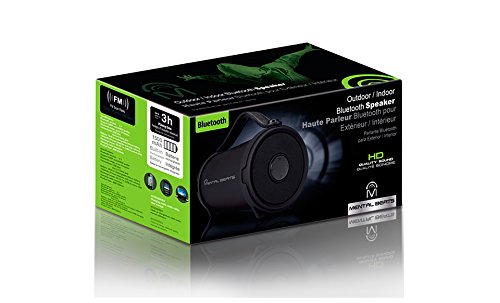
An image showing the Mental Beats Indoor/Outdoor Bluetooth Speaker. It is black, cylindrical, with a sturdy handle for portability. The control panel with buttons is visible on one end.
Control Panel and Ports
The speaker features an intuitive control panel, typically located on one end, and various ports for connectivity and charging.
- Power Button: Press and hold to turn the speaker on or off.
- Play/Pause Button: Press to play or pause audio.
- Volume Up/Next Track Button: Press to increase volume. Press and hold to skip to the next track.
- Volume Down/Previous Track Button: Press to decrease volume. Press and hold to go to the previous track.
- Mode Button: Press to switch between available input modes (e.g., Bluetooth, USB).
- USB Charging Port: For charging the speaker's internal battery.
Setup
1. Charging the Speaker
- Before first use, fully charge the speaker.
- Connect the small end of the USB charging cable to the speaker's USB charging port.
- Connect the large end of the USB charging cable to a USB power adapter (not included) or a computer's USB port.
- The charging indicator light will illuminate. It will typically change color or turn off when charging is complete.
- A full charge provides approximately 3 hours of playing time.
2. Powering On/Off
- To Power On: Press and hold the Power button for a few seconds until you hear an audible prompt or see an indicator light.
- To Power Off: Press and hold the Power button again for a few seconds until the speaker powers down.
3. Bluetooth Pairing
Pair your speaker with a Bluetooth-enabled device such as a smartphone, tablet, or laptop.
- Ensure the speaker is powered on and in Bluetooth pairing mode. The Bluetooth indicator light will typically flash.
- On your device, go to the Bluetooth settings menu.
- Search for available devices. The speaker should appear as "Mental Beats Speaker" or a similar name.
- Select the speaker from the list to initiate pairing.
- Once paired, the speaker will emit a confirmation sound, and the Bluetooth indicator light will become solid.
- You can now play audio from your device through the speaker.
Operating
Basic Audio Controls
- Play/Pause: Press the Play/Pause button.
- Volume Adjustment: Press the Volume Up (+) or Volume Down (-) buttons.
- Next Track: Press and hold the Volume Up (+) button.
- Previous Track: Press and hold the Volume Down (-) button.
Multi-Room Audio (If Applicable)
This speaker may support multi-room audio functionality. Refer to the specific instructions provided with your multi-room audio system or application for details on how to integrate and control this speaker within a multi-room setup.
Maintenance
Cleaning
- Ensure the speaker is powered off and disconnected from any power source before cleaning.
- Wipe the exterior with a soft, dry, lint-free cloth.
- Do not use abrasive cleaners, alcohol, or chemical solvents.
Storage
- Store the speaker in a cool, dry place away from direct sunlight and extreme temperatures.
- If storing for an extended period, charge the battery periodically to maintain its lifespan.
Troubleshooting
| Problem | Possible Solution |
|---|---|
| Speaker will not turn on. | Ensure the battery is charged. Connect the speaker to a power source and try again. |
| Cannot pair via Bluetooth. | Make sure the speaker is in pairing mode. Ensure Bluetooth is enabled on your device. Move the speaker closer to your device. Forget the speaker from your device's Bluetooth list and try pairing again. |
| No sound. | Check the volume levels on both the speaker and your connected device. Ensure the speaker is correctly paired and connected. |
| Poor audio quality. | Move the speaker closer to your device. Ensure there are no obstructions between the speaker and your device. Try playing a different audio source. |
Specifications
| Feature | Specification |
|---|---|
| Model Number | 00662 |
| Connectivity Technology | Bluetooth, USB |
| Speaker Type | Wireless |
| Audio Output Mode | Stereo |
| Maximum Speaker Power Output | 5 Watts |
| Battery Capacity | 1500 mAh (built-in) |
| Battery Average Life | 3 Hours |
| Human Interface Input | Buttons |
| Special Features | Multi Room Audio |
| Compatible Devices | Laptop, Smartphone, Tablet |
| Product Dimensions | 25.4 x 12.7 x 13.97 cm |
| Item Weight | 499 g |
Warranty and Support
For warranty information or technical support, please refer to the documentation provided at the time of purchase or contact your retailer. Keep your proof of purchase for any warranty claims.