
1. Introduction
The BSIDE ELM02 is an auto-ranging digital lux/FC meter designed for measuring light illuminance. It provides accurate and easy-to-read measurements across a wide range, suitable for various applications requiring light level assessment. This manual provides detailed instructions for the proper use, setup, operation, and maintenance of your ELM02 meter.
2. Safety Information
- Read all instructions carefully before operating the device.
- Do not expose the meter to extreme temperatures, humidity, or direct sunlight.
- Avoid dropping or subjecting the meter to strong impacts.
- Do not attempt to open or modify the meter; this will void the warranty and may cause damage.
- Remove the battery if the meter is not used for an extended period to prevent leakage.
- Keep the sensor clean and free from obstructions for accurate readings.
3. Product Overview
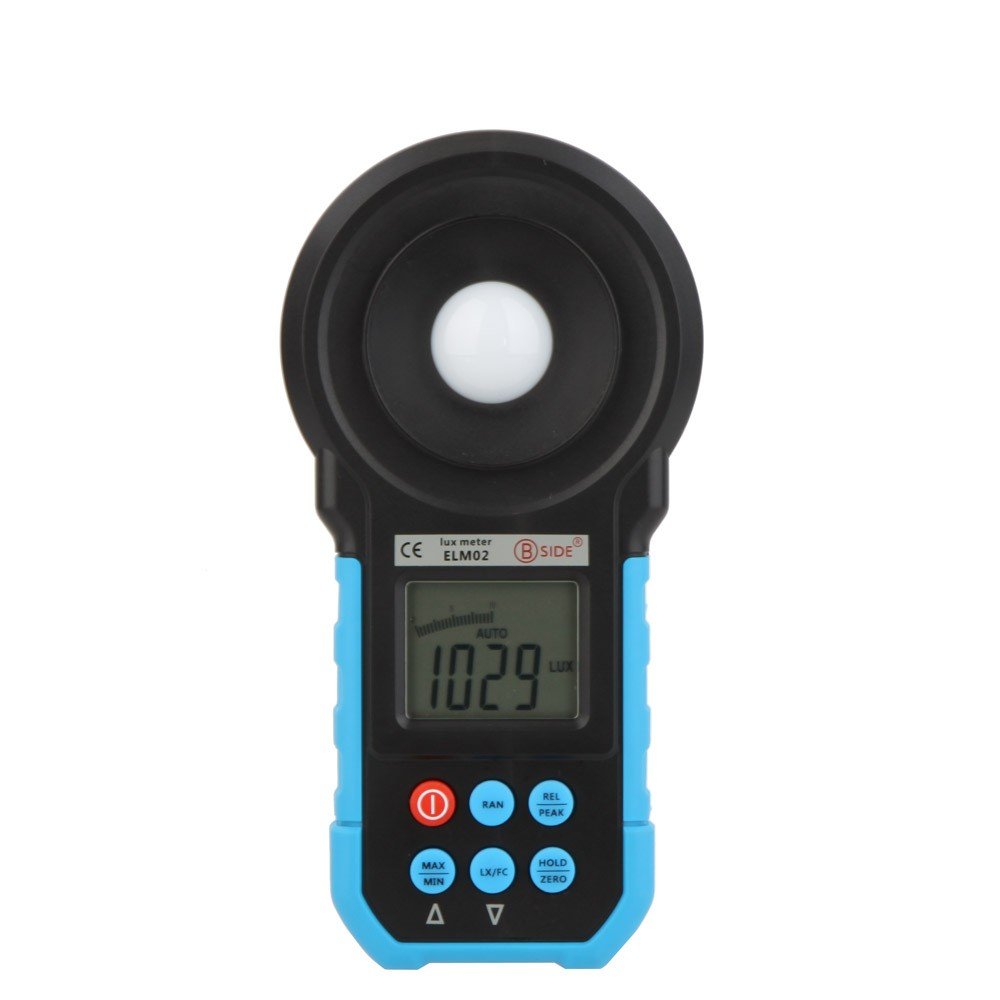
Figure 3.1: Front view of the BSIDE ELM02 Digital Lux/FC Meter, showing the light sensor, LCD display, and control buttons.
3.1 Components
- Light Sensor: Detects ambient light levels.
- LCD Display: Shows measurement readings, units, and various indicators.
- Control Buttons: For operating different functions of the meter.
- Battery Compartment: Located at the rear for 9V battery installation.
3.2 Control Buttons

Figure 3.2: Close-up view of the BSIDE ELM02 control buttons, including Power, RAN, REL/PEAK, MAX/MIN, LX/FC, and HOLD/ZERO.
- Power Button (①): Turns the meter ON or OFF.
- RAN (Range) Button: Toggles between auto-ranging and manual ranging modes. The ELM02 primarily operates in auto-range.
- REL/PEAK Button: Short press for Relative mode, long press for Peak value display.
- MAX/MIN Button: Displays the maximum or minimum measured value.
- LX/FC Button: Switches the measurement unit between Lux and Foot-Candles (FC).
- HOLD/ZERO Button: Short press to hold the current reading, long press for Zero Calibration.
4. Setup
4.1 Battery Installation
- Locate the battery compartment cover on the back of the meter.
- Slide or unscrew the cover to open it.
- Insert one 9V (6F22) battery, observing the correct polarity (+/-).
- Replace the battery compartment cover securely.
The meter will display a low battery indicator on the LCD when the battery needs replacement.
5. Operating Instructions
5.1 Powering On/Off
- To turn ON the meter, press the ① (Power) button.
- To turn OFF the meter, press and hold the ① (Power) button until the display turns off.
5.2 Taking Measurements
- Turn on the meter.
- Ensure the light sensor is clean and pointed towards the light source you wish to measure.
- The meter will automatically select the appropriate range for measurement (Auto Range function).
- The current illuminance value will be displayed on the LCD.
5.3 Unit Selection (Lux/FC)
Press the LX/FC button to toggle between Lux and Foot-Candle (FC) measurement units. The selected unit will be indicated on the LCD.
5.4 Data Hold Function
Press the HOLD/ZERO button briefly to freeze the current reading on the display. Press it again to release the hold function and resume live measurements.
5.5 Peak Value Display
Press and hold the REL/PEAK button to enter Peak mode. The meter will display the maximum light intensity detected during the measurement period. Press and hold again to exit Peak mode.
5.6 Relative Mode Measurement
Press the REL/PEAK button briefly to enter Relative mode. The current reading becomes the reference value, and subsequent measurements are displayed as the difference from this reference. Press again to exit Relative mode.
5.7 MAX/MIN Function
Press the MAX/MIN button to cycle through the maximum, minimum, and current readings recorded since the function was activated. Press and hold to clear the recorded MAX/MIN values.
5.8 Zero Calibration
In a dark environment (e.g., with the sensor cap on), press and hold the HOLD/ZERO button to perform zero calibration. This ensures accuracy by setting the baseline reading to zero in the absence of light.
5.9 Auto Power Off
The meter features an auto power-off function to conserve battery life. If no button is pressed for approximately 15 minutes, the meter will automatically shut down. To disable this feature temporarily, refer to the full user manual if available (not detailed in provided data).
6. Specifications
| Measuring Range | 20~200000 Lux; 20/200/2000/20000 FC |
| Sampling Time | 2 times/second |
| Sensor Type | Silicon photoelectric diode |
| Spectral Range | 320~730 nm |
| Power Supply | 1 x 9V battery (6F22) |
| Display | LCD with analogue bar graph |
| Features | Auto Range, Data Hold, Peak Value, Relative Mode, Lux/FC Switch, Low Battery Indicator, Zero Calibration, Auto Power Off |
| Model Number | BSIDE ELM02 Auto Range Digital LCD |
| ASIN | B01K1GG268 |
| Date First Available | July 22, 2015 |
7. Maintenance
7.1 Cleaning
- Wipe the meter's exterior with a soft, dry cloth.
- Do not use abrasive cleaners or solvents.
- Keep the light sensor clean and free of dust or smudges for accurate readings. Use a soft brush or lens cloth if necessary.
7.2 Storage
- Store the meter in a cool, dry place, away from direct sunlight and extreme temperatures.
- If storing for an extended period, remove the battery to prevent leakage and potential damage to the device.
- Utilize the provided carrying bag for protection during storage and transport.

Figure 7.1: The BSIDE ELM02 meter, carrying bag, and user manual.
8. Troubleshooting
| Problem | Possible Cause / Solution |
|---|---|
| Meter does not turn on | Check battery installation and polarity. Replace with a fresh 9V battery if necessary. |
| Inaccurate readings | Ensure the light sensor is clean and unobstructed. Perform Zero Calibration in a dark environment. Check for stable light conditions. |
| Display shows 'OL' or '---' | The measurement is out of the meter's range. Move to an area with lower or higher light intensity as appropriate. |
9. Package Contents
- 1 x BSIDE ELM02 Digital Lux/FC Meter
- 1 x English Manual
- 1 x Carrying Bag
10. Warranty and Support
For warranty information or technical support, please refer to the documentation provided with your purchase or contact the manufacturer directly. Keep your purchase receipt as proof of purchase.
