
Introduction
The CED7000 Shot Timer is a compact and advanced device designed for measuring shot times in various shooting disciplines, including dry fire practice, USPSA, IPSC, 3 Gun, and Steel Challenge. This manual provides detailed instructions for the proper setup, operation, maintenance, and troubleshooting of your CED7000 Shot Timer to ensure optimal performance and longevity.
Safety Information
Please read and understand all safety warnings before operating the CED7000 Shot Timer. Failure to follow these instructions may result in damage to the device or personal injury.
- Battery Safety: The device uses a rechargeable battery. Use only the provided charger. Do not expose the battery to extreme temperatures, puncture, or disassemble it. Dispose of batteries according to local regulations.
- Environmental Conditions: Avoid exposing the device to excessive moisture, dust, or extreme temperatures. Operate within recommended environmental conditions.
- Handling: Handle the device with care. Avoid dropping or subjecting it to strong impacts, which could damage internal components.
- Intended Use: This device is intended for timing shooting activities. Do not use it for purposes other than its design.
Package Contents
Upon opening your CED7000 Shot Timer package, please verify that all the following items are included:
- CED7000 Shot Timer Unit
- Wrist Lanyard
- Neck Lanyard
- Rechargeable Battery (pre-installed or separate)
- Battery Charger
If any items are missing or damaged, please contact your retailer or the manufacturer's support.
Product Overview
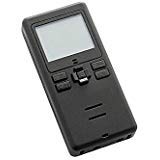
This image displays the CED7000 Shot Timer, a compact black device featuring a clear LCD screen at the top and several control buttons below it. The device has a sleek, rectangular design, optimized for handheld use.
The CED7000 Shot Timer is characterized by its compact form factor, designed to fit comfortably in the palm of your hand. It features a clear LCD screen for displaying shot times and other relevant information. Control buttons are intuitively placed below the screen for easy navigation and operation. The device is constructed from durable alloy steel, ensuring resilience during regular use.
Setup
- Initial Charging: Before first use, fully charge the CED7000 Shot Timer using the provided battery charger. Connect the charger to the device and a power outlet. The charging indicator will typically show progress and completion.
- Attaching Lanyard: Select either the wrist or neck lanyard and attach it to the designated loop on the shot timer. This helps prevent accidental drops during use.
- Power On/Off: Press and hold the power button (usually located on the side or front) to turn the device on or off. The LCD screen will illuminate upon power-on.
Operating Instructions
The CED7000 Shot Timer offers various modes and settings for different training and competition scenarios. Refer to the on-screen menu for specific options.
- Basic Shot Timing: To start a timing sequence, press the 'Start' button. The timer will begin counting upon detecting the first shot. Subsequent shots will be recorded, and the total time will be displayed.
- PAR Timer Function: The integrated PAR timer allows you to set a specific time interval for practice. The device will emit a start signal and then a stop signal after the set PAR time, enabling focused dry fire drills.
- Reviewing Shots: After a timing sequence, use the navigation buttons to review individual shot times and splits.
- Sensitivity Adjustment: The microphone sensitivity can be adjusted through the settings menu to optimize shot detection in various environments (e.g., indoor vs. outdoor ranges, with or without suppressors).
- Memory Function: The device stores multiple shot strings, allowing for later review and analysis of practice sessions.
Maintenance
Proper maintenance ensures the longevity and accuracy of your CED7000 Shot Timer.
- Cleaning: Use a soft, dry cloth to clean the exterior of the device. For the LCD screen, use a microfiber cloth. Avoid abrasive cleaners or solvents.
- Battery Care: Recharge the battery regularly, even if the device is not in frequent use, to maintain battery health. Avoid fully discharging the battery for extended periods.
- Storage: Store the shot timer in a cool, dry place away from direct sunlight and extreme temperatures. If storing for an extended period, ensure the battery is partially charged.
Troubleshooting
If you encounter issues with your CED7000 Shot Timer, refer to the following common problems and solutions:
- Device does not power on:
- Ensure the battery is fully charged.
- Verify the battery is correctly inserted (if removable).
- Inaccurate shot detection or missed shots:
- Adjust the microphone sensitivity in the settings menu.
- Ensure the microphone is not obstructed.
- Test in a quieter environment to rule out excessive background noise.
- Screen is blank or frozen:
- Try performing a soft reset by holding the power button for 10-15 seconds.
- If the issue persists, allow the battery to fully discharge and then recharge.
For issues not covered here, please contact customer support.
Specifications
| Feature | Detail |
|---|---|
| Brand | yinat |
| Model Number | 7000Tactical |
| Colour | Uy-oi508oi (Tactical Black) |
| Product Dimensions | 1.78 x 4.7 x 10.01 cm (18D x 47W x 100H millimeters) |
| Material | Alloy Steel |
| Item Weight | 82.1 g (2.9 Ounces) |
| Screen Size | 3.94 Inches |
| UPC | 751871228214 |
| Manufacturer | CED |
| First Available | August 10, 2016 |
Warranty and Support
For information regarding the product warranty, please refer to the warranty card included with your purchase or visit the official yinat/CED website. Warranty terms and conditions may vary by region and retailer.
If you require technical assistance, have questions about product functionality, or need to report a defect, please contact the manufacturer's customer support. Keep your purchase receipt and product serial number (if applicable) ready when contacting support.