
Introduction
This manual provides essential instructions for the proper installation, operation, and maintenance of your new TacParts replacement phonograph needle. This needle is designed for compatibility with various Empire 88 series turntable models, including S108-7RD, S88-7RD, 108, 108P, and 251-D7. Please read this manual thoroughly before proceeding to ensure optimal performance and longevity of your equipment.
Safety Information
- Always handle the phonograph needle with extreme care. The stylus tip is delicate and can be easily damaged.
- Avoid touching the stylus tip with your fingers, as oils and dirt can degrade sound quality and damage the needle.
- Keep the needle out of reach of children and pets.
- Ensure your turntable is powered off and unplugged before attempting any installation or maintenance.
- If you are unsure about any step, consult a qualified technician.
Setup and Installation
Follow these steps carefully to replace your phonograph needle:
- Power Off: Ensure your turntable is completely powered off and unplugged from the electrical outlet.
- Locate Cartridge: Identify the cartridge assembly at the end of the tonearm. The needle (stylus) is typically attached to the front underside of the cartridge.
- Remove Old Needle: Gently grasp the old needle assembly (often a plastic housing) and pull it forward and slightly downward, away from the cartridge body. It should detach with minimal force. Avoid twisting or applying excessive pressure.
- Inspect Cartridge: Briefly inspect the cartridge for any dust or debris before installing the new needle.
- Install New Needle: Carefully align the new TacParts phonograph needle with the cartridge body. Push it gently upwards and backwards until it clicks securely into place. Ensure it is seated firmly and flush with the cartridge. Do not force it.
- Verify Installation: Visually confirm that the new needle is correctly installed and securely attached to the cartridge.
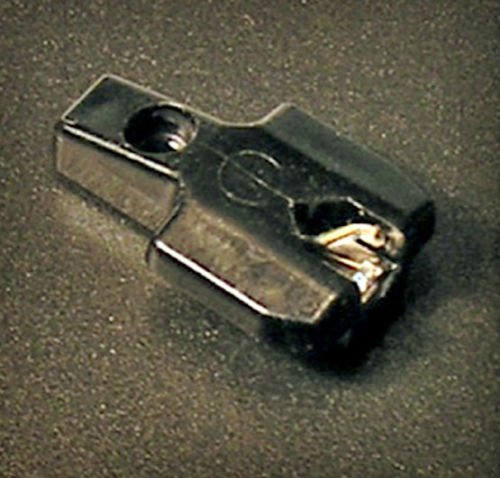
Figure 1: TacParts replacement phonograph needle. Handle with care during installation.
Operating Instructions
Once the new needle is installed, you can resume playing your vinyl records. For optimal sound quality and to prevent damage to your records and needle, consider the following:
- Tracking Force: If your turntable allows, verify that the tracking force (stylus pressure) is set according to your turntable's or cartridge's specifications. Incorrect tracking force can lead to poor sound and record wear.
- Anti-Skate: Adjust the anti-skate setting on your tonearm, if available, to prevent the stylus from favoring one side of the record groove.
- Record Condition: Always play clean records. Dust and debris on records can significantly reduce needle lifespan and sound quality.
- Gentle Handling: Lower the tonearm gently onto the record using the cueing lever, if available. Avoid dropping the tonearm onto the record.
Maintenance
Proper maintenance will extend the life of your needle and preserve your record collection:
- Stylus Cleaning: Regularly clean the stylus tip using a soft stylus brush, brushing gently from back to front (in the direction of play). Never brush side-to-side or front-to-back. Specialized stylus cleaning fluids can also be used sparingly.
- Record Cleaning: Keep your records clean using appropriate record cleaning solutions and brushes.
- Replacement Schedule: Phonograph needles have a finite lifespan. The stylus tip wears down over time, affecting sound quality and potentially damaging records. Replace your needle after approximately 500-1000 hours of playback, or sooner if you notice a degradation in sound quality or visible wear on the stylus.
Troubleshooting
If you encounter issues, refer to the following common problems and solutions:
- No Sound or Very Low Sound:
- Ensure the needle is fully seated in the cartridge.
- Check all audio connections from the turntable to your amplifier/receiver.
- Verify the amplifier/receiver input is set correctly (e.g., "Phono" input).
- Distorted or Muffled Sound:
- Clean the stylus tip thoroughly.
- Check if the tracking force is set correctly.
- Inspect the stylus for visible damage or wear. A worn stylus needs replacement.
- Ensure records are clean and free of debris.
- Skipping or Jumping:
- Ensure the turntable is on a stable, level surface.
- Check if the tracking force is set correctly (too light or too heavy can cause skipping).
- Adjust the anti-skate setting.
- Inspect the record for scratches or debris.
- Examine the stylus tip for damage or excessive wear.
Specifications
| Brand | TacParts |
| Product Type | Replacement Phonograph Needle / Stylus |
| Compatibility | Empire 88 Series Turntables (Models: S108-7RD, S88-7RD, 88, 108, 108P, 251-D7) |
| ASIN | B01JJ72TS0 |
| Date First Available | August 26, 2016 |
Warranty and Support
Specific warranty information for this TacParts phonograph needle may vary. Please refer to the product packaging or contact your retailer or the manufacturer directly for details regarding warranty coverage and support.
For technical assistance or further inquiries, please reach out to the seller or TacParts customer service.