
1. Introduction
The PlayGo 2-in-1 Sound and Light Walker is a versatile toy designed to support your child's development from 12 months to 3 years. This innovative product easily converts between a baby walker and a ride-on toy, offering dual functionality as your child grows. It features various interactive elements, including a mirror, a telephone with sound, and other engaging games to stimulate motor skills, hand-eye coordination, and dexterity.
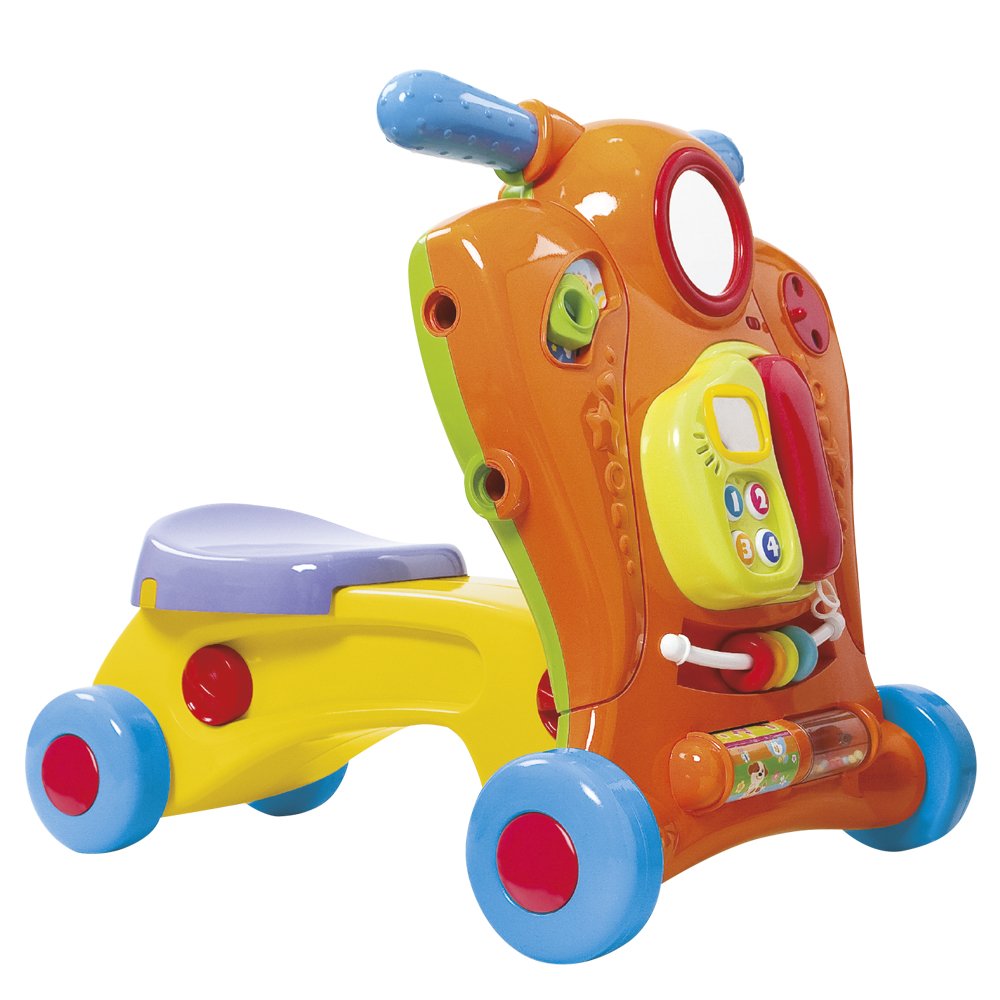
Image 1.1: The PlayGo 2-in-1 Sound and Light Walker, showcasing its vibrant orange and yellow design with integrated activity panel.
2. Safety Information
WARNING: Use under direct adult supervision at all times.
- Ensure all parts are securely assembled before allowing a child to use the product.
- Do not leave children unattended with the walker or ride-on toy.
- Keep the product away from stairs, steps, swimming pools, and other hazardous areas.
- Regularly inspect the product for any damage or loose parts. Discontinue use if any damage is found.
- Battery Safety:
- Requires 3 AA batteries (included).
- Do not mix old and new batteries.
- Do not mix alkaline, standard (carbon-zinc), or rechargeable (nickel-cadmium) batteries.
- Remove exhausted batteries promptly.
- Remove batteries if the product is not used for an extended period.
- Batteries should be inserted with the correct polarity.
3. Assembly and Setup
The PlayGo 2-in-1 Walker is designed for easy and safe transformation between its two modes. Follow these steps for initial setup and conversion.
3.1. Battery Installation
- Locate the battery compartment, typically on the underside or rear of the main unit.
- Using a screwdriver (not included), open the battery compartment cover.
- Insert 3 AA batteries, ensuring correct polarity (+/-).
- Replace the battery compartment cover and secure it with the screw.
3.2. Converting Between Walker and Ride-On Mode
The product can be easily converted. Refer to the visual guide below for the transformation process. Ensure all locking mechanisms click into place securely after conversion.

Image 3.1: The PlayGo 2-in-1 Walker packaging illustrating both the walker mode (left) and the ride-on mode (right) with children using them.
To convert, typically you will:
- Locate the release buttons or levers on the side or base of the unit.
- Press the release mechanisms and carefully adjust the handle/seat section to the desired position (upright for walker, lowered for ride-on).
- Ensure the unit locks firmly into place in the new configuration. Test stability before use.
4. Operating Instructions
4.1. Using as a Walker
In walker mode, the child can hold onto the handle and push the unit forward, aiding in their first steps and balance development. Ensure the child's feet can comfortably reach the floor.
4.2. Using as a Ride-On Toy
In ride-on mode, the child can sit on the seat and propel themselves forward using their feet. This helps develop leg strength and coordination.
4.3. Interactive Features
The activity panel offers several engaging features:

Image 4.1: A detailed view of the interactive activity panel, highlighting the removable telephone, numbered buttons, and sliding rings.
- Telephone with Sound: The removable telephone unit includes buttons that produce sounds, encouraging imaginative play and auditory stimulation.
- Mirror: A small mirror allows children to explore self-recognition.
- Motor Skills Games: Various elements like sliding rings and a spinning rattle tube are integrated to enhance fine motor skills and sensory exploration.
5. Maintenance
- Cleaning: Wipe the product with a damp cloth and mild soap. Do not immerse in water. Avoid harsh chemicals or abrasive cleaners.
- Battery Replacement: Replace batteries when sounds or lights become faint or stop working. Follow the battery installation steps in Section 3.1.
- Storage: Store the product in a cool, dry place away from direct sunlight when not in use.
- Inspection: Periodically check all screws, fasteners, and moving parts to ensure they are secure and functioning correctly.
6. Troubleshooting
6.1. No Sound or Lights
- Check if the batteries are correctly installed with the proper polarity.
- Replace old or exhausted batteries with new ones.
- Ensure the battery compartment cover is securely closed.
6.2. Difficulty Converting Modes
- Ensure all release buttons or levers are fully engaged when attempting to convert.
- Do not force the conversion. If resistance is met, re-check the mechanism for obstructions.
7. Specifications
| Feature | Detail |
|---|---|
| Model Number | 2446 (Product Number: 42509) |
| Dimensions (L x W x H) | 47.5 x 44 x 46.6 cm |
| Product Weight | 2.88 kg |
| Material | Plastic |
| Batteries Required | 3 AA (included) |
| Recommended Age | 12 months - 3 years |
| Manufacturer | Colorbaby |
8. Warranty and Support
Product Warranty: Not applicable.
For any questions or concerns regarding the PlayGo 2-in-1 Sound and Light Walker, please contact your retailer or the manufacturer directly. Keep your purchase receipt for reference.