1. Introduction
This manual provides instructions for the HA-412 replacement remote control, designed for use with various GoldStar air conditioner models. This remote offers essential functions for convenient operation of your air conditioning unit.
Important Note: This remote control is specifically designed for GoldStar air conditioners and may not be compatible with other brands like LG, as GoldStar utilizes its own unique remote control codes.
Compatible GoldStar Remote Control Model Numbers:
- 6711A20034A, 6711A20034C, 6711A20034E, 6711A20034G, 6711A20034N, 6711A20034S, 6711A20034T, 6711A20034U, 6711A20034V
- 6711A20035A, 6711A20056B, 6711A20056Q, 6711A20066A
- 6711A90019A, 6711A90024E, 6711A90024G
- AKB73016002
Compatible GoldStar Air Conditioner Models:
- BG5200ER, WG5200R, M2400HR, GWHD6005R, WG8000R, M2403R, GWHD6500R, WG8000RY4, M2404ER, GWHD6500RY6, WG8005R, M8003L, GWHD6507R, KG1000R, WG1800R, GWHD6507RY7, KG1200R, WG1804R, GWHD650OR, KG6000R, WG1805R, HWC061JAMK7, KG8000R, WG1805RY6, WG1205RY7, LWC061JGMK1, WG2400R, WG6000RH4, LWC081GGMK1, WG2404R, WG6005R, LWC101GGMK0, WG2405R, WG6007R, LWC101GGMK1, WG2405RY6, XV6513, M1293R, WG2405RY7, BG8000ER, M5203R, LWC071JGMK0, L1811ER, M5403R, LWJ0611PCG, M1203R, M6003R, WM-6011, M5200R, M8003ER, WM-6021, M6004R, WG1200R, LWM1836QCG, M8003R, WG1204R, MT7314, M8003RY3, WG5200ER, M5203L, WG1000R, WG6000R, LT7101, WG1000RY3, L6011ER, M8004R, WG1005R, MT9262, WG5004R, WG1005RY6, LWC051JGMK2, WG5005R, WG1205R, M1003R, WG5005RY6
2. Setup
Battery Installation
The HA-412 remote control requires batteries for operation. Please note that batteries are not included with the remote control and must be purchased separately. Typically, two AAA batteries are required.
- Locate the battery compartment cover on the back of the remote control.
- Slide or unclip the cover to open the compartment.
- Insert two new AAA batteries, ensuring the positive (+) and negative (-) terminals align correctly with the markings inside the compartment.
- Replace the battery compartment cover, ensuring it clicks securely into place.

Image: Front view of the HA-412 remote control. The battery compartment is located on the back.
3. Operating Instructions
The HA-412 remote control provides essential functions for your GoldStar air conditioner. Point the remote directly at the air conditioner unit when operating.
Basic Functions:
- POWER: Press this button to turn the air conditioner ON or OFF.
- TEMP (Temperature): Use the ▼ (down) and ▲ (up) buttons to adjust the desired temperature setting.
- FAN SPEED: Press this button to cycle through available fan speed settings (e.g., Low, Medium, High, Auto).
- MODE: Press this button to select the operating mode (e.g., Cool, Heat, Fan, Dry, Auto).
Optional Functions:
The following functions are available only if your specific GoldStar air conditioner model supports them. If your unit does not have these features, pressing these buttons will have no effect.
- TIMER: Used to set a timer for the air conditioner to turn on or off automatically. Refer to your air conditioner's manual for specific timer programming instructions.
- ENERGY SAVER: Activates or deactivates the energy-saving mode on your air conditioner.
- AUTO SWING: Controls the automatic oscillation of the air conditioner's louvers for wider air distribution.
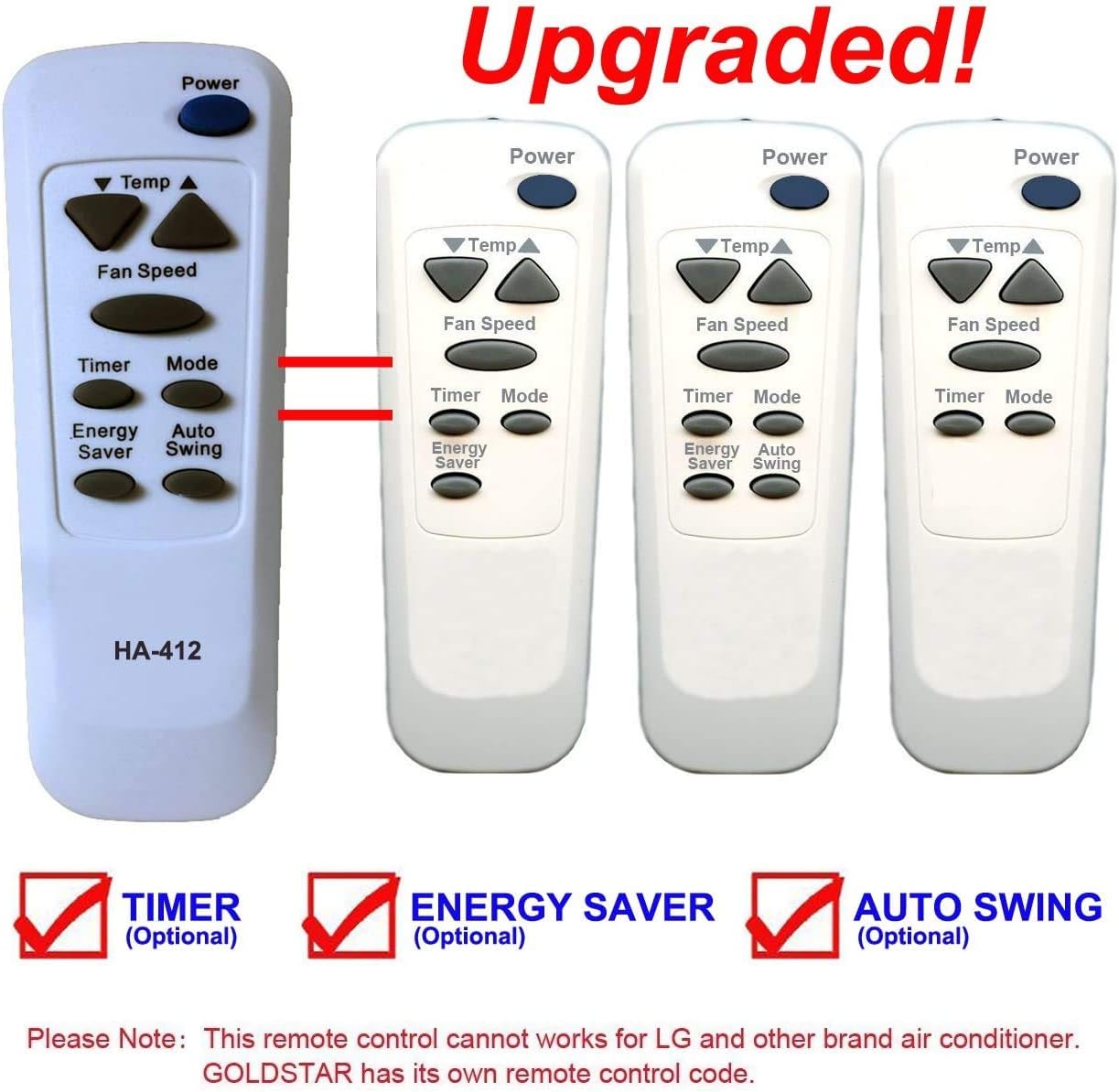
Image: The HA-412 remote control showing POWER, TEMP, FAN SPEED, TIMER, MODE, ENERGY SAVER, and AUTO SWING buttons. The image also indicates that TIMER, ENERGY SAVER, and AUTO SWING are optional functions.
4. Maintenance
Cleaning the Remote Control
To maintain the remote control's appearance and functionality:
- Wipe the surface with a soft, dry cloth.
- Do not use liquid cleaners, abrasive cleaners, or chemical solvents, as these can damage the remote's finish or internal components.
Battery Replacement
Replace batteries when the remote control's range decreases or if it stops responding. Always replace both batteries at the same time with new ones of the same type (AAA). Remove batteries if the remote will not be used for an extended period to prevent leakage.
5. Troubleshooting
If you experience issues with your HA-412 remote control, try the following troubleshooting steps:
- Remote not responding:
- Check if the batteries are inserted correctly with the correct polarity.
- Replace old batteries with new ones.
- Ensure there are no obstructions between the remote control and the air conditioner's receiver.
- Confirm you are within the effective operating range of the air conditioner.
- Specific functions not working (e.g., Timer, Energy Saver, Auto Swing):
- Verify that your GoldStar air conditioner model actually supports these optional functions. Refer to your air conditioner's original user manual.
- Remote works intermittently:
- This often indicates low battery power. Replace the batteries.
- Ensure the remote's infrared emitter is clean and unobstructed.
6. Specifications
| Feature | Detail |
|---|---|
| Model Number | HA-412 |
| Compatibility | GoldStar Air Conditioners (specific models listed in Section 1) |
| Connectivity Technology | Infrared |
| Controller Type | Button Control |
| Power Source | Batteries (not included) |
| Special Feature | Timer (optional, depends on AC unit) |
7. Verification
Before ordering or using this replacement remote, please verify that it is the correct model for your specific GoldStar air conditioner unit. Cross-reference your air conditioner's model number with the comprehensive list provided in the 'Introduction' section of this manual to ensure full compatibility and functionality.


