
wonsung LK-20
wonsung LK-20 Laser Galvo 20Kpps Speed Galvanometer Based Optical Scanning Set
Instruction Manual
1. Introduction
This manual provides detailed instructions for the assembly, operation, and maintenance of your wonsung LK-20 Laser Galvo 20Kpps Speed Galvanometer Based Optical Scanning Set. This system is designed for generating dynamic laser patterns and animations for stage lighting, artistic displays, and 3D laser printing applications. Please read this manual thoroughly before use to ensure proper function and safety.
2. Safety Information
WARNING: This product involves laser radiation. Improper use can result in serious eye injury or skin damage. Always follow safety guidelines.
- Never look directly into the laser beam or its reflections.
- Always wear appropriate laser safety glasses when operating the system.
- Ensure the laser beam path is clear of people and reflective surfaces.
- Operate the system in a controlled environment.
- Keep out of reach of children.
- Ensure proper ventilation to prevent overheating of components.
3. Package Contents
Verify that all components listed below are present in your package:
- Main control board (Show Card)
- Galvanometer X-Y sets (with mirrors)
- Galvanometer driver boards (integrated with X-Y sets or separate)
- Power supply unit
- DB25 connector cable
- ILDA connector cable
- Internal wiring harnesses
If any items are missing or damaged, please contact your vendor immediately.
4. Product Overview
The wonsung LK-20 system comprises several key components that work together to create laser projections. The core of the system is the galvanometer scanner, which uses two small mirrors mounted on motors to rapidly deflect a laser beam in X and Y axes, creating patterns. The main control board (show card) generates the signals that drive these galvanometers, and a power supply provides the necessary electrical current.

Image 1: Overview of the wonsung LK-20 Laser Galvo system components, including the power supply, main control board, driver boards, and galvanometer scanners with mirrors, all interconnected by wires.
The system is modular, allowing for flexibility in integration with existing laser setups or for custom projects.
5. Setup Instructions
Careful assembly and wiring are essential for the correct operation of the LK-20 system. Ensure the power supply is disconnected from the mains during assembly.
5.1 Component Identification
Familiarize yourself with each component. The galvanometer scanners are typically black cylindrical units with small mirrors. The main control board is a circuit board with various connectors and often a digital display or DIP switches. The power supply is a metal enclosure with input and output terminals.
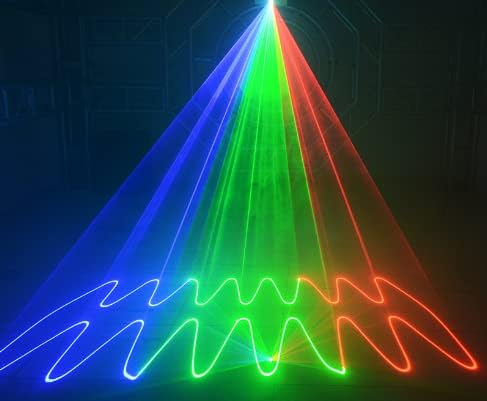
Image 2: Close-up view of two galvanometer scanner units, each with a mirror attached, showing their compact design and wiring connections.
5.2 Wiring Connections
- Galvanometer to Driver Boards: Connect the X and Y galvanometer scanners to their respective driver board outputs. These connections are typically keyed to prevent incorrect insertion.
- Driver Boards to Main Control Board: Connect the driver boards to the main control board (show card) using the provided ribbon cables or multi-pin connectors. Ensure correct orientation.
- Power Supply to Control Boards: Connect the DC output of the power supply to the main control board and driver boards. The system requires a 15V DC power input. Verify polarity before connecting.
- AC Power Input: Connect the AC input of the power supply to a suitable mains power source. For soldering to an inlet, follow standard IEC AC power wire coloring: brown for the hot line (phase), blue for the neutral line, and yellow/green for grounding. The power supply unit's AC input is typically fused.
- External Control Connections (Optional): If using external control, connect the DB25 or ILDA connector to the main control board.
After all connections are made, double-check them for security and correct polarity before applying power.
6. Operating Instructions
The wonsung LK-20 offers both standalone operation via its show card and external control options.
6.1 Standalone Operation (Show Card)
The main control board features DIP switches to select various pre-programmed patterns and modes. Refer to the specific DIP switch settings provided with your show card for detailed mode selection. For a quick test, setting all switches to LOW except for switch 1 and switch 10 (resulting in a [1000000001] configuration) will activate an 'auto cartoon' mode, displaying random animations.
Some show cards also include a microphone input, allowing the system to generate patterns influenced by ambient audio signals.

Image 3: Examples of laser patterns generated by the system, featuring animated figures such as an eagle, a person, a camel, and a penguin.

Image 4: A laser pattern illustrating two faces in a kissing embrace, demonstrating the system's ability to create detailed imagery.
6.2 External Control (ILDA/DMX)
The system supports external control via ILDA (International Laser Display Association) and DMX512 interfaces. This allows for advanced control from a computer or dedicated lighting console.
- ILDA: Connect an ILDA-compatible Digital-to-Analog Converter (DAC) to the DB25 port on the main control board. Software like Pangolin's BEYOND can then be used to create and project complex laser shows.
- DMX512: A 3-pin connector is available for DMX interface. An XLR/DMX connector with appropriate wiring is needed to connect the PCB port to a DMX adapter. Software such as freeStyler can be used for DMX control.

Image 5: A vibrant display of colorful laser beams radiating outwards from a central point, forming a dynamic starburst pattern.

Image 6: Laser patterns featuring wavy lines in blue, green, and red, demonstrating the system's capability to produce intricate linear designs.
7. Maintenance
Regular maintenance ensures the longevity and optimal performance of your laser galvo system.
- Cleaning Mirrors: Periodically inspect the galvanometer mirrors for dust or smudges. Use a soft, lint-free cloth and a specialized optical cleaning solution to gently clean the mirror surfaces. Avoid touching the mirrors with bare hands.
- Connection Checks: Ensure all wiring connections remain secure. Loose connections can lead to intermittent operation or component damage.
- Environmental Conditions: Operate the system in a clean, dry environment. Avoid excessive dust, humidity, and extreme temperatures.
8. Troubleshooting
If you encounter issues with your wonsung LK-20 system, refer to the following common problems and solutions:
| Problem | Possible Cause | Solution |
|---|---|---|
| No laser output or erratic patterns | Loose wiring connections Faulty power supply Incorrect DIP switch settings Damaged galvanometer motor | Check all power and signal cables for secure connections. Verify power supply output voltage (15V DC). Replace if faulty. Consult the show card manual for correct DIP switch configurations. Inspect galvanometer motors for physical damage or overheating. If a motor is hot and unresponsive, it may be faulty and require replacement. |
| Power supply unit not turning on | No AC input power Internal fuse blown Faulty power supply | Ensure the AC power cable is securely plugged into a live outlet. Check the power supply's internal fuse (if accessible and user-serviceable). If the power supply is confirmed faulty, replace it with a compatible unit (e.g., a +-15V power supply). |
| Manual missing or unclear instructions | Documentation not included or lost | Contact the seller or manufacturer for a digital copy of the instruction manual. |
| Galvanometer motors become hot during operation | Overload or internal fault Insufficient cooling | Reduce the scanning speed or complexity of patterns if possible. Ensure adequate airflow around the motors. If overheating persists and affects performance, a motor may be faulty. |
9. Specifications
Technical specifications for the wonsung LK-20 Laser Galvo system:
- Model Number: LK-20
- Scanning Speed: > 20Kpps (30K ILDA test-pattern, ±20° optical)
- Power Source: Direct Current
- Voltage: 15 Volts (DC)
- Amperage: 1 Amps
- Light Source Type: Laser (external, not included)
- Material: Iron
- Finish Type: Unfinished
- Product Dimensions: Approximately 4"L x 3"W x 2"H (main unit)
- Item Weight: Approximately 1.32 pounds (0.6 Kilograms)
- Mounting Type: Rack Mount (components may require custom mounting)
- Included Components: Main board, Mirror, DB25 connector, ILDA connector, X Y sets
- UPC: 756320479704
10. Warranty and Support
For warranty information, technical support, or replacement parts, please contact the wonsung customer service department or your authorized reseller. Keep your purchase receipt as proof of purchase.
You can often find support resources and contact information on the official wonsung website or through the platform where the product was purchased.
Related Documents - LK-20
 |
Thorlabs QG4 and QG5 Series 1-Axis VantagePro Galvo Systems User Guide User guide for Thorlabs QG4 and QG5 Series 1-Axis VantagePro Galvo Systems, detailing installation, operation, technical specifications, safety precautions, maintenance, troubleshooting, and disposal. |
 |
Thorlabs GVS Series Scanning Galvo Systems User Guide User guide for Thorlabs GVS series scanning galvo systems (GVS001, GVS002, GVS101, GVS102, GVS201, GVS202, GVS301, GVS302). Covers laser beam steering, installation, operation, and specifications for laser scanning, microscopy, and marking applications. |
 |
Portable Galvanometer Laser Engraver Z3 User Manual User manual for the Z3 Portable Galvanometer Laser Engraver, detailing features, specifications, safety, installation, and operation for precise laser engraving. |
 |
LG Air Conditioner Replacement Parts List and Exploded Views Comprehensive guide to replacement parts and exploded views for LG air conditioning units, including models LK-0580, LK-0880, LK-1080, LK-1580, and LK-2080 series. Find part numbers and specifications for cooling and heat pump systems. |
 |
Thorlabs QS15 & QS20 Series 1- & 2-Axis Galvo Scanners User Guide User guide for Thorlabs QS15 and QS20 Series 1- and 2-Axis Galvo Scanners, covering specifications, safety, installation, and maintenance. |
 |
JUKI LK-1900C Series Instruction Manual: Operation and Maintenance Guide Comprehensive instruction manual for JUKI LK-1900C Series computer-controlled high-speed bartacking machines. Covers specifications, installation, operation, maintenance, and troubleshooting for various models. |
Ask a question about this manual
Ask about setup, troubleshooting, compatibility, parts, safety, or missing instructions. Manuals+ will review the question and use this page’s manual context to help answer it.