
Introduction
This manual provides essential information for setting up, operating, maintaining, and troubleshooting your Dell UltraSharp U2417H 24-inch Full HD InfinityEdge Monitor. Please read this manual thoroughly before using the monitor to ensure proper and safe operation.
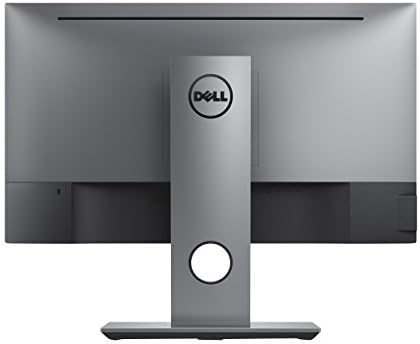
The Dell UltraSharp U2417H monitor features a 24-inch Full HD (1920 x 1080) IPS display with an InfinityEdge design, offering minimal bezels for an expansive viewing experience. It includes anti-glare coating with a 3H hard coat and supports VESA mounting. The stand provides versatile adjustments including tilt, pivot, swivel, and height adjustment to optimize your viewing comfort.
Package Contents
Verify that all components listed below are included in your package:
- Dell UltraSharp U2417H Monitor
- Monitor Stand (Base and Riser)
- Power Cable
- HDMI Cable
- DisplayPort (DP) Cable
- Mini DisplayPort (mDP) Cable
- USB 3.0 Upstream Cable
- Documentation (Quick Setup Guide, Safety Information)
Setup
1. Assembling the Monitor Stand
- Place the monitor panel face down on a soft, clean cloth to prevent scratches.
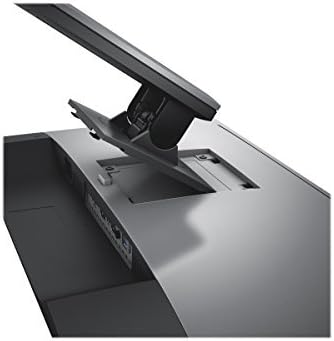
- Attach the stand riser to the monitor panel by aligning the tabs and pushing until it clicks into place.
- Attach the stand base to the riser, ensuring it is securely fastened.
2. Connecting the Cables
Connect the necessary cables to the monitor and your computer.
- Power Cable: Connect one end to the monitor's AC power port and the other to a power outlet.
- Video Cable: Connect either an HDMI, DisplayPort (DP), or Mini DisplayPort (mDP) cable from your computer's video output to the corresponding input on the monitor.
- USB Upstream Cable: For USB hub functionality, connect the USB 3.0 upstream cable from your computer to the monitor's upstream USB port.
Operating the Monitor
Power On/Off
Press the power button located on the bottom right side of the monitor bezel to turn the monitor on or off. A small LED indicator next to the button will show the power status.
Adjusting the Display
The Dell U2417H monitor offers multiple adjustment options for optimal viewing comfort:
- Height Adjustment: Lift or lower the monitor panel along the stand riser.
- Tilt: Tilt the screen forwards or backwards to adjust the vertical viewing angle.
- Swivel: Rotate the monitor panel left or right on its base.
- Pivot: Rotate the monitor panel 90 degrees clockwise or counter-clockwise for portrait or landscape orientation.


On-Screen Display (OSD) Menu
The OSD menu allows you to adjust various monitor settings such as brightness, contrast, color, input source, and more. Access the OSD menu using the buttons located on the bottom right bezel of the monitor.
Maintenance
Cleaning the Monitor
- Always unplug the monitor from the electrical outlet before cleaning.
- Use a soft, lint-free cloth lightly dampened with water or a non-abrasive screen cleaner.
- Do not spray cleaner directly onto the screen or monitor casing.
- Avoid using benzene, thinner, ammonia-based cleaners, or abrasive cleaners.
General Care
- Keep the monitor away from direct sunlight and heat sources.
- Ensure adequate ventilation around the monitor.
- Avoid placing heavy objects on the monitor or its cables.
Troubleshooting
No Image on Screen
- Ensure the power cable is securely connected to both the monitor and the power outlet.
- Verify that the video cable (HDMI, DP, or mDP) is properly connected to both the monitor and your computer.
- Check if the correct input source is selected in the monitor's OSD menu.
- Restart your computer.
Flickering or Distorted Image
- Check the video cable for any damage or loose connections.
- Ensure your computer's graphics card drivers are up to date.
- Adjust the refresh rate in your computer's display settings to 60 Hz.
USB Ports Not Functioning
- Ensure the USB 3.0 upstream cable is connected from your computer to the monitor.
- Try connecting the USB device to a different USB port on the monitor or directly to your computer.
Specifications
| Feature | Detail |
|---|---|
| Brand | Dell |
| Model Number | U2417H |
| Screen Size | 24 Inches |
| Resolution | Full HD (1920 x 1080) |
| Display Technology | IPS LED |
| Refresh Rate | 60 Hz |
| Response Time | 6 Milliseconds (Gray to Gray) FAST Mode, 8 Milliseconds (Gray to Gray) Normal Mode |
| Aspect Ratio | 16:9 |
| Brightness | 250 cd/m² (typical) |
| Viewing Angle | 178 Degrees (Horizontal/Vertical) |
| Color Gamut | 99% sRGB |
| Screen Surface | Anti-Glare with 3H Hard Coat |
| Connectivity | 1x HDMI (MHL), 1x DisplayPort (in), 1x Mini DisplayPort, 1x DisplayPort (out), 1x USB 3.0 Upstream, 4x USB 3.0 Downstream, 1x Audio Line-out |
| Adjustability | Height, Tilt, Swivel, Pivot |
| VESA Mounting | Yes |
| Dimensions (HxWxD) | 12.37"H x 21.17"W x 1.78"D (without stand) |
| Weight | 13.9 Pounds (with stand) |
Warranty and Support
Warranty Information
Your Dell UltraSharp U2417H monitor comes with a 3-Year Advanced Exchange Service. This warranty covers defects in materials and workmanship under normal use. For detailed terms and conditions, please refer to the warranty documentation included with your product or visit the official Dell support website.
Technical Support
For technical assistance, driver downloads, or further information, please visit the official Dell Support website. You will need your monitor's Service Tag number, which can be found on a label on the back of the monitor or on the packaging.
Dell Support Website: www.dell.com/support
Additional Resources
Product Videos
Dell UltraSharp InfinityEdge Monitor Review
Video: A detailed review of the Dell UltraSharp InfinityEdge monitor, highlighting its features and benefits for various uses.