
1. Introduction
Thank you for choosing the LEDUPDATES C3014 Series 18-inch Showcase LED Light. This product is designed to provide bright, pure white illumination for display cases, shelves, and other applications. Its linkable design allows for flexible installation to suit various lengths. This manual provides essential information for safe installation, operation, and maintenance of your LED light.
The C3014 Series LED light features a durable aluminum construction, 6000K-6500K pure white color temperature, and utilizes quality 2835 LED chips. It includes a UL Listed 12V AC adapter and a 6ft DC cable for reliable performance.
2. Safety Information
- Read all instructions before installation and use.
- Keep this manual for future reference.
- Do not operate the light with a damaged cord or plug.
- Ensure the power supply voltage matches the product's requirements (12V DC).
- Do not disassemble or modify the light fixture or power adapter. This may void the warranty and create electrical hazards.
- Avoid direct eye exposure to the light source when illuminated.
- This product is intended for indoor use only.
- Disconnect power before cleaning or performing any maintenance.
3. Package Contents
Verify that all components are present and in good condition:
- 1 x LEDUPDATES C3014 Series 18-inch LED Light Bar
- 1 x UL Listed 12V AC Power Adapter with On/Off Switch
- 1 x 6ft DC Cable
- 2 x Mounting Clips
4. Setup Instructions
4.1 Mounting the LED Light Bar
- Determine the desired location for your LED light bar.
- Position the two provided mounting clips at appropriate intervals along the length of the light bar's intended placement. Ensure they are evenly spaced for secure support.
- Secure the mounting clips to the surface using screws (not included) or suitable adhesive, depending on the surface material.
- Snap the LED light bar into the mounted clips. Ensure it is firmly seated.
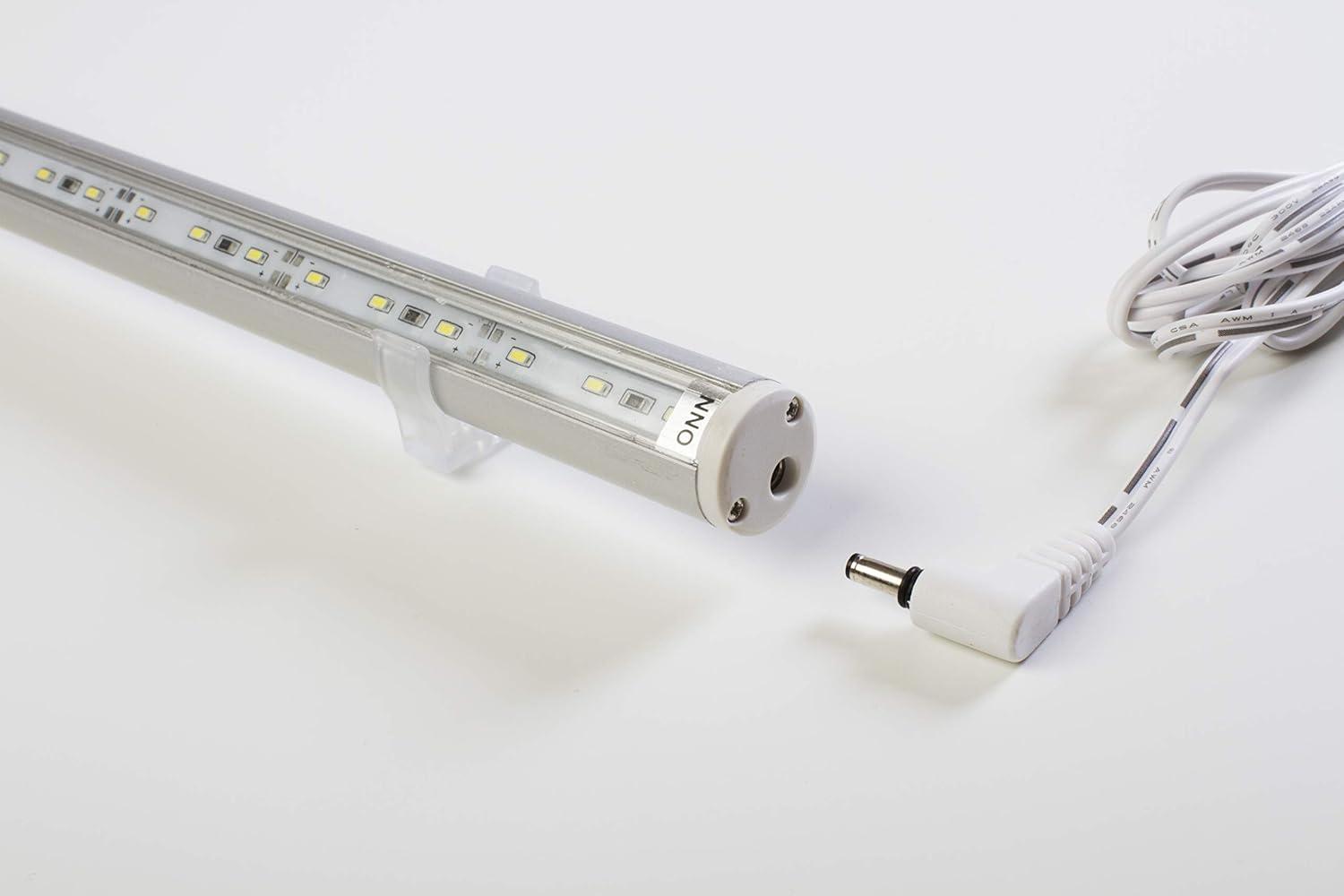
Image: LED light bar showing mounting clips and power input.
4.2 Connecting the Power Adapter
- Connect the DC cable from the UL Listed 12V AC Power Adapter to the power input port on one end of the LED light bar. Ensure a snug fit.
- Plug the AC power adapter into a standard electrical outlet.

Image: Close-up of the power adapter being connected to the LED light bar.
5. Operating Instructions
Once the LED light bar is securely mounted and connected to the power supply, operate it using the integrated on/off switch on the power adapter cable.
- To turn the light ON, slide the switch to the 'ON' position.
- To turn the light OFF, slide the switch to the 'OFF' position.

Image: The UL Listed power adapter showing the on/off switch.
6. Linking Multiple Lights
The C3014 Series LED lights are designed to be linkable, allowing you to create longer continuous lighting solutions. This is achieved by connecting the output end of one light bar to the input end of another.
- Ensure all light bars are disconnected from the main power supply before linking.
- Align the male connector pin of one LED light bar with the female input port of another LED light bar.
- Gently push the two light bars together until they are securely connected.
- Repeat for additional light bars as needed.
- Connect the single power adapter to the first light bar in the linked series.
Note: Ensure the total wattage of linked lights does not exceed the maximum capacity of the power adapter. Consult the specifications section for individual light bar power consumption.

Image: Two C3014 series LED light bars shown in the process of being linked.
7. Maintenance
- Cleaning: Disconnect the power supply before cleaning. Use a soft, dry, or slightly damp cloth to wipe the surface of the light bar. Do not use abrasive cleaners or solvents.
- Inspection: Periodically check the power cord and connections for any signs of damage. If damage is found, discontinue use and contact customer support.
- Storage: If storing the light for an extended period, ensure it is clean and dry. Store in a cool, dry place away from direct sunlight.
8. Troubleshooting
| Problem | Possible Cause | Solution |
|---|---|---|
| Light does not turn on. | No power to the outlet. | Check if the outlet is functional by plugging in another device. |
| Power adapter not properly connected. | Ensure the DC cable is fully inserted into the light bar and the AC adapter is fully plugged into the outlet. | |
| On/Off switch is in the 'OFF' position. | Slide the switch to the 'ON' position. | |
| Light flickers or is dim. | Loose connection. | Check all connections, including between linked light bars. |
| Power adapter overloaded (if linking multiple lights). | Reduce the number of linked lights or use a higher capacity power adapter (sold separately). | |
| Light bar is damaged. | Physical damage. | Discontinue use and contact customer support for replacement or repair. |
9. Specifications
| Feature | Detail |
|---|---|
| Model | C3014 |
| Length | 18 inches (approx. 0.75"L x 0.75"W x 18.25"H) |
| Diameter | 0.75 inches |
| Color Temperature | 6000K-6500K (Pure White) |
| Light Source | 2835 LED Chip |
| Material | Aluminum (Powder Coated Finish) |
| Input Voltage | 12 Volts DC |
| Power Source | Corded Electric (UL Listed AC Adapter included) |
| Mounting Type | Wall Mount (with included clips) |
| Plug Format | A - US style |
| Included Components | LED Light Bar, Power Adapter, DC Cable, Mounting Clips |

Image: The 18-inch LED light bar with its approximate length dimension.
10. Warranty and Support
For warranty information or technical support, please contact LEDUPDATES customer service. Keep your purchase receipt as proof of purchase.
Contact information can typically be found on the product packaging or the official LEDUPDATES website.