1. Introduction
The Nintendo Entertainment System: NES Classic Edition is a miniaturized version of the iconic NES console, pre-loaded with 30 classic games. This manual provides essential information for setting up, operating, and maintaining your console to ensure an optimal gaming experience.
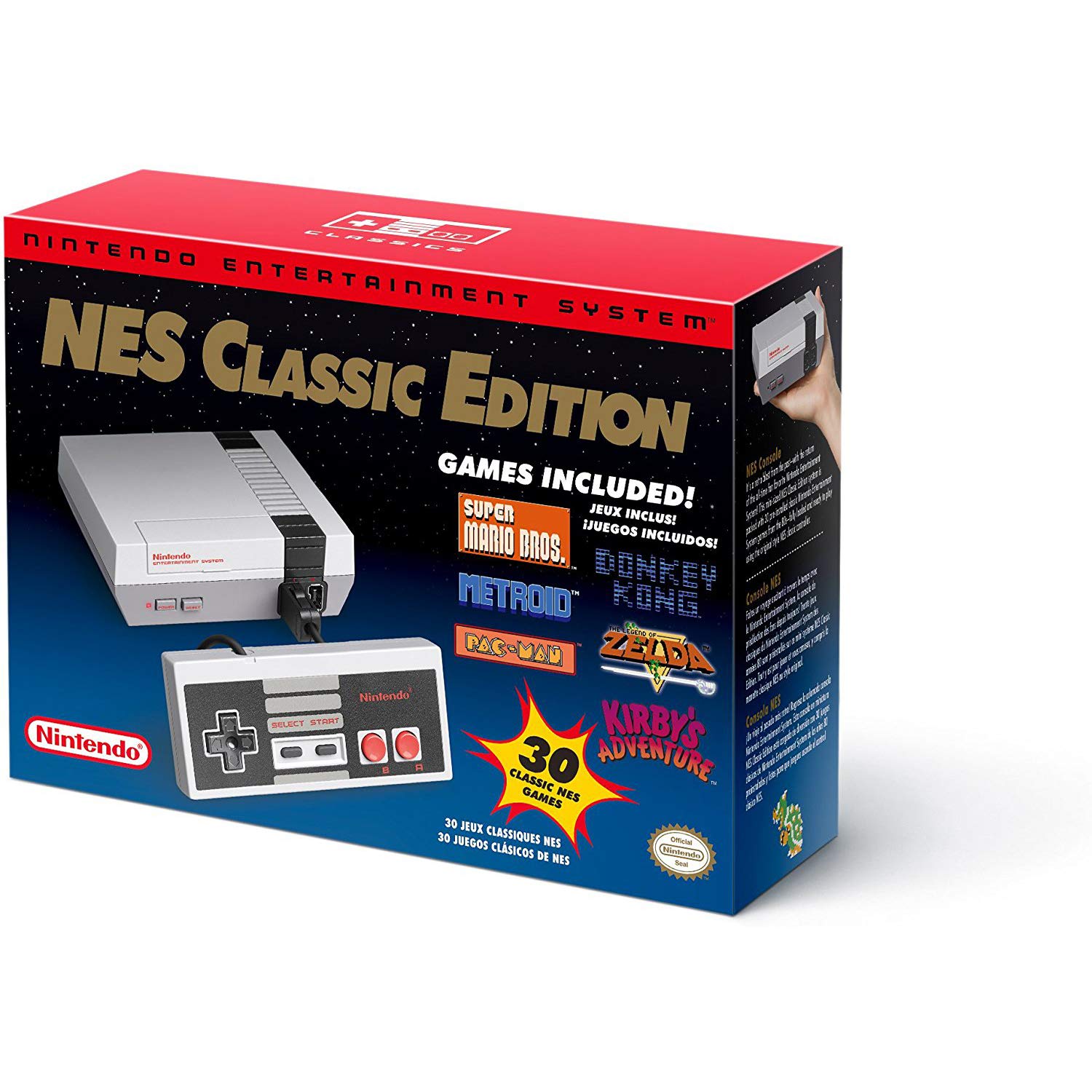
Image: The NES Classic Edition console, controller, and its packaging.
2. What's Included
Your NES Classic Edition package contains the following items:
- Nintendo Entertainment System: NES Classic Edition Console
- One NES Classic Controller
- HDMI Cable
- AC Adapter (USB power cable and AC adapter)
- 30 Pre-installed Classic NES Games

Image: The NES Classic Edition console with its classic controller connected.
3. Setup Guide
3.1 Connecting the Console
Follow these steps to connect your NES Classic Edition to your television:
- Connect one end of the HDMI cable to the HDMI OUT port on the NES Classic Edition console.
- Connect the other end of the HDMI cable to an available HDMI input on your television.
- Connect the USB power cable to the DC IN port on the console.
- Plug the AC adapter into a wall outlet and connect the other end of the USB power cable to the AC adapter.
- Connect the NES Classic Controller to one of the controller ports on the front of the console.
- Turn on your television and select the correct HDMI input source.
- Press the POWER button on the NES Classic Edition console to turn it on.
3.2 Initial Power-Up
Upon successful connection and power-up, the NES Classic Edition menu will appear on your screen, displaying the selection of pre-installed games.
Video: An unboxing and setup demonstration of the NES Classic Edition, showing how to connect the console.
4. Operating Instructions
4.1 Navigating the Game Menu
Use the D-pad on your NES Classic Controller to navigate through the list of games. Press the A button to select a game and the B button to go back.
4.2 Playing Games
Once a game is selected, it will start automatically. Refer to the original game manuals (not included, but often available online) for specific gameplay instructions.
4.3 Using Suspend Points (Save States)
The NES Classic Edition features 'Suspend Points' which allow you to save your game progress at any time. To access this feature:
- During gameplay, press the RESET button on the console. This will return you to the main game menu.
- A small floating square representing your current game state will appear in the bottom-left corner.
- Use the D-pad to select an empty Suspend Point slot (or an existing one you wish to overwrite).
- Press the A button to save your progress. You can also lock a Suspend Point to prevent accidental overwriting.
- To resume gameplay from a Suspend Point, select it from the list and press the START button.
Video: A review of the NES Classic Edition, demonstrating game selection and the suspend point feature.
5. Key Features
- 30 Pre-loaded Games: Enjoy a curated selection of classic NES titles, including Super Mario Bros., The Legend of Zelda, Mega Man 2, and more.
- HDMI Connectivity: Connects easily to modern televisions for crisp, clear visuals.
- Suspend Points: Save your game progress at any time with multiple save slots per game.
- Classic Controller: Experience authentic NES gameplay with the included replica controller.
- Compact Design: A miniaturized console that fits easily into any entertainment setup.
Video: An overview of the NES Classic Edition, highlighting its features and game library.
6. Technical Specifications
| Feature | Detail |
|---|---|
| Model Number | CLVSNESA |
| Dimensions (L x W x H) | 2.95 x 8.86 x 6.5 inches |
| Item Weight | 1 Pound |
| Connectivity | HDMI Out, Micro USB (DC IN) |
| Included Games | 30 Classic NES Games |
| Controller Ports | 2 (Wii-type ports) |
| Release Date | November 11, 2016 |
7. Care and Maintenance
To ensure the longevity of your NES Classic Edition, follow these care guidelines:
- Keep the console in a clean, dry environment, away from direct sunlight, extreme temperatures, and humidity.
- Clean the console and controller regularly with a soft, dry cloth. Do not use liquid cleaners or abrasive materials.
- Avoid dropping or subjecting the console and controller to strong impacts.
- Ensure proper ventilation around the console to prevent overheating.
8. Troubleshooting
If you encounter issues with your NES Classic Edition, try the following solutions:
- No Power: Ensure the AC adapter is securely plugged into both the console and a working wall outlet.
- No Picture/Sound: Verify that the HDMI cable is correctly connected to both the console and the TV, and that your TV is set to the correct HDMI input. Try a different HDMI port or cable if necessary.
- Controller Not Responding: Check that the controller is securely plugged into the console's controller port. Ensure no debris is obstructing the connection.
- Game Freezes/Glitches: Try pressing the RESET button on the console to return to the main menu and restart the game. If the issue persists, power cycle the console by unplugging and replugging the AC adapter.
9. Warranty and Support
The Nintendo Entertainment System: NES Classic Edition is manufactured by Nintendo. For specific warranty details, technical support, or service inquiries, please refer to the official Nintendo support website or contact their customer service directly. Keep your proof of purchase for warranty claims.