
Introduction
This manual provides essential information for the proper setup, operation, and maintenance of your Blue Octave Home 2.1-Channel Home Theater Speaker System, Model B22. Please read these instructions thoroughly before using the product to ensure optimal performance and longevity.
Package Contents
Verify that all items listed below are included in your package:
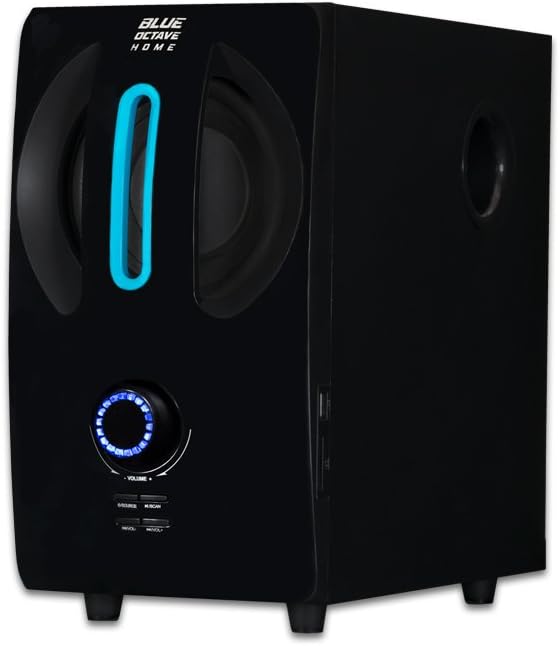
- 1 x Subwoofer
- 2 x Satellite Speakers
- 1 x 3.5mm Aux to RCA Cable
- 1 x RCA to RCA Cable
- 1 x Remote Control
- 1 x User Manual (this document)

Product Features
- 350 Watts System Power: Delivers robust audio output.
- Frequency Response: 40Hz - 20KHz for a wide range of sound.
- Magnetically Shielded: Reduces interference with other electronic devices.
- Built-in Audio Amplifier: Integrated amplification for convenience.
- Ultimate Bass Boost Design: Enhanced low-frequency performance.
- Digitally Designed Port: Optimized for extra bass response.
- Rear Bass Control Knob: Allows adjustment of bass levels.
- Computerized Enclosure Design: Engineered for acoustic precision.
- Plug and Play Connections: Simple setup for various audio sources.
- Full Function Remote Control: Convenient wireless operation.
- Versatile Connectivity: Compatible with 3.5mm headphone output or RCA audio output devices.
Setup Instructions
Follow these steps to set up your speaker system:
- Placement: Position the subwoofer on a stable surface, preferably on the floor, for optimal bass. Place the two satellite speakers equidistant from your listening position, facing towards you. Ensure adequate ventilation around the subwoofer.
- Connect Satellite Speakers: Connect the RCA cables from the satellite speakers to the 'OUTPUT INPUT' RCA jacks on the rear of the subwoofer. Ensure the left (white) and right (red) channels are matched correctly.
- Connect Audio Source:
- For devices with a 3.5mm headphone jack (e.g., computer, smartphone, tablet): Use the provided 3.5mm Aux to RCA cable. Connect the 3.5mm end to your device's headphone jack and the RCA ends to the 'INPUT' RCA jacks on the rear of the subwoofer.
- For devices with RCA audio outputs (e.g., TV, DVD player): Use the provided RCA to RCA cable. Connect one end to your device's audio output and the other end to the 'INPUT' RCA jacks on the rear of the subwoofer.
- Power Connection: Ensure the power switch on the rear of the subwoofer is in the 'OFF' position. Plug the subwoofer's power cord into a standard AC power outlet.
- Power On: Flip the power switch on the rear of the subwoofer to the 'ON' position. The system is now ready for operation.


Operating Instructions
Power On/Off
To power on the system, ensure the rear power switch is 'ON', then press the power button on the front panel of the subwoofer or on the remote control. Press again to power off.
Volume Control
Adjust the master volume using the large rotary knob on the front of the subwoofer or the 'VOL+' and 'VOL-' buttons on the remote control.
Input Selection
Press the 'SOURCE' button on the front panel of the subwoofer or the corresponding input buttons (AUX, FM, USB, SD) on the remote control to switch between audio sources.
Bass Adjustment
The bass level can be fine-tuned using the 'BASS' control knob located on the rear panel of the subwoofer.

Maintenance
To ensure the longevity and optimal performance of your speaker system, follow these maintenance guidelines:
- Cleaning: Use a soft, dry cloth to clean the surfaces of the speakers and subwoofer. Avoid using liquid cleaners, aerosols, or abrasive materials, as they may damage the finish or internal components.
- Ventilation: Ensure that the subwoofer's ventilation ports are not blocked. Proper airflow prevents overheating.
- Storage: If storing the system for an extended period, disconnect it from power and store it in a cool, dry place away from direct sunlight and extreme temperatures.
- Cable Care: Avoid bending or crimping the audio and power cables excessively. Regularly check cables for any signs of wear or damage.
Troubleshooting
If you encounter issues with your speaker system, refer to the following common problems and solutions:
| Problem | Possible Cause | Solution |
|---|---|---|
| No sound from speakers |
|
|
| Distorted or unclear sound |
|
|
| Remote control not working |
|
|
Specifications
Detailed technical specifications for the Blue Octave Home B22 Speaker System:
- Model Name: B22
- Speaker Type: Computer, Satellite, Subwoofer
- Compatible Devices: Desktop, Laptop, MP3 Player, Smartphone, Tablet, Television
- Subwoofer Dimensions (H x W x D): 12.38" x 6.75" x 13.25"
- Satellite Speaker Dimensions (H x W x D): 6.75" x 4.125" x 4.5" each
- Surround Sound Channel Configuration: 2.1
- Color: Black
- Item Weight: 11 Pounds
- Control Method: Remote, Manual Knobs
- Power Source: Corded Electric
- Speaker Maximum Output Power: 350 Watts
- Connectivity Technology: Auxiliary (3.5mm, RCA)
- Audio Output Mode: Stereo
- UPC: 849155039776

Warranty and Support
This Blue Octave Home 2.1-Channel Home Theater Speaker System, Model B22, comes with a Limited Warranty. For specific details regarding warranty coverage, terms, and conditions, please refer to the warranty card included in your product packaging or contact Blue Octave Home customer support.
For technical assistance, troubleshooting beyond this manual, or warranty claims, please contact Blue Octave Home customer support through their official website or the contact information provided with your purchase documentation.
