
1. Introduction
This manual provides instructions for the assembly, operation, and maintenance of your Global Industrial Steel Storage Cabinet, Model 237635TN. This cabinet is designed for storing office and industrial supplies, featuring a locking recessed handle and adjustable shelves for versatile storage solutions.

Image 1.1: The Global Industrial Steel Storage Cabinet with its doors open, revealing the interior with four adjustable shelves. The cabinet is shown storing various items, demonstrating its storage capacity.
2. Safety Information
Please read and understand all safety instructions before assembling or operating this cabinet. Failure to follow these instructions may result in injury or damage to the product.
- Ensure all components are present and undamaged before assembly.
- Assemble the cabinet on a flat, stable surface to prevent tipping.
- Do not exceed the maximum weight capacity per shelf (300 lbs) or the overall weight limit of the cabinet (740 lbs).
- Distribute weight evenly on shelves to maintain stability.
- Keep fingers clear of moving parts during assembly and shelf adjustment.
- Secure the cabinet to a wall if there is any risk of tipping, especially in areas with heavy traffic or uneven floors.
3. Setup and Assembly
This steel storage cabinet is designed for fast and easy assembly, requiring only four screws for the main structure. Follow these steps for proper setup:
- Unpack Components: Carefully remove all parts from the packaging. Verify that all components listed in the packing list are present and undamaged.
- Assemble Cabinet Frame: Follow the included assembly diagram to connect the side panels, back panel, and top/bottom panels using the provided hardware. The main structure typically requires only four screws.
- Install Fixed Shelf: The cabinet includes one fixed shelf. Position and secure this shelf according to the assembly instructions.
- Install Adjustable Shelves: The cabinet comes with four adjustable shelves. These shelves can be positioned at 1-1/4 inch increments using the tool-free shelf clips.
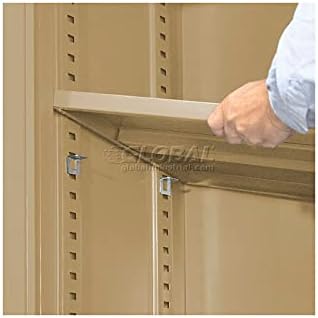
Image 3.1: A hand demonstrates the adjustment of a shelf within the cabinet. The image highlights the shelf clips and the vertical slots that allow for 1-1/4 inch increment adjustments.
To adjust, insert the shelf clips into the desired slots on the vertical supports, then place the shelf onto the clips. Ensure all four clips are securely seated before placing items on the shelf. - Attach Doors: Mount the steel box-formed doors to the cabinet frame. Ensure they swing freely and align correctly.
- Install Locking Handle: Install the recessed locking handle. This handle is designed to eliminate snags and prevent prying, enhancing security.
4. Operation
4.1 Locking Mechanism
The cabinet features a 3-point locking system with a 5/16 inch thick locking rod for enhanced strength and rigidity. The recessed handle includes a lock with two keys for security.

Image 4.1: A close-up view of a hand inserting a key into the recessed locking handle of the cabinet. This image illustrates the key entry point for securing the cabinet.
- To lock the cabinet, ensure both doors are fully closed. Insert one of the provided keys into the lock cylinder in the recessed handle and turn it to the locked position. Remove the key.
- To unlock the cabinet, insert the key and turn it to the unlocked position. The handle can then be operated to open the doors.
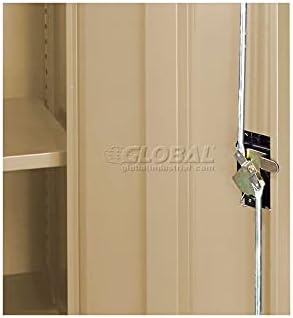
Image 4.2: A detailed view of the internal 3-point locking rod mechanism, showing how the rod engages with the cabinet frame to secure the doors.
4.2 Shelf Adjustment
The four adjustable shelves allow for flexible storage configurations. Refer to step 3.4 in the Setup and Assembly section for detailed instructions on adjusting shelf height.
- Each adjustable shelf has a capacity of 300 lbs.
- Ensure weight is distributed evenly across each shelf to prevent warping or instability.
5. Maintenance
Regular maintenance will ensure the longevity and proper functioning of your storage cabinet.
- Cleaning: Wipe down the cabinet surfaces with a soft, damp cloth and mild detergent as needed. Avoid abrasive cleaners that could damage the powder coat finish.
- Inspection: Periodically check all screws and connections to ensure they are tight. Inspect the locking mechanism and door hinges for smooth operation. Lubricate hinges or lock cylinder with a silicone-based lubricant if movement becomes stiff.
- Weight Distribution: Regularly review the contents of your cabinet to ensure weight is evenly distributed and not exceeding the maximum capacity of any shelf or the cabinet itself.
6. Troubleshooting
| Problem | Possible Cause | Solution |
|---|---|---|
| Cabinet doors do not close properly or are misaligned. |
|
|
| Lock mechanism is stiff or not engaging. |
|
|
| Cabinet feels unstable or wobbly. |
|
|
7. Specifications
| Model Name | 237635TN |
| Brand | Global Industrial |
| Material | Steel (Frame: Alloy Steel, Top: Steel, Back: Alloy Steel) |
| Color | Tan |
| Outside Dimensions (W x D x H) | 36" x 18" x 72" |
| Inside Dimensions (W x D x H) | 35-7/8" x 17" x 65-1/2" |
| Number of Shelves | 4 (adjustable) + 1 (fixed) |
| Shelf Capacity (Adjustable) | 300 lbs per shelf |
| Overall Weight Limit | 740 Pounds |
| Item Weight | 118 Pounds |
| Finish Type | Powder Coated |
| Locking System | 3-point with recessed handle and 2 keys |
| Shelf Adjustment Increments | 1-1/4 inches |
8. Warranty Information
Specific warranty details for Global Industrial products are typically provided at the point of purchase or can be found on the official Global Industrial website. Please retain your proof of purchase for any warranty claims. For detailed warranty terms and conditions, please visit the manufacturer's website or contact their customer service.
9. Customer Support
If you encounter any issues not covered in this manual or require further assistance, please contact Global Industrial customer support. Have your product model number (237635TN) and purchase information ready when contacting support.
For contact information, please refer to the Global Industrial official website or your purchase documentation.