
ARIES 2061027
ARIES AeroTread Running Boards User Manual
Model: 2061027
Product Overview
The ARIES AeroTread Running Boards are designed to provide a secure and stylish step into your SUV or crossover. Featuring a sleek profile, full-length non-skid treads, and durable construction, these running boards are built to withstand various elements and offer reliable performance.
Key features include:
- Sleek Design: Aerodynamic look with rounded corners and tapered ends.
- Dual Build Construction: Strong, lightweight extruded aluminum base with a black stainless steel trim accent piece.
- Corrosion-Resistant: Both aluminum base and stainless steel trim are highly rust-resistant, with a durable carbide black powder coat finish on the trim.
- Comfortable Step: Equipped with 5-inch wide, full-length, non-skid hard plastic treads for secure footing.
- No-Drill Installation: Designed for installation using a track mounting system with vehicle-specific brackets, utilizing pre-existing holes in the vehicle's frame.

Figure 1: ARIES AeroTread Running Boards and included mounting brackets.
Installation
Proper installation is crucial for the safety and performance of your ARIES AeroTread Running Boards. It is recommended to review the complete installation manual before beginning the process.
Required Tools: Specific tools may vary, but generally include a wrench set, socket set, and possibly a torque wrench.
Installation Manual: For detailed, step-by-step instructions, please refer to the official Installation Manual (PDF).
General Installation Steps:
- Preparation: Ensure the vehicle's underside is clean and free of debris. Identify the pre-existing mounting holes on the vehicle's frame.
- Bracket Installation: Attach the vehicle-specific mounting brackets to the designated points on the vehicle frame. Do not fully tighten hardware at this stage.
- Running Board Attachment: Slide the running boards onto the track mounting system of the brackets. Adjust for proper alignment and desired position.
- Final Tightening: Once aligned, securely tighten all hardware according to the torque specifications provided in the installation manual.
- Inspection: After installation, double-check all connections to ensure they are secure and the running boards are stable.

Figure 2: The universal track mounting system allows for flexible positioning on vehicle-specific brackets.

Figure 3: An ARIES AeroTread Running Board seamlessly installed on the side of an SUV.
Operating Instructions
The ARIES AeroTread Running Boards are designed for simple and effective use.
- Stepping On/Off: Use the full-length, 5-inch wide step pad to safely and comfortably step into or out of your vehicle. The non-skid surface provides traction in various weather conditions.
- Weight Capacity: Ensure that the combined weight on the running board does not exceed the manufacturer's recommended weight capacity. Refer to the installation manual for specific load limits.

Figure 4: The wide step surface provides a secure platform for entering and exiting the vehicle.

Figure 5: The non-skid tread pattern maintains grip even when wet.
Maintenance
Regular maintenance will help preserve the appearance and functionality of your ARIES AeroTread Running Boards.
- Cleaning: Wash the running boards regularly with mild soap and water. Avoid abrasive cleaners or harsh chemicals that could damage the finish. Rinse thoroughly and dry with a soft cloth.
- Hardware Inspection: Periodically check all mounting hardware for tightness. Vibrations from driving can cause fasteners to loosen over time. Re-tighten as necessary to ensure the boards remain secure.
- Damage Check: Inspect the running boards for any signs of damage, such as cracks, bends, or excessive wear on the step pads. Address any issues promptly to prevent further damage or safety hazards.
Troubleshooting
If you encounter issues with your ARIES AeroTread Running Boards, consider the following common solutions:
| Problem | Possible Cause | Solution |
|---|---|---|
| Running boards feel loose or unstable. | Loose mounting hardware. | Inspect and re-tighten all mounting bolts and nuts. Refer to the installation manual for correct torque specifications. |
| Unusual noises (rattling, squeaking) from running boards. | Loose hardware or contact with vehicle components. | Check all fasteners for tightness. Ensure no part of the running board or bracket is rubbing against the vehicle's frame or body. |
| Damage to the running board surface or tread. | Impact from road debris or excessive wear. | Minor cosmetic damage may be repaired with appropriate touch-up products. Significant structural damage may require replacement of the affected board or components. |
Specifications
Detailed specifications for the ARIES AeroTread Running Boards (Model 2061027):
- Model Number: 2061027
- Dimensions (L x W x H): 72 x 8 x 7 inches
- Step Pad Width: 5 inches (full-length)
- Material: Extruded Aluminum base, Black Stainless Steel trim
- Finish: Carbide Black Powder Coat (trim)
- Color: Black
- Item Weight: 11.88 pounds
- Vehicle Service Type: Sport Utility Vehicle (SUV)
- Fit Type: Universal Fit (with vehicle-specific brackets for select Toyota 4Runner models)
- UPC: 812410031891
What's in the Box:
- AeroTread Boards (Pair)
- Vehicle-specific Mounting Brackets
- Installation Hardware
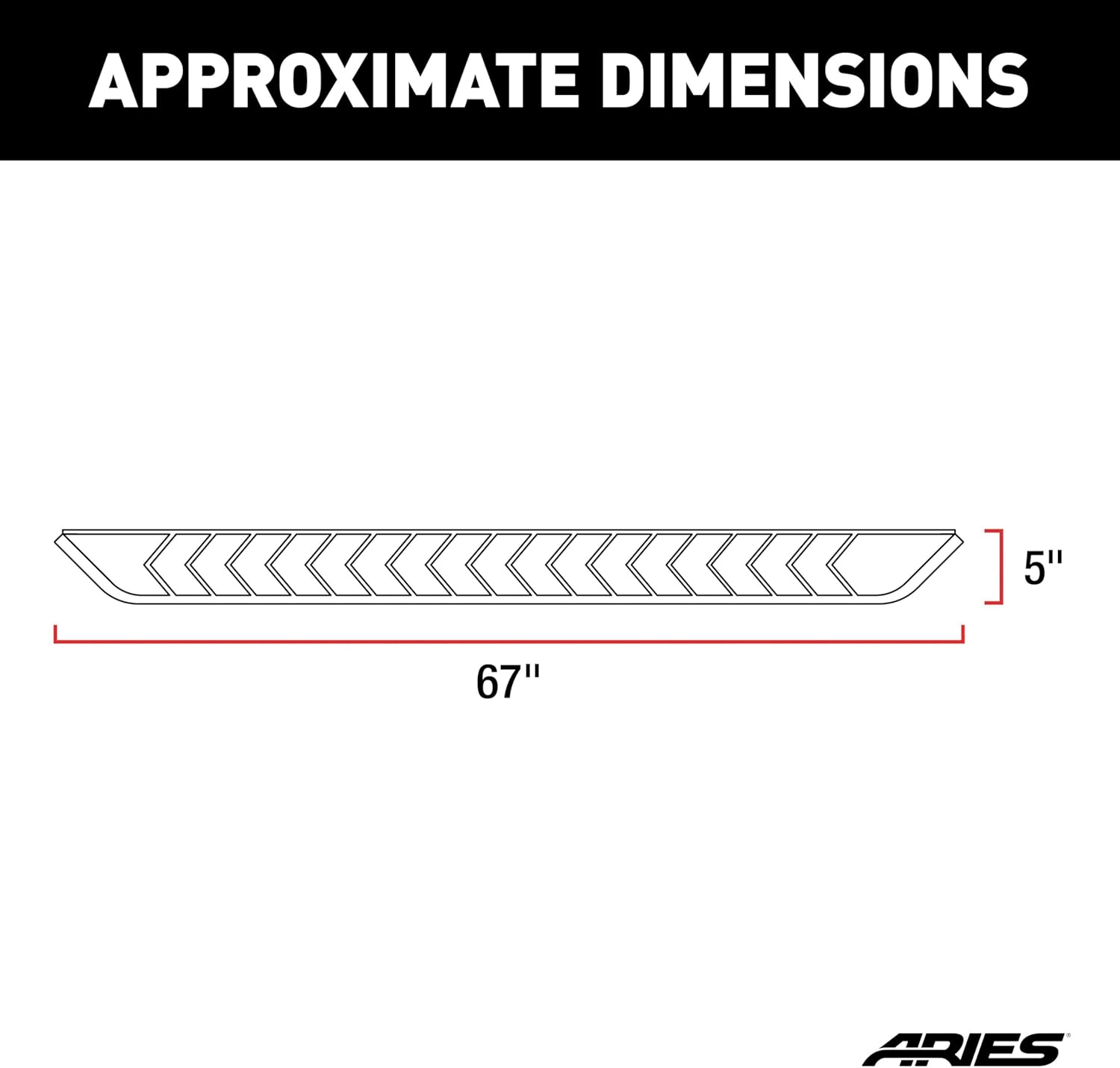
Figure 6: Approximate dimensions of the ARIES AeroTread Running Board.

Figure 7: Detail of the full-length, tough plastic treads for enhanced grip.
Warranty and Support
ARIES products are backed by a commitment to quality. For specific warranty information regarding your AeroTread Running Boards, please refer to the documentation included with your purchase or visit the official ARIES website.
For technical support, installation assistance, or to inquire about replacement parts, please contact ARIES customer service through their official channels. Always provide your product model number (2061027) and purchase details when seeking support.
Related documents2061027


Ask a question about this manual
Ask about setup, troubleshooting, compatibility, parts, safety, or missing instructions. Manuals+ will review the question and use this page’s manual context to help answer it.