
KWANWA KW618
KWANWA LED Digital Alarm Clock User Manual
Model: KW618
1. Introduction
Thank you for purchasing the KWANWA LED Digital Alarm Clock. This manual provides detailed instructions for setting up, operating, and maintaining your new alarm clock. Designed for simplicity and clarity, this battery-operated clock features a large LED display, adjustable brightness, and an easy-to-use alarm function, making it ideal for bedrooms, travel, and various other settings.
Please read this manual thoroughly before use to ensure proper operation and to maximize the lifespan of your device.

Figure 1.1: KWANWA LED Digital Alarm Clock (Black Case-red Led)
2. Product Overview
The KWANWA LED Digital Alarm Clock is a versatile and user-friendly device. Key features include:
- Large 1.2'' LED Digit Display: Provides clear visibility from a distance, even in the dark.
- Battery Operated: Requires 4 x AA alkaline batteries (not included) for constant display for over 12 months.
- Adjustable 3-Level LED Brightness: High, Medium, and Low settings for daytime, with an automatic dimming Night Mode (8:00 PM - 6:00 AM).
- Easy-to-Set Controls: Intuitive buttons for time, alarm, dimmer, and 12/24-hour format.
- Snooze Function: Provides an extra 7 minutes of sleep, repeatable up to 3 times.
- Wall-Mountable & Table-Top Design: Flexible placement options for various rooms.

Figure 2.1: Product Dimensions and Key Features
3. Setup
3.1 Battery Installation
- Locate the battery compartment on the back of the alarm clock.
- Slide open the battery compartment cover.
- Insert 4 x AA alkaline batteries (not included) into the compartment, ensuring correct polarity (+/-).
- Close the battery compartment cover securely.

Figure 3.1: Battery Compartment (4 AA batteries not included)
3.2 Placement
The KWANWA alarm clock is designed for both tabletop and wall-mounted use.
- Tabletop: Place the clock on any flat, stable surface such as a nightstand, desk, or shelf.
- Wall-Mount: Use the 1 hole on the back of the clock to hang it securely on a wall. Ensure the mounting hardware (not included) is appropriate for the clock's weight and your wall type.

Figure 3.2: Versatile Placement Options
4. Operating Instructions
4.1 Setting the Time
- Press and hold the "TIME SET" button located on the back of the clock until the hour digits begin to flash.
- Use the "HOUR" button to adjust the hour.
- Use the "MIN" button to adjust the minutes.
- Press "TIME SET" again to confirm and exit time setting mode.
To switch between 12-hour and 24-hour format, press the "12/24Hr" button.

Figure 4.1: Rear Control Panel
4.2 Setting the Alarm
- Press and hold the "AL SET" button until the alarm hour digits begin to flash.
- Use the "HOUR" button to adjust the alarm hour.
- Use the "MIN" button to adjust the alarm minutes.
- Press "AL SET" again to confirm and exit alarm setting mode.
- To activate or deactivate the alarm, press the "AL ON/OFF" button. An alarm icon will appear on the display when the alarm is active.
4.3 Snooze Function
When the alarm sounds, touch the large "SNOOZE AL STOP" button on the top of the clock to activate the snooze function. This will pause the alarm for 7 minutes. The snooze can be repeated up to 3 times.
To stop the alarm completely for the day, press any button other than the snooze button. The alarm will still sound the next day at the set time. To cancel the alarm permanently, press the "AL ON/OFF" button until the alarm icon disappears from the display.

Figure 4.2: Snooze Function in Use
4.4 Adjusting Brightness
The clock offers 3 levels of LED brightness for daytime use (High, Medium, Low). Use the "DIM" switch on the back of the clock to select your preferred brightness level.
The clock features an automatic Night Mode, which dims the display between 8:00 PM and 6:00 AM to protect your eyes and conserve battery life. This feature cannot be manually adjusted or disabled.
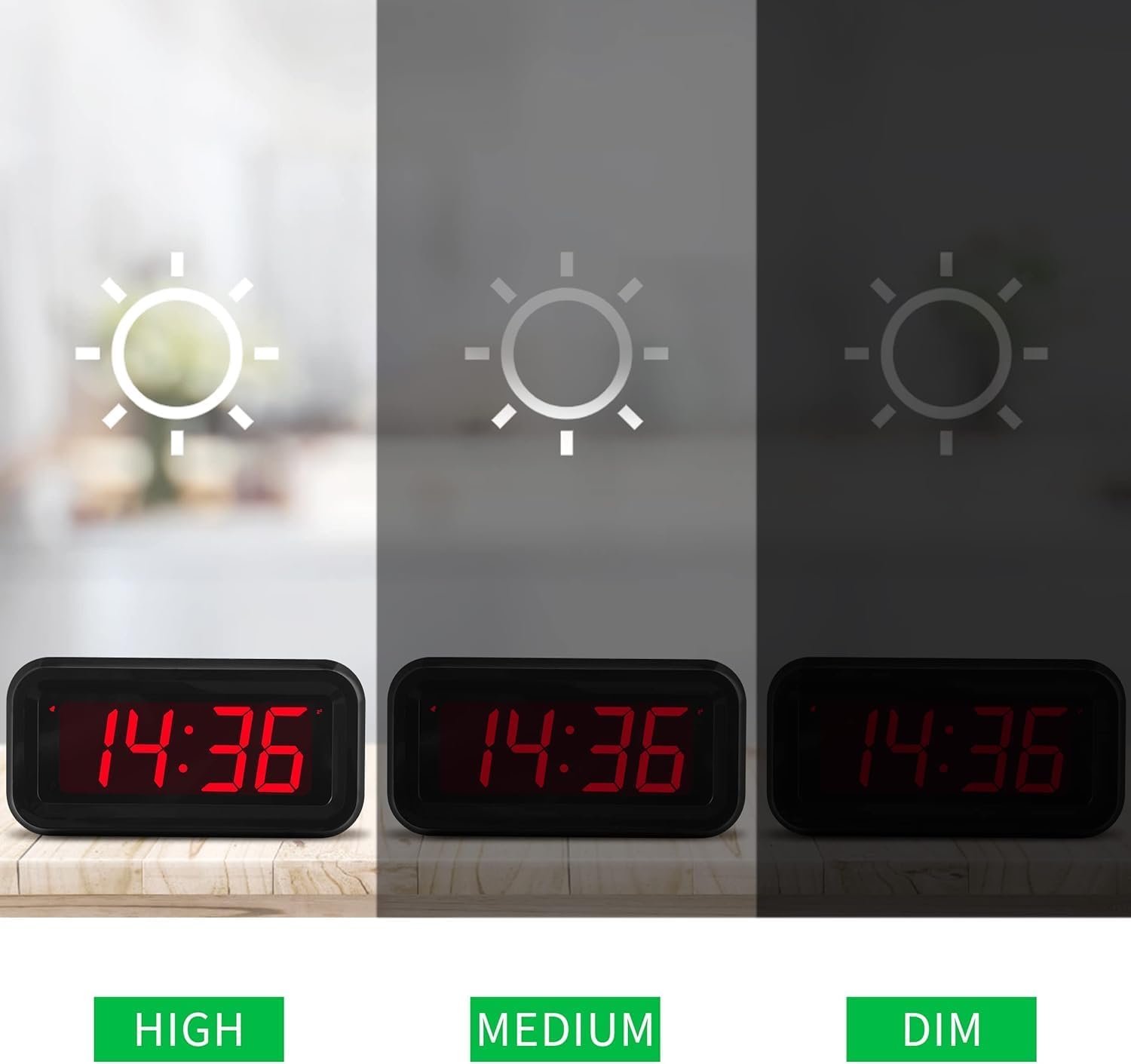
Figure 4.3: Adjustable Brightness Levels
5. Maintenance
- Cleaning: Wipe the clock with a soft, dry cloth. Do not use abrasive cleaners or solvents, as they may damage the surface.
- Battery Replacement: Replace all 4 AA batteries when the display starts to dim significantly or stops working. Always use new alkaline batteries for optimal performance.
- Storage: If storing the clock for an extended period, remove the batteries to prevent leakage and damage.
6. Troubleshooting
| Problem | Possible Cause | Solution |
|---|---|---|
| Display is blank or dim. | Batteries are low or incorrectly installed. | Replace batteries with new AA alkaline batteries, ensuring correct polarity. |
| Alarm does not sound. | Alarm is not activated or set incorrectly. | Ensure the alarm is set and activated (alarm icon visible). Check alarm time. |
| Time is incorrect. | Time was not set correctly after battery installation or power interruption. | Reset the time using the "TIME SET" button. |
| Snooze function not working. | Snooze button not pressed correctly or alarm was stopped. | Ensure you press the top "SNOOZE AL STOP" button when the alarm sounds. |
7. Specifications
| Feature | Detail |
|---|---|
| Brand | KWANWA |
| Model Number | KW618 |
| Display Type | Digital LED |
| Power Source | 4 x AA Alkaline Batteries (not included) |
| Product Dimensions | 5"W x 2"H (approx. 12.7 cm x 5.08 cm) |
| Item Weight | 4.23 ounces (approx. 120 grams) |
| Display Color | Red LED |
| Brightness Levels | 3 (High, Medium, Low) + Automatic Night Mode |
| Time Format | 12/24 Hour Selectable |
| Snooze Duration | 7 minutes (repeatable 3 times) |
| Mounting Type | Tabletop / Wall Mount |
8. Warranty and Support
For any questions, concerns, or support needs regarding your KWANWA LED Digital Alarm Clock, please refer to the official KWANWA store on Amazon or contact their customer service directly.
An official User Manual (PDF) is also available for download: Download User Manual (PDF)
Please retain your purchase receipt for warranty purposes.
Ask a question about this manual
Ask about setup, troubleshooting, compatibility, parts, safety, or missing instructions. Manuals+ will review the question and use this page’s manual context to help answer it.