
1. Product Overview and Features
The DAEWOO KOR-142HR is a 1.4 cubic feet microwave oven designed for efficient and convenient cooking. It features an elegant red design with silver trim and a stylish tempered glass door. This model includes specialized functions to enhance your cooking experience.
- Chef Mexicano Menus: 9 pre-set menus for preparing typical Mexican dishes.
- Quick Cook & Reheat: 4 quick cook menus and 4 reheat menus for common food items.
- CRS Cooking System: Ensures uniform heating and cooking results.
- Defrost Function: Allows defrosting by food type and weight for precise thawing.
- Zer-On Function: Automatically eliminates standby power consumption after 10 minutes of inactivity, even when plugged in.
- Quick Start Button: For immediate cooking at full power.
- Timer: Integrated timer for precise cooking control.
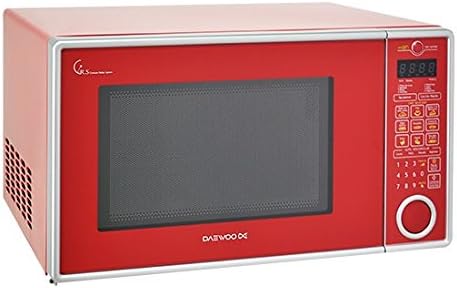
Figure 1.1: Front view of the DAEWOO KOR-142HR Microwave Oven, showcasing its red exterior and control panel.
2. Safety Instructions
Read all instructions carefully before using the appliance. Failure to follow these instructions may result in electric shock, fire, or injury.
- Do not attempt to operate this oven with the door open or if the door is damaged.
- Do not place any object between the oven front face and the door, or allow soil or cleaner residue to accumulate on sealing surfaces.
- Do not heat liquids or other foods in sealed containers as they are liable to explode.
- Always use microwave-safe cookware.
- Ensure proper ventilation around the appliance.
- Keep children away from the microwave during operation.
- Never operate the oven if the power cord or plug is damaged.
3. Setup and Installation
Proper setup ensures safe and efficient operation of your microwave oven.
- Unpacking: Carefully remove all packaging materials from the oven and its accessories. Check for any damage.
- Placement: Place the microwave oven on a flat, stable surface that can support its weight. Ensure there is adequate space for ventilation: at least 10 cm (4 inches) at the rear, 20 cm (8 inches) on the top, and 5 cm (2 inches) on the sides.
- Power Connection: Plug the microwave oven into a grounded electrical outlet. Ensure the voltage matches the specifications (240 Volts).
- Turntable Installation: Place the turntable ring inside the oven cavity, then position the glass turntable plate securely on top of the ring.
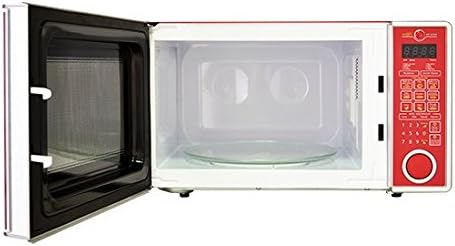
Figure 3.1: Interior view showing the glass turntable and oven cavity.
4. Operating Instructions
This section details how to use the various functions of your DAEWOO KOR-142HR microwave oven.
4.1 Basic Microwave Cooking
- Place food in a microwave-safe container on the turntable.
- Close the oven door securely.
- Press the 'Time Cook' button (or similar) and use the number pad to enter the desired cooking time.
- Press the 'Power Level' button (if available) to adjust power, then use the number pad. (Default is usually 100%).
- Press 'Start' to begin cooking.
4.2 Chef Mexicano Menus
The oven features 9 pre-programmed menus for popular Mexican dishes.
- Place the food in the oven.
- Press the 'Chef Mexicano' button repeatedly to cycle through the menu options until the desired dish appears on the display.
- Enter the food weight or quantity if prompted.
- Press 'Start'.
4.3 Quick Cook and Reheat Functions
Use these functions for rapid cooking or reheating of common items.
- Quick Cook: Press the 'Quick Cook' button (or corresponding number) for instant cooking of items like popcorn or beverages.
- Reheat: Press the 'Reheat' button (or corresponding number) to select from 4 pre-set reheating options.
- Follow on-screen prompts for quantity if applicable, then press 'Start'.
4.4 Defrost Function
This function allows you to defrost food by weight or type.
- Place the frozen food in the oven.
- Press the 'Defrost' button.
- Select the defrost mode (e.g., by weight or food type) using the appropriate buttons.
- Enter the weight or select the food type.
- Press 'Start'. The oven may prompt you to turn the food over during the defrost cycle.
4.5 Zer-On Function
The Zer-On function automatically activates after 10 minutes of inactivity, reducing standby power consumption to zero. No manual action is required to activate this feature.
5. Maintenance and Cleaning
Regular cleaning and maintenance will prolong the life of your microwave oven.
- Interior Cleaning: Wipe the interior cavity with a damp cloth after each use. For stubborn stains, use a mild detergent or a microwave-safe cleaner. Do not use abrasive cleaners or scouring pads.
- Exterior Cleaning: Clean the exterior surfaces with a soft, damp cloth. Avoid spraying cleaners directly onto the control panel.
- Turntable: The glass turntable and turntable ring can be removed and washed in warm, soapy water or in a dishwasher.
- Door Seals: Regularly clean the door seals and adjacent parts to ensure proper closure and prevent microwave leakage.
- Do Not Immerse: Never immerse the appliance, cord, or plug in water or any other liquid.
6. Troubleshooting
If you encounter problems with your microwave oven, refer to the following table for common issues and solutions.
| Problem | Possible Cause | Solution |
|---|---|---|
| Oven does not start | Power cord not plugged in; Door not closed properly; Fuse blown or circuit breaker tripped. | Ensure plug is firmly in outlet; Close door securely; Check household fuse or reset circuit breaker. |
| Food not cooking evenly | Food not stirred or turned; Incorrect power level or cooking time. | Stir or turn food halfway through cooking; Adjust power level and cooking time as needed. |
| Light bulb not working | Light bulb burned out. | Contact qualified service personnel for replacement. |
| Excessive noise during operation | Turntable not correctly placed; Foreign object in cavity. | Ensure turntable and ring are correctly positioned; Remove any obstructions. |
7. Specifications
Detailed technical specifications for the DAEWOO KOR-142HR Microwave Oven.
| Specification | Detail |
|---|---|
| Brand | DAEWOO |
| Model Name | KOR-142HR |
| Product Dimensions (D x W x H) | 41 cm x 57 cm x 32 cm |
| Color | Red |
| Special Features | Chef Mexicano, Zer-On |
| Recommended Uses | Quick cooking, preparing typical Mexican meals, reheating |
| Installation Type | Built-in (Countertop) |
| Material | Chrome (Exterior), Stainless Steel (Interior) |
| Controller Type | Button |
| Voltage | 240 Volts |
| Number of Power Levels | 13 |
| Timer Function | Available |
| Heating Method | Electromagnetic Radiation, Convection |
| Defrost System Type | Auto-defrost |
| Cooking Programs | CRS, Chef Mexicano, Reheat, Quick |
| Number of Programs | 17 |
| Item Weight | 15.8 Kilograms |
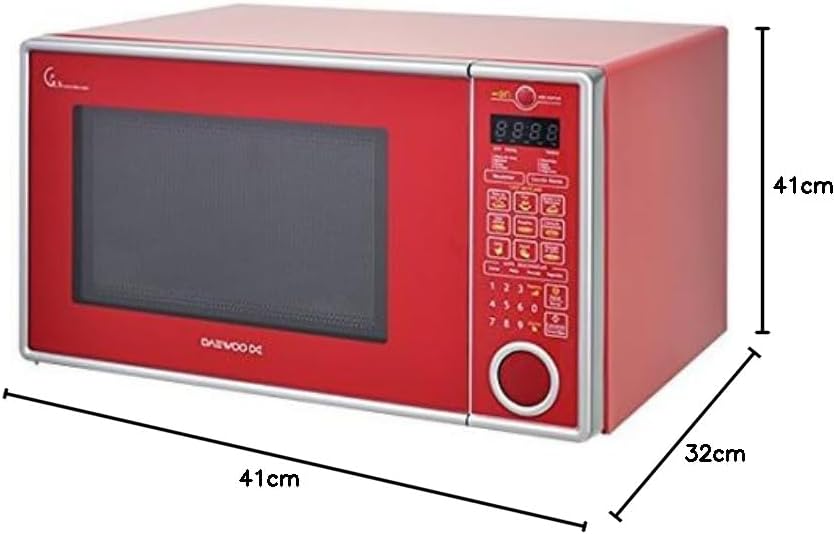
Figure 7.1: Dimensions of the DAEWOO KOR-142HR Microwave Oven.
8. Warranty and Support
Your DAEWOO KOR-142HR Microwave Oven comes with a manufacturer's warranty.
- Warranty Period: This product is covered by a 1-year warranty from the date of purchase.
- Warranty Coverage: The warranty covers defects in materials and workmanship under normal use. It does not cover damage resulting from misuse, accident, alteration, or unauthorized repair.
- Customer Support: For warranty claims, technical assistance, or service inquiries, please contact DAEWOO customer support. Refer to your purchase documentation for specific contact information.