
Introduction
Thank you for choosing the Mitzu MC-202 Universal Battery Charger. This manual provides essential information for the safe and efficient operation of your charger. Please read it thoroughly before use and retain it for future reference.
Safety Information
- Use this charger only with Ni-MH and Ni-CD rechargeable batteries. Do not attempt to charge alkaline, lithium, or other non-rechargeable battery types, as this may cause explosion, leakage, or personal injury.
- Do not disassemble, modify, or repair the charger.
- Avoid exposing the charger to water, moisture, or extreme temperatures.
- Keep out of reach of children.
- Unplug the charger from the power outlet when not in use or before cleaning.
- Ensure proper battery polarity (+/-) when inserting batteries into the charger.
- If the charger or batteries become excessively hot during charging, discontinue use immediately and unplug the device.
Package Contents
- 1 x Mitzu MC-202 Universal Battery Charger
- Note: Some product bundles may include 2 x 1300 mAh AA Ni-MH rechargeable batteries. Please check your specific product packaging.
Product Overview
The Mitzu MC-202 is a compact and easy-to-use charger designed for Ni-MH and Ni-CD batteries. It features two charging slots for AA/AAA batteries and one slot for a 9V battery, along with a charging indicator.

Image: Front view of the Mitzu MC-202 universal battery charger with two AA batteries inserted. The charger is white with red indicator lights above each AA slot.

Image: Back view of the Mitzu MC-202 battery charger, featuring a foldable power plug and a label detailing its specifications and model number.
Setup
- Unpack the Charger: Carefully remove the Mitzu MC-202 charger from its packaging.
- Inspect for Damage: Check the charger for any visible damage. Do not use if damaged.
- Prepare Batteries: Ensure the batteries you intend to charge are Ni-MH or Ni-CD type.
Operating Instructions
- Insert Batteries:
- For AA/AAA batteries: Insert up to two AA or AAA Ni-MH/Ni-CD batteries into the designated slots, ensuring correct polarity (+ and -). The positive (+) end of the battery should align with the positive (+) terminal in the charger, and the negative (-) end with the negative (-) terminal.
- For 9V battery: Insert one 9V Ni-MH/Ni-CD battery into the dedicated 9V slot, matching the polarity.
- Connect to Power: Fold out the charger's power plug and insert it into a standard electrical outlet (100-240V AC, 50-60Hz).
- Monitor Charging: The charging indicator light(s) will illuminate to show that charging is in progress. The charger monitors the charging status for convenience.
- Remove Batteries: Once charging is complete (the indicator light may change or turn off, depending on the specific model's behavior), unplug the charger from the outlet and carefully remove the charged batteries.

Image: A hand inserting a Mitzu AA battery into a remote control, illustrating the correct orientation for battery placement. This principle applies to inserting batteries into the charger as well.
Maintenance
- Cleaning: Disconnect the charger from the power outlet before cleaning. Use a soft, dry cloth to wipe the exterior of the charger. Do not use liquid cleaners or solvents.
- Storage: Store the charger in a cool, dry place away from direct sunlight and moisture when not in use.
- Battery Care: For optimal battery life, avoid overcharging and completely discharging rechargeable batteries.
Troubleshooting
| Problem | Possible Cause | Solution |
|---|---|---|
| Charger indicator light does not turn on. |
|
|
| Batteries do not charge or charge slowly. |
|
|
| Charger or batteries become very hot. |
|
|
Specifications
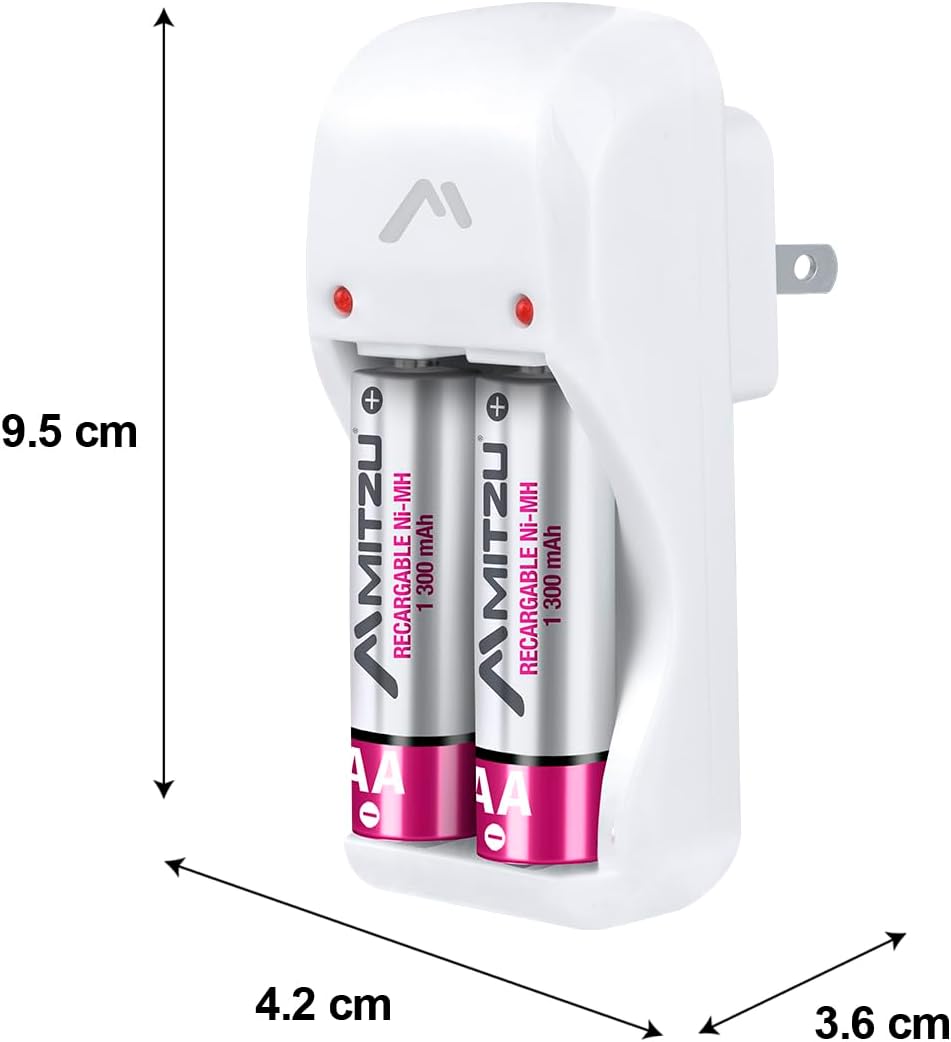
Image: Mitzu MC-202 charger with dimensions labeled: approximately 9.5 cm height, 4.2 cm width, and 3.6 cm depth.
| Feature | Detail |
|---|---|
| Brand | Mitzu |
| Model | MC-202 |
| Part Number | MC-202 |
| Input | 100-240V AC, 50-60Hz, 0.5W |
| Output 1 (AA/AAA) | 1.2V DC, 120mA x 2 |
| Output 2 (9V) | 8.4V DC, 35mA x 1 |
| Compatible Battery Types | Ni-MH, Ni-CD |
| Compatible Battery Sizes | AA, AAA, 9V |
| Product Dimensions (Charger Unit) | 9.5 cm (Height) x 4.2 cm (Width) x 3.6 cm (Depth) |
| Package Dimensions | 44 x 26 x 22.5 cm |
| Product Weight | 450 g |
| Battery Capacity (for included AA batteries, if applicable) | 1300 mAh (NiMH) |
| Batteries Included | No (for charger unit only; some product bundles may include batteries) |
Warranty and Support
For warranty information or technical support, please refer to the contact details provided on your product packaging or visit the official Mitzu website. Keep your purchase receipt as proof of purchase.
Mitzu Official Store: Visit Mitzu Store on Amazon.com.mx