
BOYO VISION Keyfree Touch
BOYO Keyfree Touch - Keyless Vehicle Digital Touch Keypad User Manual
Brand: BOYO VISION | Model: Keyfree Touch
Product Overview
The BOYO Keyfree Touch system is a patented digital door lock designed for vehicles, including cars, trucks, and vans. It allows users to securely lock and unlock their vehicle by entering a personalized 4-10 digit PIN code directly on the Keyfree Touch pad. This innovative keypad is discreetly situated behind the front windshield, offering a convenient keyless entry solution.
Key Features:
- Product Type: Car Alarm System Component
- Dimensions: Approximately 1.27 cm L x 7.874 cm W x 18.034 cm H (Package)
- Origin: South Korea
- Weight: Approximately 1.0 lbs (Package)
- Keyless Entry: Secure 4-10 digit PIN code access.
- Discreet Installation: Mounts behind the front windshield.
- Compatibility: Designed for Cars, Trucks, and Vans.
Setup and Installation
Proper installation of the BOYO Keyfree Touch keypad is crucial for optimal performance and security. The device is designed to be mounted on the inside of your vehicle's front windshield.
Installation Steps:
- Choose Location: Select a flat, clean area on the inside of your front windshield, preferably in the lower corner near the A-pillar, where the keypad will be easily accessible but not obstruct your view. Ensure the chosen spot allows for the keypad to be oriented correctly (numbers readable from outside).
- Clean Surface: Thoroughly clean the chosen area on the windshield with an alcohol wipe to remove any dirt, dust, or grease. Allow it to dry completely.
- Peel Adhesive: Carefully peel off the protective backing from the adhesive on the back of the Keyfree Touch keypad.
- Attach Keypad: Press the keypad firmly onto the cleaned windshield surface. Apply pressure evenly for at least 30 seconds to ensure a strong bond.
- Route Wiring: Carefully route the keypad's wiring along the edge of the windshield and down the A-pillar, tucking it neatly under trim panels to conceal it. Connect the wiring to your vehicle's electrical system according to the detailed wiring diagram provided in the separate installation guide (not included in this user manual). Professional installation is recommended for wiring.
- Verify Orientation: Ensure the keypad is installed with the "enter" button and numbers oriented correctly for easy use from outside the vehicle. Incorrect orientation (upside down) will make it difficult to operate.
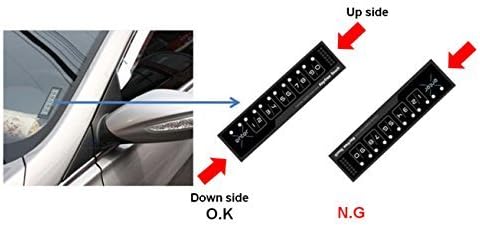
Image Description: This image illustrates the proper placement of the BOYO Keyfree Touch keypad on a vehicle's windshield. It shows a car's side mirror and windshield, with an arrow pointing to the ideal installation spot. To the right, two diagrams of the keypad are shown: one labeled "Down side O.K" indicating the correct orientation with the "enter" button at the bottom, and another labeled "Up side N.G" showing an incorrect, upside-down orientation. This highlights the importance of installing the keypad with the correct vertical alignment for functionality.
Operating Instructions
The BOYO Keyfree Touch system allows you to lock and unlock your vehicle using a personalized PIN code. Follow these steps to operate your keypad.
Setting Your PIN Code:
Refer to the separate programming guide or your vehicle's alarm system manual for detailed instructions on how to set or change your 4-10 digit PIN code. This process typically involves putting your vehicle's alarm system into programming mode and then entering your desired code on the Keyfree Touch keypad.
Unlocking Your Vehicle:
- Activate Keypad: Gently touch any part of the keypad to wake it up. The backlight should illuminate.
- Enter PIN: Carefully enter your personalized 4-10 digit PIN code using the touch-sensitive numbers. Each successful touch should register with a visual or auditory feedback (e.g., a light flash or beep).
- Confirm: After entering your full PIN code, press the "enter" button (marked with an 'X' or 'enter' text).
- Vehicle Unlocks: If the PIN is correct, your vehicle's doors will unlock. If the PIN is incorrect, the system may provide an error indication (e.g., multiple flashes, no response).

Image Description: This image provides a detailed view of the BOYO Keyfree Touch digital keypad. It shows the illuminated touch-sensitive buttons, labeled 'enter', '1/2', '3/4', '5/6', '7/8', and '9/0'. A finger is shown actively pressing the '7/8' button, demonstrating the touch interaction required for entering the PIN code. Small white dots above each number pair indicate the touch points.
Locking Your Vehicle:
To lock your vehicle, simply touch the "enter" button on the keypad. Your vehicle's doors will lock, and the alarm system (if connected) will arm.

Image Description: This image displays the BOYO Keyfree Touch digital keypad in its inactive state, without any finger interaction. All the touch-sensitive buttons are clearly visible, including 'enter', '1/2', '3/4', '5/6', '7/8', and '9/0'. The design is sleek and black, with white numbering and symbols, indicating the simple and intuitive interface for keyless vehicle access.
Maintenance
The BOYO Keyfree Touch keypad is designed for durability and requires minimal maintenance. Following these simple guidelines will help ensure its longevity and reliable performance:
- Cleaning: To clean the keypad surface, use a soft, damp cloth. Avoid abrasive cleaners, solvents, or harsh chemicals, as these can damage the keypad's finish or electronic components.
- Avoid Extreme Temperatures: While designed for automotive use, prolonged exposure to extreme heat or cold can affect electronic devices. Ensure your vehicle's interior climate control is functioning properly.
- Protect from Direct Sunlight: Although installed behind the windshield, prolonged direct sunlight exposure can potentially degrade materials over time. Parking in shaded areas when possible can help.
- Wiring Inspection: Periodically check the visible wiring for any signs of wear, fraying, or damage. If any damage is observed, consult a professional for repair to prevent electrical issues.
Troubleshooting
If you encounter issues with your BOYO Keyfree Touch keypad, try the following troubleshooting steps before seeking professional assistance:
- Keypad Not Responding/No Backlight:
- Ensure the vehicle's ignition is off and doors are closed (if applicable to your alarm system's setup).
- Check the wiring connections to ensure they are secure and not damaged.
- Verify that the vehicle's battery has sufficient charge.
- Incorrect PIN Entry:
- Ensure you are entering the correct 4-10 digit PIN code. Double-check your code.
- Make sure you are pressing the "enter" button after inputting the full code.
- Try entering the code slowly and deliberately, ensuring each touch registers.
- Vehicle Not Locking/Unlocking:
- Confirm that the keypad is properly connected to your vehicle's alarm or central locking system.
- Check your vehicle's alarm system for any error codes or disarm states.
- Ensure all vehicle doors, hood, and trunk are fully closed.
- Intermittent Operation:
- Check for any potential electromagnetic interference from other devices in or near the vehicle.
- Ensure the keypad is securely mounted and not loose.
If these steps do not resolve the issue, it is recommended to consult a professional automotive electronics technician or contact BOYO VISION customer support.
Specifications
| Feature | Detail |
|---|---|
| Product Dimensions | 17.78 x 1.91 x 7.62 cm |
| Item Model Number | Keyfree Touch |
| Other Display Features | Wireless (refers to keypad communication, not power) |
| Colour | Black |
| Item Weight | 90.7 g |
| Manufacturer | Vision Tech America |
| Compatible Devices | Cars, Trucks, Vans |
| Remote Control Included? | Yes (likely refers to the overall system, not the keypad itself) |
| ASIN | B01HV5FZAG |
| Date First Available | July 11 2016 |
Warranty and Support
For specific warranty information regarding your BOYO Keyfree Touch keypad, please refer to the documentation included with your purchase or contact the retailer from whom you purchased the product. Warranty terms and conditions can vary by region and seller.
For technical support, product inquiries, or assistance with installation and programming, please contact BOYO VISION customer service. Contact details can typically be found on the manufacturer's official website or on the product packaging.
Manufacturer: Vision Tech America
Place of Business: FULLERTON, CA, 92831 US
It is recommended to have your product model number (Keyfree Touch) and ASIN (B01HV5FZAG) ready when contacting support for faster assistance.
Ask a question about this manual
Ask about setup, troubleshooting, compatibility, parts, safety, or missing instructions. Manuals+ will review the question and use this page’s manual context to help answer it.